If you are searching for the best free music production apps for beginners, you are probably in one of these situations:
- You want to make your first song but have zero experience
- You do not want to spend money on expensive DAWs
- You feel overwhelmed by professional music software
- You want something simple, free, and easy to use
The good news is this: in 2026, beginners have more powerful free music production apps than ever before. You can create beats, record vocals, mix tracks, and even publish songs without paying a single dollar.
In this guide, we compare the best beginner-friendly free music production apps for PC, Mac, iPhone, Android, and browser users.
What Makes a Music Production App Beginner-Friendly?
Not all free apps are actually easy.
Here’s what beginners should look for:
- Clean and simple interface
- Drag-and-drop workflow
- Built-in loops and instruments
- No complicated setup
- Free export (no watermark)
- Tutorials or learning support
A “free” app that requires deep music theory knowledge is not beginner-friendly.
Quick Comparison Table
| App | Platform | Truly Free | Best For | Difficulty |
|---|---|---|---|---|
| GarageBand | iOS / Mac | Yes | Songwriting | Easy |
| BandLab | Web / iOS / Android | Yes | Beginners + Collaboration | Very Easy |
| Cakewalk | Windows | Yes | Full production | Medium |
| LMMS | Windows / Mac / Linux | Yes | Electronic music | Medium |
| Soundtrap | Web | Limited free | Online creation | Easy |
| MPC Beats | Windows / Mac | Yes | Beat making | Easy |
| Audacity | Windows / Mac | Yes | Recording & editing | Easy |
Now let’s break them down in detail.
1. GarageBand (Best for Apple Beginners)
Platform:
Mac, iPhone, iPad
Why Beginners Love It
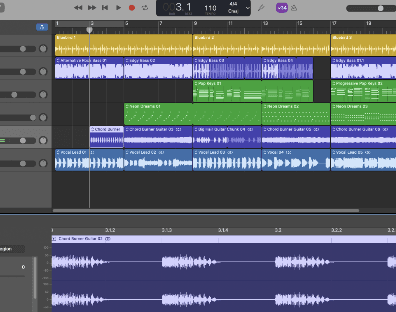
GarageBand is one of the most beginner-friendly free music production apps ever made. It comes pre-installed on most Apple devices and includes professional-quality instruments.
Key Features
- Built-in virtual instruments
- Smart Drums
- Loops library
- Simple mixing interface
- No watermark exports
Pros
- Completely free
- Easy layout
- Great sound quality
Cons
- Apple only
- Limited advanced mixing tools
If you own an iPhone or Mac, this should be your first choice.
2. BandLab (Best Truly Free Online Option)
Platform:
Browser, iOS, Android
Why It’s Perfect for Beginners
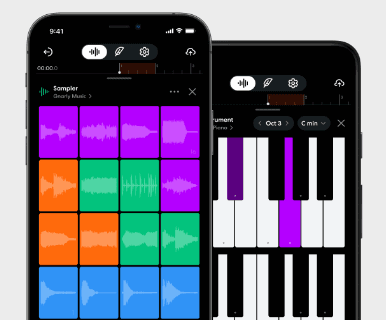
BandLab runs directly in your browser. No installation needed.
It is completely free and includes:
- Unlimited projects
- Free cloud storage
- Built-in loops
- Auto mastering
Pros
- 100% free
- Works on any device
- Very easy to learn
Cons
- Requires internet
- Less powerful than pro DAWs
For absolute beginners who want zero setup, this is one of the best free music production apps available.
3. Cakewalk (Best Free Professional DAW for Windows)
Platform:
Windows
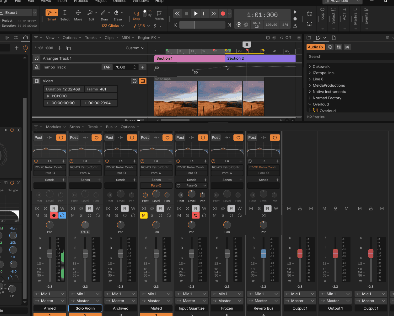
Cakewalk is shockingly powerful for something that is free.
Features
- Unlimited tracks
- Professional mixing console
- MIDI editing
- VST support
Pros
- Studio-level features
- Completely free
Cons
- Windows only
- Slight learning curve
If you are a serious beginner who wants to grow into professional production, Cakewalk is an excellent long-term choice.
4. LMMS (Best for Electronic Music)
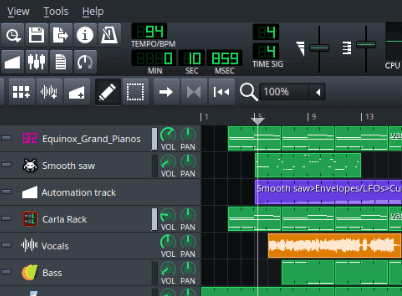
Platform:
Windows, Mac, Linux
LMMS is an open-source DAW ideal for making beats and electronic music.
Pros
- Totally free
- Great for EDM and hip-hop
- Built-in synths
Cons
- Interface feels older
- Not ideal for vocal recording
5. Soundtrap (Best for Online Collaboration)
Soundtrap is beginner-friendly and great for collaboration.
Free version is limited but usable.
6. MPC Beats (Best for Beat Makers)
If your goal is hip-hop or trap beats, MPC Beats makes rhythm creation very simple.
7. Audacity (Best for Recording & Editing)
Audacity is not a full DAW, but it’s perfect for recording vocals and editing audio.
Can Beginners Really Make Professional Music with Free Apps?
Yes.
Many YouTube creators, indie artists, and bedroom producers start with free music production apps.
The quality of your music depends more on:
- Creativity
- Practice
- Arrangement skills
Not the price of your software.
Best Free Music Production Apps by Category
- Easiest Overall - BandLab
- Best for iPhone Users - GarageBand
- Best for Windows Users - Cakewalk
- Best for Beat Making - MPC Beats
- Best for Electronic Music - LMMS
Are Free Music Production Apps Really Free?
Here’s what to watch for:
- Some apps limit exports
- Some require subscription for advanced effects
- Some include in-app purchases
GarageBand, Cakewalk, LMMS, BandLab, and Audacity are truly free without watermark.
How to Choose the Right Free Music Production App
Ask yourself:
- What device do I use?
- Do I want to make beats or full songs?
- Do I need vocal recording?
- Do I prefer mobile or desktop?
If you want the simplest possible experience, start with BandLab or GarageBand.
Final Verdict
If you are completely new to music production and want a free, stress-free start:
- Use GarageBand if you have Apple devices
- Use BandLab if you want something instant and online
- Use Cakewalk if you are on Windows and want professional tools
The best free music production app is the one you actually use consistently.
Start simple. Make your first beat. Finish your first song. Improve from there.