AI Music(Music Creation)
MusicSeed Model
Where to Find it?
Go to the AI Music page and use the Model selector at the top to see all available models.
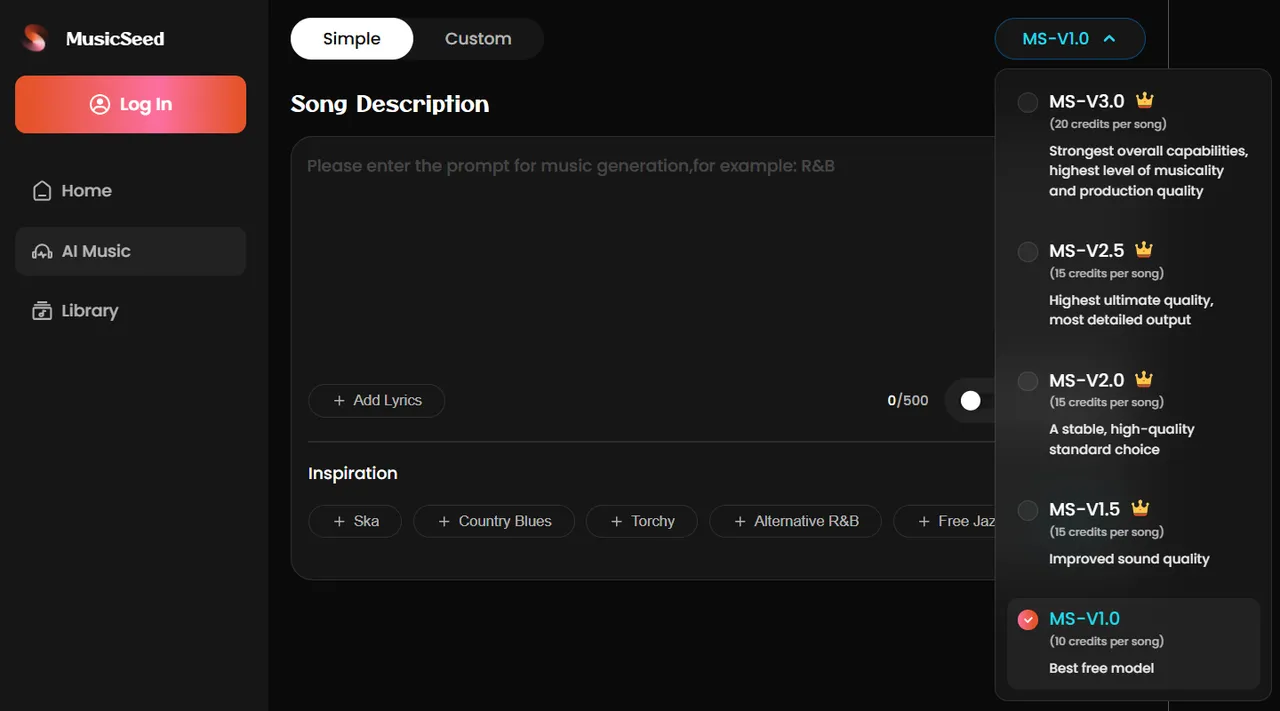
MS-V3.0
Strongest overall capabilities, highest level of musicality and production quality
Credit cost: 20 credits per song
Available for: All subscription users (Basic / Standard / Pro)
Key Features:
Advanced Genre Intelligence: Expanded style library with significantly improved genre fidelity and authentic sonic characteristics.
Pro-Grade Vocal Engine: Enhanced vocal range capture and processing for greater emotional depth and natural timbre.
High-Definition Sound Design: Capture subtle musical nuances—from precise tone modulation to complex instrument layering.
Intelligent Prompt Interpretation: Ideas are translated into audio with higher accuracy and creative alignment.
Prompt Enhancement Suite: Simple inputs (e.g., genre tags) are intelligently expanded into rich, production-ready descriptions.
Adaptive Cover & Persona System: Covers retain more original melodic detail and feature enhanced cross-genre adaptation capabilities.
Optimized Workflow Engine: Substantially reduced generation time for a faster, more fluid creative process.
MS-V2.5
Highest ultimate quality, most detailed output
Credit cost: 15 credits per song
Available for: All subscription users (Basic / Standard / Pro)
Key Features:
Immersive Sonic Precision: Creates an unparalleled soundstage with exceptional clarity and spatial definition for studio-grade listening.
Authentic Vocal Reproduction: Delivers true-to-life vocal timbre and nuanced expression with the highest fidelity.
Granular Element Control: Offers meticulous creative control over every individual component in the mix.
Expert Genre Processing: Leverages genre-aware algorithms to achieve authentically polished and expertly mixed results.
Enhanced Dynamic Depth: Reproduces a wider range of loudness and subtlety for more lifelike and impactful music.
Intuitive Detail Control: Guides the AI to focus on or refine specific musical details for more precise outcomes.
MS-V2.0
A Stable, High-Quality Standard – The Balanced Choice for Demanding Projects
Credit cost: 15 credits per song
Available for: All subscription users (Basic / Standard / Pro)
Key Features:
Professional-Grade Output: Consistently high-quality audio suitable for serious music production and prototyping.
Expanded Genre Versatility: Confidently handles a broader spectrum of styles with greater authenticity.
Detailed Vocal Rendering: Captures finer vocal textures and expressiveness with improved realism.
Nuanced Sound Design: Allows for greater control over instrumental character and mix balance.
Reliable Prompt Interpretation: Accurately understands and executes more complex creative instructions.
Stable & Robust Workflow: Provides a dependable and efficient creation experience for continuous work.
MS-V1.5
Improved Sound Quality – Enhanced Fidelity and Richness
Credit cost: 15 credits per song
Available for: All subscription users (Basic / Standard / Pro)
Key Features:
Enhanced Audio Fidelity: Significantly improved clarity, depth, and overall sound definition.
Richer Tonal Expression: Delivers warmer, more natural instrument timbres and vocal presence.
Improved Dynamic Range: Better capture of musical energy and contrast for a more engaging listen.
Refined Genre Execution: More authentic stylistic details and tighter production within core genres.
Balanced Performance: Maintains fast generation while offering a noticeable step up in audio quality.
MS-V1.0
The Best Free Model – Accessible, Reliable Core AI Music Creation
Credit cost: 10 credits per song
Available for: All users (Free / Basic / Standard / Pro)
Key Features:
Solid Sound Quality: Delivers clear, balanced audio output for a wide range of musical ideas.
Core Genre Support: Handles popular genres effectively, providing a reliable starting point for creation.
Essential Vocal Synthesis: Produces clear and coherent vocals for songs and melodies.
Straightforward Prompt Response: Faithfully translates basic prompts into musical structure.
Two Creation Modes
On the AI Music page, you can switch between Simple Mode and Custom Mode at the top. Both modes are used to generate complete songs but offer different levels of control.
Simple Mode - Text to Music
Where to find it?
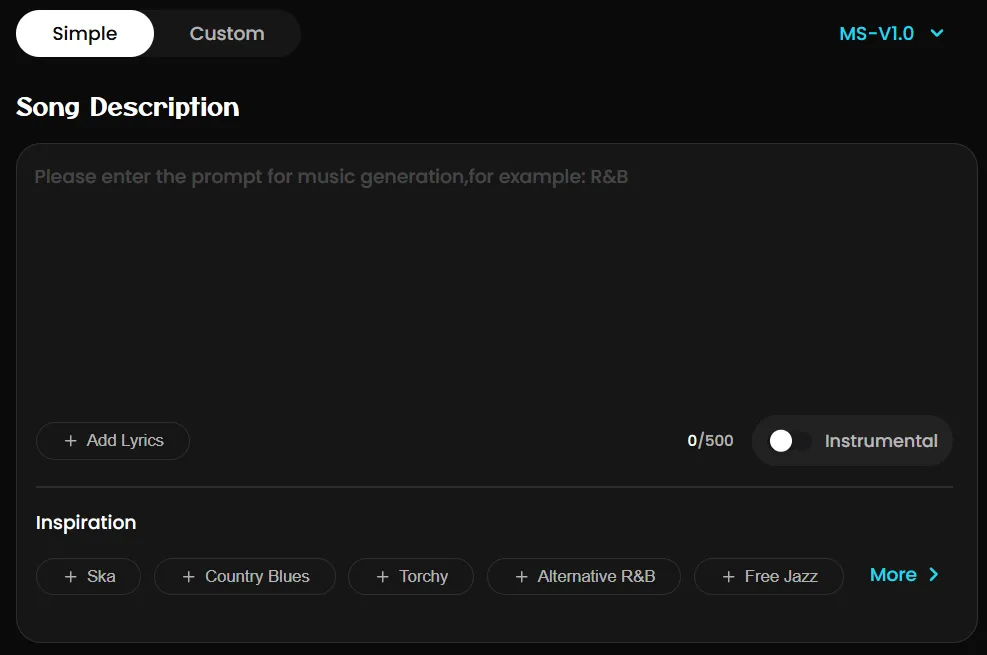
On the AI Music page, switch to "Simple" using the mode selector at the top.
What does it do?
"Simple" allows you to quickly generate a song using a short description or a set of predefined options. The AI will automatically create the melody, vocals, and arrangement based on your input. It's ideal for creators who don't have specific lyrics but have a clear idea of the song's style.
How to use it?
- Enter a Song Description
In the description box, use simple, natural language to describe the song you want.
Example: "An upbeat summer pop song with tropical house beats and a sunny male vocal."
You can also use other LLMs (like ChatGPT) to generate descriptions.
- Use the "More" Options for Refinement (Recommended)
Click the "More" button to fill in detailed information step-by-step for better results:
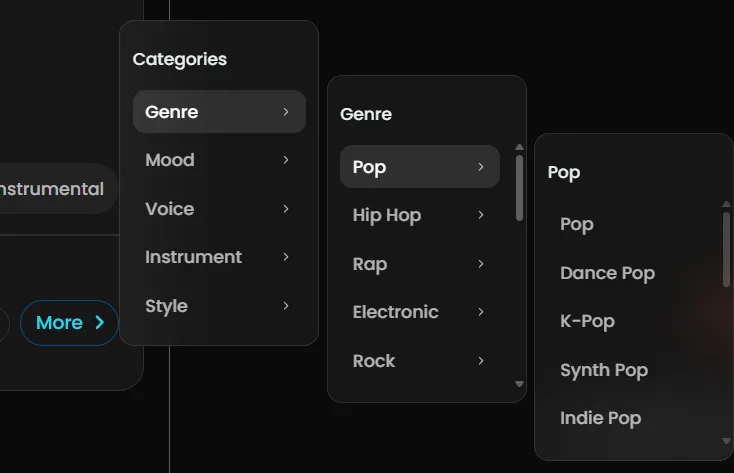
Genre: Pop, Rock, R&B, Electronic, etc.
Mood: Chill, Aggressive, Happy, Melancholic, etc.
Voice: Soft Female Vocal, Rap Male Vocal, Powerful Male Vocal, etc.
Instrument: Piano, Synth, Electric Guitar, Acoustic Drums, etc.
Style (reference blend): Retro 80s vibe, Lo-fi Chill, Cinematic, etc.
- Generate Your Song Once filled in, click the generate button to create your song.
Pro tips
Use this template for detailed control:
👍A [emotion, vibe]-driven [genre] track with [tempo in BPM] tempo, featuring [instrumentation], [vocal type + style], and [production features/effects]. Lyrics are [tone/theme, optional]. Song structure is [verse/chorus/bridge].
Important notes
❌ Do not mention specific artists or brand names in your description (e.g., "like Taylor Swift" will cause generation to fail).
✅ The more specific and vivid your description, the closer the generated song will match your vision.
✅ Combining multiple dimensions from the "More" options yields better outcomes.
Custom Mode - Lyrics & Style to Music
Where to find it?
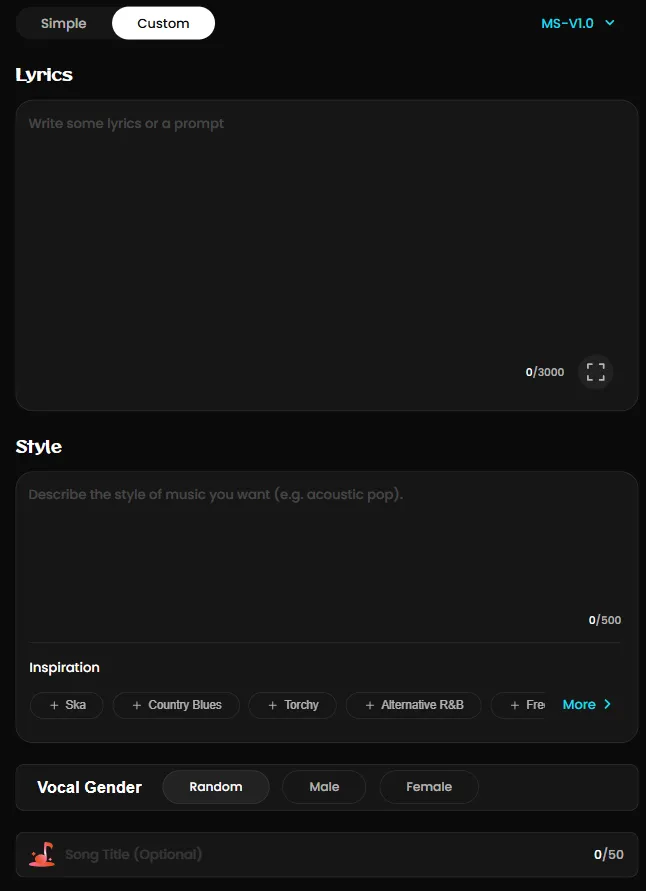
On the AI Music page, switch to "Custom" using the mode selector at the top.
What does it do?
Custom Mode provides advanced control options. You can input custom lyrics, define the music style in detail, and set specific parameters. It's perfect for creators who have a complete concept for their song.
How to use it?
- Enter Lyrics
In the Lyrics input box, paste or type your full lyrics.
For optimal structure, use tags to define sections, e.g.,
[Verse 1],[Chorus],[Bridge].Important: Do not paste copyrighted lyrics—this will cause generations to fail.
Advanced tips - Control vocals & harmonies (best with MS-V2.0/MS-V2.5/MS-V3.0)
Add bracketed [ ] tags inside your lyrics to fine-tune performance:
[Male Vocal] / [Female Vocal] - specify vocal gender
[Harmony] - add harmonies
[Hook] - highlight the chorus section
[Spoken] - insert spoken or rap-style parts
[Growl] - add rock/metal growls
Example:
[Verse 1] [Female Vocal] I walked alone through midnight rain
[Harmony] A whisper carried by the wind again
- Define Music Style
In the Style input box, describe in detail the musical style, atmosphere, and production characteristics you want.
Example: "Melancholic synth-pop with layered pads and a strong kick drum, mid-tempo, creating a spacious and emotional atmosphere."
Click the "More" button to fill in detailed information step-by-step for better results:
Genre: Pop, Rock, R&B, Electronic, etc.
Mood: Chill, Aggressive, Happy, Melancholic, etc.
Voice: Soft Female Vocal, Rap Male Vocal, Powerful Male Vocal, etc.
Instrument: Piano, Synth, Electric Guitar, Acoustic Drums, etc.
Style (reference blend): Retro 80s vibe, Lo-fi Chill, Cinematic, etc.
- Select Parameters & Fill in Song Information
Gender: Choose your preferred vocal gender from the dropdown menu (e.g., Male, Female).
Audio Title(Optional): Name your generated song.
- Generate Your Song Once everything is set, click the generate button to create your song.
Mode Selection Advice
Choose Simple Mode if: You want to quickly turn inspiration into music, don't have prepared lyrics, or wish to explore different styles first.
Choose Custom Mode if: You already have lyrics written, need granular control over the song's style, or have very specific sound and atmosphere requirements.
Account & Billing
Supported payment methods
MusicSeed currently offers a variety of convenient payment options to suit users globally. We support:
International Card Payments: Visa, MasterCard, Discover, and Diners Club.
Mobile & Digital Wallets: Apple Pay, Google Pay, Naver Pay, and Kakao Pay.
We are continuously working to add more payment methods in the future to enhance your checkout experience.
💡 If your payment fails, please contact our support team for assistance.
Refund policy
👉 MusicSeed Refund Policy
Eligible refund cases include:
Unresolvable technical malfunctions or fatal service errors that prevent core functionality.
Accidental duplicate purchases or unintentional buying of similar products.
Failure to receive order confirmation/access within 24 hours, with no support response within 48 hours of notification.
Lack of auto-renewal notification before a subscription renewal, if reported within 7 days of the charge.
Multiple payments for the same product due to a payment platform error.
Important notes:
Trial Period: Utilize the free trial before purchase. Issues not reported during the 30-day trial may affect eligibility.
General Exclusions: Refunds are typically not granted for reasons such as finding a lower price elsewhere, purchasing a similar product from another provider, buying promotional items, fraudulent transactions, or failing to understand product features before purchase.
Process: Submit requests via the Refund Request Form or support, providing necessary details (product name, order number, email, reason). The team aims to process requests within one business day.
Contact: For assistance or to request a refund, email [email protected].
Rights & Ownership
What counts as commercial vs. non-commercial use?
Non-commercial use refers strictly to personal, non-profit activities. Examples include:
Listening on MusicSeed.
Sharing on social media (e.g., YouTube) where the content is not monetized.
Commercial use involves any direct or indirect generation of revenue. Examples include:
Distributing music on streaming platforms (e.g., Spotify, Apple Music).
Using music in advertisements, film/TV/game soundtracks, or other media projects.
Monetizing the music on platforms like YouTube.
Selling or licensing the music to third parties.
Usage Rights by Plan
(For full details, please refer to: MusicSeed Pricing Plans)
Free / Basic Users
Rights Granted: Non-commercial use only.
You may use generated music for personal enjoyment, learning, or non-monetized sharing.
Not Permitted: Any form of commercialization or monetization.
Standard / Pro Users
Rights Granted: Commercial use.
You may release, sell, monetize, or license your generated music in any legal commercial context.
Copyright & Ownership
Why is copyright complicated? Copyright laws vary globally, and the eligibility of AI-generated music for protection is still debated in many regions. We strongly recommend consulting your local copyright office or legal authority before seeking formal copyright registration or engaging in commercial use.
Ownership by Plan:
Free / Basic Users: MusicSeed retains ownership of the generated music. You are granted a license for non-commercial use only.
Standard / Pro Users: You own the generated music. This ownership is coupled with commercial usage rights, allowing you to exploit the work commercially (e.g., release, sell, license).
Important Note: Ownership does not automatically guarantee copyright protection. Many jurisdictions only extend copyright to human-authored works. Therefore, music created entirely by AI may not qualify for copyright, even if you own it.
Ownership ≠ Copyright (An Analogy)
J.K. Rowling holds the copyright to Harry Potter.
If you purchase a book (own the physical object), you cannot legally reproduce or adapt it into a film, as the copyright remains with the author.
Similarly, owning AI-generated music does not necessarily mean you hold the copyright, as some legal systems may not recognize it as a "human-authored" work.
Special Case: Lyrics Copyright
If you write the original lyrics yourself, you fully own the copyright to those lyrics and may register them separately.
You may also attempt to register the complete song (music + your lyrics). In some regions, copyright offices may recognize you as the author of the overall work, with MusicSeed considered a tool used in the creative process.
Crucial: Laws differ significantly by jurisdiction. Always confirm the specific requirements and interpretations with your local copyright authority before proceeding with registration.
Community
Join our Discord community to connect with other creators, get free credit rewards, and chat directly with our team (we're online every day to answer your questions). Click the link and become part of the Musicful family!
STRAT HERE
- #🎉│welcome: Welcome channel for new members
- #📜︱rules: General rules for the community
- #🚀│product-updates: Latest MusicSeed features and announcements
COMMUNITY
- 🙋│introduce-yourself: Tell us who you are and what you create
- 💬│chat-now: General chat — anything goes
- 🌍│where-are-you-from: Share your country and connect by region
AI Music Creation
- 🎶│share-your-ai-music: Post your MusicSeed creations & get feedback
- 💡│music-prompts: Share or request prompts for new songs
- 📄│lyrics-to-song: Share lyrics, request melodies or vocal styles
- 🎼│melody-creation: Discuss composition & melody ideas
- 🧠│ai-tips-and-guides: AI workflow tips, guides & resources
COLLAB
- 🤝│find-collaboration: Find partners for your next AI project
- 🎤│vocals: Vocalists & AI singers community
- 🥁│producers: Producers & sound designers
- ✍│lyricists: Writers & lyric creators
HELP
- 🛠️│support: User support and troubleshooting
- 🐞│bug-report: Report bugs & technical issues
- 💭│suggestions: Feature requests & improvement ideas
- 🧠│tips-and-guides: Quick how-tos, FAQs & tutorials