Introduction
Before trying AI Song Maker, most users want to know one thing: can it really turn a prompt or lyrics into a usable song? That is the real question behind many AI Song Maker reviews, especially for creators who do not want to waste time or credits on an AI music tool that looks good on the surface but feels limited in practice.
AI Song Maker is an online AI music generator built for users who want to create songs from text prompts, lyrics, uploaded ideas, or simple creative descriptions. It is aimed at beginners, lyric writers, social media creators, hobby musicians, and anyone who wants to generate music without using a traditional DAW or hiring a producer.
This AI Song Maker review looks at the platform from a practical user perspective. We will cover features, pricing, credits, real user feedback, workflow quality, pros and cons, use cases, and the best alternatives. The goal is simple: help you decide whether AI Song Maker is actually worth trying, or whether another AI music tool may fit your needs better.
Quick Overview of AI Song Maker
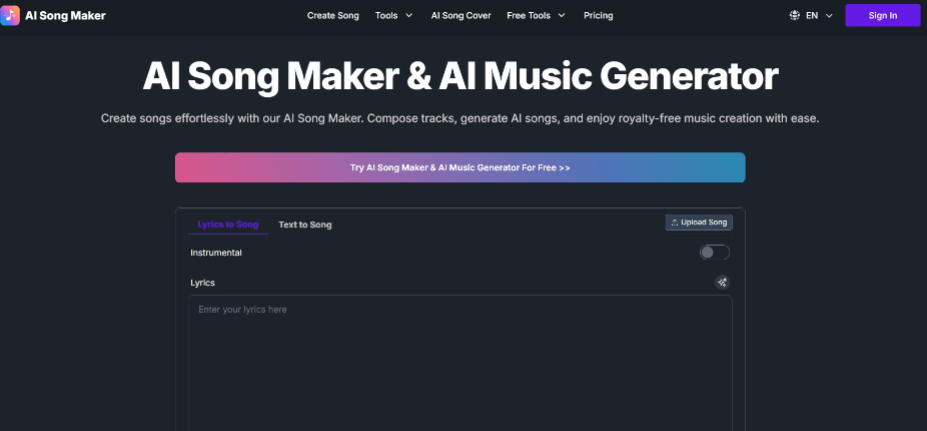
AI Song Maker is a browser-based AI song creation platform. It includes Text/Lyrics to Music, AI Lyrics Generator, AI Song Cover, AI Vocal Removal, AI Singing Photo, Custom Voice Model, Upload Custom Music, and related music editing features.
The tool is easy to start with. Users do not need a DAW, plugins, music theory knowledge, or vocal recording setup. In a normal workflow, the main task is writing a clear prompt, choosing the right mode, generating a song, and comparing the result.
The important thing to understand is that AI Song Maker works better as a fast drafting tool than a guaranteed final production tool. It can produce useful song ideas, but users should expect some trial and error before getting a version that feels ready to use.
| Item | Details |
|---|---|
| Type | Online AI song maker and AI music generator |
| Output | AI songs, vocals, instrumentals, lyrics, covers, separated audio, extended tracks |
| Skill level | Beginner to intermediate |
| Main strength | Fast song creation from lyrics or text prompts |
| Main limitation | Limited control over vocal phrasing, arrangement, and final mix details |
AI Song Maker is easiest to recommend for users who want to hear an idea quickly. It is harder to recommend for users who need exact creative control, detailed editing, or consistent release-ready output from the first generation.
AI Song Maker Rating Summary
Overall Rating: ⭐⭐⭐⭐☆ 4.3/5
AI Song Maker scores well for ease of use, feature variety, and beginner accessibility. It gives non-musicians a quick way to move from a lyric or idea to a complete song draft. However, its score is lower for advanced customization, professional editing control, and output consistency.
| Category | Rating | Review Notes |
| Ease of use | 4.6/5 | Simple workflow and beginner-friendly interface |
| Feature range | 4.4/5 | Covers song generation, lyrics, covers, vocal removal, custom voice, and uploads |
| Output quality | 4.2/5 | Good for demos and creator projects, but not always final-ready |
| Customization | 3.8/5 | Prompts help, but detailed arrangement control is limited |
| Pricing value | 4.0/5 | Free plan is useful for testing, paid plans are better for regular use |
| Professional use | 3.7/5 | Better for drafts than full production workflows |
Best for: beginners, casual songwriters, social media creators, YouTube creators, TikTok creators, indie game developers, marketers, and users who need quick song concepts.
Main strength: AI Song Maker makes it easy to turn lyrics or prompts into complete song drafts without production skills.
Main limitation: The tool does not always provide enough control for users who need precise vocals, polished mixes, or highly specific arrangement changes.
AI Song Maker Pricing: Free Plan, Credits, and Paid Plans
Pricing is one of the most important parts of this AI Song Maker review because AI song generation usually takes more than one attempt. A user may need to test different prompts, genres, vocal styles, and lyric structures before getting a song that feels usable. That means the credit system directly affects the real experience.
AI Song Maker offers a free plan. At the time of review, the free plan shows 20 credits per day, which equals about 4 song generations. This is enough to test the interface and hear the general quality, but it is not enough for serious comparison. If you are testing multiple genres or trying to make a song for a real project, the free limit can run out quickly.
The paid plans use a credit-based model. The pricing page shows Basic, Standard, and Pro plans with different yearly credit amounts, upload limits, concurrent generation limits, storage, download formats, and commercial rights.
| Plan | Listed Price | Credits / Usage | Best For |
| Free | $0/month | 20 credits/day, about 4 song generations | First-time testing |
| Basic | $10.49/month on discounted annual display | 12,000 credits/year, about 2,400 song generations | Casual creators |
| Standard | $20.99/month on discounted annual display | 30,000 credits/year, about 6,000 song generations | Frequent creators |
| Pro | $41.99/month on discounted annual display | 72,000 credits/year, about 14,400 song generations | Heavy users and teams |
The free plan is useful, but it should be treated as a trial. It helps users answer one key question: does the vocal style, generation quality, and workflow match what they need? It is not the best option for users who need to compare many versions or produce music regularly.
Should You Pay for AI Song Maker?
AI Song Maker is worth paying for only if the free plan already gives you results close to what you need. The paid plans mainly make sense for users who generate songs regularly, test multiple styles, need longer uploads, want more downloads, or require commercial use options.
For one-time casual testing, the free plan is enough. For serious creator work, the real question is whether the credit cost feels reasonable after several test generations. The main risk of paying is not the feature list, but output uncertainty. Users may spend credits trying different versions before finding one song that feels usable.
What Real Users Say About aisongmaker.io
Third-party feedback gives a more balanced view than a product page. Trustpilot reviews for aisongmaker.io are mixed but useful. Positive users often mention that the tool is easy to use and can generate enjoyable songs quickly. Some users like that they can test the free plan before paying. Negative feedback tends to focus on limits, repeated results, generation quality variation, support, subscription experience, or credit-related concerns.
One useful positive review theme is that users can create nice songs with decent voices even from the free plan. This matters because it shows where AI Song Maker performs best: not as a full studio replacement, but as a quick way to hear a song idea with a usable vocal direction.
What Users Like
Users often like how simple AI Song Maker feels. The platform does not require music production experience, plugins, or recording equipment. For beginners, the biggest advantage is that the tool removes the blank-page problem. You do not need to know melody, chords, arrangement, or mixing before hearing a full song draft.
Users also like the lyrics-to-song workflow. If someone already has lyrics, AI Song Maker can help turn those words into a vocal song. This is especially useful for hobby songwriters, poets, content creators, and people making personalized songs.
Another positive point is the feature range. AI Song Maker is not only a basic text-to-song tool. It also includes AI lyrics generation, AI song cover, vocal removal, custom voice model, AI Singing Photo, and custom music upload. For casual creators, having these tools in one place is convenient.
Common Complaints
The most common complaint is that results are not always consistent. Some generations may sound good, while others may feel generic, repetitive, or not close enough to the prompt. This is normal for many AI music tools, but it becomes more noticeable when users are spending credits.
Another common issue is control. AI Song Maker lets users describe genre, mood, vocals, and style, but it does not give the same control as a DAW. Users cannot easily fine-tune every vocal phrase, chord movement, section transition, instrument layer, or mix detail.
Some users also mention concerns around subscription handling, failed generations, downloads, support response, or credit usage. These issues do not affect every user, but they are important for anyone considering a paid plan.
Overall, real user feedback suggests that AI Song Maker is easy and fun to try, but users should test it carefully before upgrading. It is better for quick creative drafts than for users who need total control or guaranteed final-ready music.
What Does AI Song Maker Actually Do?
AI Song Maker turns lyrics, text prompts, and music instructions into AI-generated songs, while also offering related tools for lyrics, song covers, vocal removal, custom voices, music uploads, and song editing.
In practical terms, the platform helps users move from idea to listenable draft quickly. You can enter lyrics, describe a genre or mood, choose a style direction, generate a track, and use the result as a demo, social video soundtrack, personal song, or creative reference.
It is not a complete replacement for Ableton Live, FL Studio, Logic Pro, or a professional producer. It works best as an AI drafting assistant for songwriting, content creation, and music ideation.
Real Workflow Test with AISongMaker
Test Scenario
For this review, the test scenario is based on a common user need: making an emotional pop song from existing lyrics. The user has lyrics but no melody, no singer, no instrumental, and no production setup.
The goal is to create a complete song draft that can be used as a reference, social video soundtrack, or personal demo.
Example prompt:
“Create an emotional pop song with warm female vocals, soft piano, light drums, and a hopeful chorus. The song should feel intimate, modern, and suitable for a short video about starting over.”
Generation Process
The process starts with choosing the correct mode. If you already have lyrics, Lyrics to Song is the most direct option. If you only have a theme or idea, Text to Song is better. If you are working with an existing track, tools like AI Vocal Removal or Upload Custom Music may be more relevant.
Next, the user enters lyrics or a prompt. This step matters more than many beginners expect. A vague prompt usually leads to a more generic result. A detailed prompt gives the AI a clearer direction.
A stronger prompt should include:
| Prompt Element | Example |
| Genre | emotional pop, lo-fi R&B, cinematic rock |
| Mood | hopeful, intimate, sad, energetic |
| Vocal direction | warm female vocals, soft male vocals, spoken intro |
| Instruments | piano, acoustic guitar, light drums, synth pads |
| Use case | short video, personal demo, game background, brand intro |
After generation, the user needs to listen critically. The first result should usually be treated as a draft, not the final version. In most cases, the real workflow is generate, compare, revise the prompt, and generate again.
Output Quality
AI Song Maker performs best with clear mainstream styles. Pop, acoustic, cinematic, EDM, lo-fi, hip-hop, rock, and simple background music prompts are easier to guide than very niche or highly technical production requests.
For demos, the result can be useful. A good generation may include vocals, melody, rhythm, arrangement, and a clear song structure. That is enough for many casual projects, social clips, songwriting tests, and personal songs.
However, the output is not always final-ready. Vocal phrasing can occasionally sound unnatural. Some lyrics may not fit perfectly into the melody. The arrangement may repeat ideas. The mix may not always feel polished enough for commercial release.
This is the key user expectation: AI Song Maker is good at helping users hear an idea quickly, but it is not a one-click guarantee. Users who treat it as a fast drafting assistant will likely be happier than users expecting a perfect finished track every time.
Example Result
A strong result from this workflow would be a 2-3 minute emotional pop demo with soft piano, clear vocals, a simple verse-chorus structure, and a memorable hook. It would work well as a songwriting draft, short video soundtrack, or personal music idea.
A weaker result might have the right mood but awkward lyric timing, a less natural vocal tone, or a chorus that does not feel strong enough. In that case, the best solution is not to repeat the same prompt, but to add more specific direction.
For example:
“Make the chorus more emotional, keep the piano softer, reduce the drums, use a more intimate vocal delivery, and make the ending feel cinematic.”
Compared with tools like Suno, Udio, and MusicSeed, AI Song Maker is easy to test and offers a broad feature set. However, if the goal is a cleaner creator-focused workflow for original music, MusicSeed is a strong alternative to compare before paying.
AI Song Maker Pros and Cons
| Pros | Cons |
| Easy for beginners | Free credits can run out quickly |
| Supports text-to-song and lyrics-to-song | Output quality can vary |
| Includes AI lyrics, covers, vocal removal, and custom voice tools | Limited detailed editing control |
| Useful for demos, social videos, and personal songs | Some results may sound generic or repetitive |
| Can create full song drafts quickly | Not a professional DAW replacement |
| Paid plans include commercial use options | Users should still review terms before publishing |
| Good for non-musicians | May require several generations to get a strong result |
AI Song Maker is strongest as a fast creative tool. It helps users test ideas quickly, but it does not remove the need for human review, prompt refinement, and sometimes post-production.
Compare AI Song Maker with Other AI Music Tools
AI Song Maker sits between a simple prompt-based song generator and a broader music utility platform. It is more flexible than a basic lyrics generator because it can create full songs and offer related audio tools. However, it is not as detailed as a professional music production environment.
| Tool | Best For | Main Difference |
| AI Song Maker | Quick songs from lyrics or text | Multi-tool platform with generation and editing features |
| MusicSeed | Creator-friendly AI music generation | Strong for text-to-music and lyrics-to-music workflows |
| Suno | Full songs from simple prompts | Very accessible for fast AI song creation |
| Udio | AI music creation and sharing | Strong for discovery and creative exploration |
| Loudly | Royalty-free creator music | Useful for stems, remixing, and licensing-focused content |
| Soundraw | Instrumental background music | Better for videos, ads, and royalty-free background tracks |
| Boomy | Fast music creation | Good for generating many simple tracks quickly |
| Kits AI | AI vocals and voice conversion | Better for vocal workflows than full song creation |
| LALAL.AI | Stem splitting and vocal separation | Strong for audio separation, not full song generation |
| Moises | Music practice and stem tools | Better for musicians working with existing tracks |
If you want a quick song from a lyric idea, AI Song Maker is worth trying. If you want a more focused creator workflow for original music, MusicSeed is one of the strongest alternatives. If you want a large AI song community, Suno and Udio are also important tools to compare.
The best choice depends on the project. AI Song Maker is convenient for testing. MusicSeed is better for a cleaner creator workflow. Suno and Udio are stronger for broad AI song exploration. Loudly and Soundraw are better when royalty-free background music is the main goal.
Best AI Song Maker Alternatives
MusicSeed
MusicSeed is a strong alternative for users who want to create music from text, lyrics, mood, style, and genre prompts. It is especially useful for creators who need songs for videos, demos, social clips, background music, and content projects.
Choose MusicSeed if your main goal is to turn text or lyrics into creator-ready music for videos, demos, social clips, and content projects, especially when you want a more focused workflow instead of a mixed toolbox.
Suno
Suno is one of the most popular AI song generators. It is good for users who want to create full songs with vocals from simple prompts.
Choose Suno if you want fast, accessible full-song generation and a large user ecosystem.
Udio
Udio is another major AI music platform. It works well for users who want to explore song ideas, generate vocal music, and discover examples from other creators.
Choose Udio if you want AI music generation with a stronger discovery and sharing angle.
Loudly
Loudly focuses on creator-friendly AI music, royalty-free tracks, stems, remixing, and music customization.
Choose Loudly if you need background tracks, stems, and music assets for videos or brand content.
Soundraw
Soundraw is better for customizable instrumental background music. It is not mainly a lyrics-to-song tool, but it is useful for YouTube, ads, podcasts, and business videos.
Choose Soundraw if you need background music more than vocal songs.
Boomy
Boomy is designed for fast song generation and publishing. It is simple and accessible for casual users.
Choose Boomy if speed and quantity matter more than detailed control.
Mureka
Mureka is another AI song creation platform that can turn ideas and lyrics into music.
Choose Mureka if you want to compare different AI song generation styles.
Kits AI
Kits AI focuses more on AI vocals, voice conversion, voice cloning, and singing voice workflows.
Choose Kits AI if your main need is AI vocal transformation rather than full song generation.
LALAL.AI
LALAL.AI is mainly known for vocal removal and stem separation. It is useful when working with existing songs or audio files.
Choose LALAL.AI if you need to separate vocals, drums, bass, or instruments from a track.
Moises
Moises is useful for musicians, singers, students, and teachers who need stem separation, pitch changes, tempo control, and practice tools.
Choose Moises if you work with existing songs and need music practice or audio editing support.
Best overall alternative: MusicSeed
Best for beginners: MusicSeed or Suno
Best for professionals: Udio, Loudly, Kits AI, or Moises, depending on the workflow
AI Song Maker is a good starting point, but it is not the only option. Users should compare pricing, output quality, commercial rights, and workflow before upgrading.
AI Song Maker Rating Breakdown
AI Song Maker performs well in beginner accessibility and feature range. It is weaker in advanced control and professional production depth.
| Evaluation Area | AI Song Maker | MusicSeed | Suno | Udio | Loudly |
| Beginner ease | 4.6 | 4.7 | 4.8 | 4.4 | 4.3 |
| Text-to-song workflow | 4.2 | 4.7 | 4.8 | 4.5 | 4.0 |
| Lyrics-to-song workflow | 4.3 | 4.6 | 4.6 | 4.4 | 3.8 |
| Vocal quality | 4.0 | 4.3 | 4.5 | 4.4 | 3.8 |
| Background music use | 4.1 | 4.5 | 4.2 | 4.1 | 4.6 |
| Editing control | 3.7 | 4.2 | 4.0 | 4.1 | 4.4 |
| Creator use cases | 4.2 | 4.7 | 4.5 | 4.3 | 4.6 |
| Pricing clarity | 4.0 | 4.4 | 4.2 | 4.1 | 4.2 |
| Overall value | 4.3 | 4.6 | 4.5 | 4.4 | 4.3 |
Quick pick:
- Choose AI Song Maker if you want an easy lyrics-to-song tool with extra music features.
- Choose MusicSeed if you want a creator-friendly AI music workflow.
- Choose Suno if you want fast full songs from short prompts.
- Choose Udio if you want AI music creation with discovery features.
- Choose Loudly if you need royalty-free music, stems, and remix tools.
The key insight is that AI Song Maker works best for idea generation and quick drafts. For deeper creator workflows, users may want to compare it with MusicSeed, Suno, or Udio before making a final decision.
Use Cases for AI Song Maker Online
Turning Lyrics Into a Demo Song
AI Song Maker is useful when a user already has lyrics but does not know how to compose melody, chords, or arrangement. The lyrics-to-song workflow can turn written lines into a full vocal demo.
Example: A songwriter writes a chorus and wants to hear it as a pop ballad before developing the full song.
Creating Music for Social Videos
Short-form creators often need music for TikTok, Instagram Reels, YouTube Shorts, or personal video edits. AI Song Maker can generate a track based on mood, style, and use case.
Example: A creator needs an emotional acoustic song for a 30-second travel memory video.
Making Background Music for Games
Indie game developers can use AI Song Maker to create early soundtrack drafts, mood references, or background music concepts.
Example: A developer creates a mysterious ambient track for a puzzle game scene.
Testing Songwriting Ideas
AI Song Maker helps users hear whether a lyric idea works musically. This is helpful for beginners who struggle to imagine melody or structure.
Example: A user tests the same lyrics as acoustic pop, cinematic rock, and lo-fi R&B.
Creating Karaoke or Remix Assets
Because AI Song Maker includes vocal removal and related audio tools, it can support simple karaoke, practice, and remix workflows.
Example: A hobby singer removes vocals from a song to practice singing over the instrumental.
Building Music Concepts for Clients
Freelancers, marketers, and editors can use AI-generated songs to pitch mood directions before commissioning final production.
Example: A video editor creates three soundtrack concepts for a brand campaign pitch.
Who AI Song Maker Is For
Best For
- Beginners who want to create songs without music production skills
- Songwriters who want to hear lyrics as real song drafts
- YouTube, TikTok, and Instagram creators
- Indie game developers needing soundtrack ideas
- Hobby musicians exploring AI music tools
- Marketers and freelancers testing music concepts
- Students and educators experimenting with music creation
Not Ideal For
- Professional producers who need full DAW-level control
- Artists who require exact vocal phrasing
- Users who need guaranteed release-ready masters
- Teams with strict commercial licensing requirements
- Musicians who need detailed MIDI, stems, chords, and mix control
- Users who dislike credit-based generation systems
AI Song Maker is best for quick creation, idea testing, and beginner-friendly music drafts. It is not the best fit for users who expect precise production control or final commercial masters without editing.
How to Use AI Song Maker
Step 1: Choose the Right Feature
Start by choosing the feature that matches your goal. Use Lyrics to Song if you already have lyrics. Use Text to Song if you only have a theme or idea. Use Vocal Remover if you want to separate vocals from an existing track. Use Upload Custom Music if you want to work from your own audio.
Choosing the right mode matters because each feature is designed for a different workflow.
Step 2: Write a Detailed Prompt
A detailed prompt gives the AI more useful direction. Include genre, mood, vocal type, instruments, tempo feel, and intended use.
Weak prompt:
“Make a sad song.”
Better prompt:
“Create an emotional piano pop song with warm female vocals, soft drums, intimate verses, and a hopeful chorus. The song should feel cinematic and work for a short video about starting over.”
Step 3: Add Lyrics or Upload Audio
If you are using Lyrics to Song, paste your lyrics and structure them clearly with labels like Verse, Chorus, and Bridge. If you are using audio-based features, upload a clean file and keep the length limits in mind.
Clear input usually leads to better output. Messy lyrics, unclear prompts, or low-quality audio may reduce result quality.
Step 4: Generate and Compare Versions
Click generate and listen to the result carefully. Do not judge the tool from only one generation. AI music often needs several attempts before producing the best version.
Compare melody, vocals, arrangement, structure, and emotional fit. If the result is close but not right, refine the prompt instead of starting with the same wording again.
Step 5: Download and Check Usage Rights
Once you find a usable track, download it according to your plan. If you plan to use the music commercially, check the current license terms and plan details before publishing, monetizing, or delivering it to a client.
The overall experience is simple, but the best results come from clear prompting, repeated testing, and careful review.
Conclusion
AI Song Maker is a solid online AI music generator for users who want to turn lyrics, text prompts, and ideas into full song drafts quickly. It is easy to use, feature-rich, and accessible for beginners who do not know music production.
Its strongest value is speed. You can test lyrics, generate vocals, create background songs, remove vocals, upload custom music, and explore creative ideas in one platform. For social content, personal demos, early songwriting, and quick music experiments, AI Song Maker is worth trying.
Its biggest weakness is control. The tool can create good drafts, but it does not always follow instructions perfectly. Users may need several generations, and professional creators may still need editing, mixing, mastering, or a more specialized tool.
Final verdict: AI Song Maker is worth trying for beginners and casual creators, especially with the free plan. Paying makes sense only after users confirm that the generation quality, vocal style, credit system, and commercial terms match their workflow. If you want a stronger creator-focused alternative for text-to-music and lyrics-to-music workflows, MusicSeed is one of the best options to compare before upgrading.