AIVA looks simple at first: choose a style, generate instrumental music, edit the result, and download a track. But for many creators, the bigger question comes after generation: can you use that music in a video, game, client project, or monetized channel?
That is why this AIVA AI review focuses on usage rights, not only music quality. AIVA Free, Standard, and Pro do not only change downloads and export formats. They also affect copyright ownership, monetization, credit requirements, and commercial use.
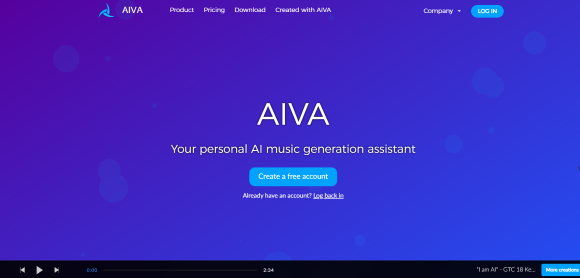
AIVA AI, also searched as AIVA, AIVA.ai, aiva.ai, and AIVA music generator, is best understood as an AI composition assistant for instrumental music, background tracks, cinematic ideas, game music, and editable music drafts. AIVA’s official site describes it as an AI music generation assistant that supports 250+ styles, audio or MIDI influence, track editing, and file downloads.
This review focuses on AIVA.ai by Aiva Technologies, the AI music generation assistant, not unrelated products or companies using similar AIVA names.
AIVA AI Review Quick Verdict
AIVA AI is worth trying if you need instrumental music, cinematic background tracks, game music, ambient pieces, or editable composition drafts. Its main value is not only generation speed, but the way each plan connects music creation with usage rights.
It may be less suitable for users who want vocal-first AI songs, lyric-to-song generation, or instant social-media-style tracks with vocals. For those users, MusicSeed, Suno, or Udio may fit a different workflow.
| Question | Answer |
|---|---|
| Is AIVA AI worth trying? | Yes, if you need instrumental AI music, background tracks, cinematic music, or editable compositions. |
| Is AIVA mainly a vocal song generator? | No. AIVA is better known for instrumental composition workflows. |
| Best for | Video creators, game developers, composers, students, background music users |
| Main strength | Instrumental composition, style control, MIDI/audio influence, licensing structure |
| Main caution | Copyright and monetization depend heavily on the plan |
| Best MusicSeed fit | Users who want lyrics-to-music or prompt-to-song creation |
Key Facts
| Item | Details |
|---|---|
| Product type | AI music composition assistant |
| Brand variants | AIVA, AIVA AI, AIVA.ai, aiva.ai, AIVA music generator |
| Main workflow | Generate instrumental music and editable compositions |
| Best use cases | Cinematic music, game music, background music, composition drafts |
| Main limitation | Not mainly built for vocal-first AI songs |
| Key decision factor | Pricing, copyright ownership, and commercial use rights |
What If You Need an AIVA AI Alternative?
AIVA AI alternatives should be compared by workflow, not by saying one tool is simply better than another. AIVA fits users who want instrumental composition and licensing control, while other tools may fit lyrics-to-music, vocal songs, recording, editing, or stem separation.
This quick table helps users decide whether they should continue with AIVA or compare another tool first.
| If You Need… | Consider… |
|---|---|
| Instrumental composition with license tiers | AIVA |
| Lyrics-to-music or prompt-to-song creation | MusicSeed |
| Fast vocal AI songs | Suno |
| Creative style exploration | Udio |
| Royalty-free background music | Soundraw / Mubert |
| Recording and editing | BandLab |
| Stem separation or vocal removal | LALAL.AI / Moises |
This does not mean these tools replace AIVA in every use case. AIVA is strongest when the user wants instrumental composition and licensing clarity. MusicSeed fits users who want to turn lyrics, prompts, or song ideas into new music drafts.
AIVA AI Pricing: Free, Standard, and Pro
AIVA AI pricing should not be judged by price alone. For AIVA, the plan decides more than downloads. It affects copyright ownership, monetization, credit requirements, export formats, and how safely you can use the music in real projects.
Based on the AIVA pricing screenshots reviewed in June 2026, AIVA offers Free, Standard, and Pro plans for individuals, with both monthly and annual billing. The pricing page also shows separate tabs for Students & Schools and Enterprises, but this review focuses on the individual plans shown in the screenshots.
Monthly Pricing
| Plan | Monthly Price | Copyright / Monetization | Best For |
|---|---|---|---|
| Free, Forever | €0 | Copyright owned by AIVA; no monetization; credit required | Testing and non-commercial practice |
| Standard Monthly | €15/month + VAT | Copyright owned by AIVA; limited monetization; no credit required | Creators monetizing only on YouTube, Twitch, TikTok, and Instagram |
| Pro Monthly | €49/month + VAT | Copyright owned by you; full monetization; no credit required | Creators who need ownership and broader commercial use |
Annual Pricing
| Plan | Annual Billing Display | Copyright / Monetization | Best For |
|---|---|---|---|
| Free, Forever | €0 | Copyright owned by AIVA; no monetization; credit required | Testing and non-commercial use |
| Standard Annually | €11/month + VAT, billed annually | Copyright owned by AIVA; limited monetization; no credit required | Regular creators who want a lower monthly equivalent |
| Pro Annually | €33/month + VAT, billed annually | Copyright owned by you; full monetization; no credit required | Commercial creators who need copyright ownership |
Annual prices are shown as monthly equivalents, but users are billed annually. Discount labels can change over time, so it is safer to describe the displayed annual price instead of relying on one fixed discount claim.
Plan Differences
| Plan | What You Get | What It Means |
|---|---|---|
| Free | 3 downloads per month, tracks up to 3 minutes, MP3 and MIDI downloads, credit required | Good for testing ideas, but not for commercial use |
| Standard | 15 downloads per month, tracks up to 5 minutes, MP3 and MIDI downloads, limited monetization | Useful for creators who publish on selected social platforms |
| Pro | 300 downloads per month, tracks up to 5 minutes 30 seconds, all file formats, high-quality WAV export, full monetization | Better for client work, broader commercial use, and ownership needs |
Pricing Takeaway
Free is useful if you only want to test AIVA or create non-commercial ideas. Standard may fit creators who monetize on selected social platforms. Pro is the plan to consider when copyright ownership, broader commercial use, and high-quality exports matter.
For AIVA, the cheapest plan is not always the safest plan. Before paying, test not only the sound quality. Test whether the plan matches your publishing use case.
Can You Use AIVA AI Music Commercially?
AIVA AI commercial use depends on the plan. The Free plan is positioned for non-commercial use, Standard allows limited monetization on selected platforms, and Pro is designed for broader commercial use and copyright ownership.
AIVA’s End User License Agreement defines non-commercial, limited commercial, and full copyright license models. The limited commercial model mentions monetization on selected third-party websites, including YouTube, Twitch, TikTok, and Instagram, while the full copyright model assigns copyrights of the MIDI and/or audio composition to the licensee.
| Plan | Commercial Use | Practical Meaning |
|---|---|---|
| Free | No commercial use | Better for testing, drafts, and non-commercial practice |
| Standard | Limited monetization | May fit creators using selected supported platforms |
| Pro | Broader commercial use | More relevant for client work, paid projects, commercial videos, and wider publishing |
The key question is not only “Can AIVA create music?” It is also “Can I legally use this track the way I intend to?”
Who Owns The Music Created With AIVA AI?
AIVA AI copyright is one of the biggest reasons users should compare plans carefully. If you only want to experiment, copyright may not feel urgent. If you plan to publish, monetize, sell, or deliver music to a client, ownership becomes part of the buying decision.
AIVA’s Helpdesk states that users who upgrade to Pro Monthly or Pro Annually own the copyright of compositions created before the subscription started and during the subscription. It also states that users retain copyright of compositions they already owned before cancelling Pro.
| Plan | Can You Monetize? | Who Owns Copyright? | Credit Required? |
|---|---|---|---|
| Free | No commercial use | AIVA | Yes |
| Standard | Limited monetization on selected platforms | AIVA | No |
| Pro | Broader commercial use | You | No |
Copyright Takeaway
Free can be useful for testing, but it is not the right plan if you want to monetize. Standard may fit creators who only need limited monetization on supported platforms. Pro is the more relevant option when copyright ownership, commercial flexibility, and high-quality exports matter.
Choosing the Right AIVA AI Plan
AIVA AI plan choice should start from your use case, not from the lowest price. A track for a private project is very different from a monetized YouTube video, paid brand campaign, client video, or game soundtrack.
The table below translates AIVA’s Free, Standard, and Pro plans into real-world decisions.
| User Need | Suggested Plan |
|---|---|
| Test AIVA before paying | Free |
| Create non-commercial music ideas | Free |
| Use music on YouTube, Twitch, TikTok, or Instagram | Standard |
| Need more downloads and longer tracks | Standard or Pro |
| Need full copyright ownership | Pro |
| Need client work or broader commercial use | Pro |
| Need high-quality WAV exports | Pro |
| Need music for a paid ad or brand campaign | Pro |
| Need soundtrack ownership for a game or commercial project | Pro |
Real-World Checks
| Scenario | What To Check |
|---|---|
| YouTube monetized video | Check whether your plan allows monetization on YouTube |
| Twitch, TikTok, or Instagram content | Standard may fit limited monetization if the use stays within allowed platforms |
| Client video project | Pro may be more appropriate if copyright ownership matters |
| Indie game soundtrack | Check distribution rights and whether ownership is required |
| Paid ads or brand campaign | Review commercial rights carefully before publishing |
| Spotify or streaming release | Confirm ownership and distribution rights before release |
| School project or non-profit use | Free may be enough if credit and non-commercial rules fit |
These examples are not legal advice. They are practical checks users should make before publishing, monetizing, or distributing music created with AIVA.
How To Use AIVA AI in 5 Steps
AIVA AI works best when users treat it as a composition workflow, not only a one-click generator. The process usually starts with choosing a musical direction, then generating, editing, checking usage rights, and exporting the final result.
Step 1: Choose a Style or Starting Point
Start by choosing the type of instrumental music you want to create. AIVA can be used for cinematic music, game background music, ambient tracks, video music, and composition drafts.
If you already have a clear direction, choose a style that matches your project. If you are still exploring, generate a few variations before deciding which direction fits best.
Step 2: Add Audio or MIDI Influence If Needed
If you want more control, you can use an audio or MIDI influence to guide the composition. This is useful when you already have a melody idea, mood reference, chord direction, or musical structure in mind.
This step is especially helpful for composers, game creators, and video editors who want the generated track to follow a more specific musical direction.
Step 3: Generate and Review the Track
After choosing a style or influence, generate the track and listen carefully. Do not judge AIVA from only one result. Try a few versions if the first output does not match the mood, pacing, or arrangement you need.
For commercial projects, review not only the sound quality but also whether the track fits the intended scene, platform, or audience.
Step 4: Edit the Composition
AIVA is more useful when you refine the generated result instead of accepting the first version immediately. Review the arrangement, structure, mood, and musical flow before exporting.
This matters for cinematic music, game music, ambient tracks, YouTube background music, and client-facing projects where the track needs to feel polished and suitable for a specific use case.
Step 5: Check the License and Export the Right Format
Before downloading or publishing the track, check whether your AIVA plan allows your intended use. Free, Standard, and Pro differ in monetization, copyright ownership, credit requirements, download limits, track length, and export formats.
Choose the export format based on your workflow. MP3 may be enough for drafts, MIDI can help with further editing in a DAW, and WAV may be more relevant for higher-quality production needs.
Quick Workflow:
To use AIVA AI, follow these five steps:
| Step | What To Do | Why It Matters |
|---|---|---|
| 1 | Choose a style or starting point | Sets the mood, genre, and direction of the instrumental track |
| 2 | Add audio or MIDI influence if needed | Gives the composition a clearer musical reference |
| 3 | Generate and review the track | Helps you compare variations before choosing a usable version |
| 4 | Edit the composition | Improves structure, pacing, mood, and project fit |
| 5 | Check the license and export | Confirms whether your plan allows commercial use, monetization, and the file format you need |
- Best for: instrumental music, YouTube background music, game soundtracks, cinematic drafts, ambient tracks, and client-facing music projects.
- Check before publishing: copyright ownership, monetization rules, credit requirements, download limits, track length, and export format.
What Are The Best AIVA AI Alternatives?
AIVA AI alternatives are useful when the user’s workflow does not start with instrumental composition. Some users need lyrics-to-music, some need vocal songs, some need background music libraries, and others need stem separation.
The best alternative depends on whether the user needs composition, song generation, editing, background music, or audio utility tools.
1. MusicSeed
AIVA starts from composition settings. MusicSeed starts from a simpler creative input: lyrics, prompts, or a song idea. That makes MusicSeed easier to consider when the user does not want to manage an instrumental composition workflow, but wants to turn text into a complete music draft.
Use it for lyrics-to-music, text-to-music, song idea generation, and beginner-friendly AI music creation.
2. Suno
Suno fits users who want fast AI songs with vocals and social-ready ideas. It is more vocal-song oriented than AIVA.
Use it for prompt-to-song generation, fast vocal song ideas, social content music, and full AI song drafts.
3. Udio
Udio fits users who want to explore creative music directions and test styles. It is useful for experimental AI music generation.
Use it for style exploration, genre testing, creative song drafts, and experimental directions.
4. Soundraw
Soundraw fits users who want background music for content and prefer a more direct creator workflow.
Use it for YouTube background music, corporate videos, content creation, and royalty-free style workflows.
5. Mubert
Mubert fits users who want generated background music, loops, or content-friendly audio.
Use it for background tracks, loops, creator content, and streaming-style music generation.
6. BandLab
BandLab fits users who want recording, editing, and manual music creation tools.
Use it for recording vocals, editing tracks, mobile creation, and collaboration.
7. LALAL.AI Or Moises
LALAL.AI and Moises fit users who are not trying to compose new instrumental music, but want to work with existing audio.
Use them for stem separation, vocal remover workflows, instrumental extraction, and practice tracks.
What Can You Create With AIVA AI?
AIVA AI is strongest for instrumental music, background tracks, cinematic ideas, ambient pieces, and game-style compositions. It is less direct for users who want vocal-first songs or lyrics-to-music generation.
AIVA feels more like a composition workspace than a pure prompt-to-song toy. The workflow is less about typing one sentence and hoping for a finished hit song, and more about shaping instrumental music through style, influence, editing, and export choices.
| Feature | Why It Matters |
|---|---|
| Instrumental composition | Useful for background music, cinematic ideas, and game music |
| 250+ style generation | Helps users start from different musical directions |
| Audio/MIDI influence | Gives composers more control than a simple prompt-only workflow |
| Track editing | Lets users refine generated ideas instead of starting over |
| MIDI download | Useful for DAW users and composers |
| WAV export on Pro | Helpful for higher-quality production workflows |
What May Feel Limited
| Limitation | Why It Matters |
|---|---|
| Not mainly vocal-first | Users wanting AI songs with vocals may prefer another workflow |
| Licensing depends on plan | Commercial use requires careful plan choice |
| Output may need editing | Professional users may still refine arrangements |
| Interface may feel composer-focused | Casual users may want a simpler prompt-to-song flow |
| Free plan is limited | Useful for testing, not ideal for serious publishing |
Trustpilot Reviews and Public Feedback
AIVA AI reviews on Trustpilot should be treated carefully because the public sample is small. The Trustpilot page for aiva.ai shows 3 reviews and a TrustScore of 2.8, marked as Average. That is useful as a public signal, but it is not enough to represent every AIVA user.
Because the review count is limited, this section should not be used to claim that users generally like or dislike AIVA. It is better to present Trustpilot feedback as one small part of the decision, alongside pricing, license rules, official product information, and your own Free plan test.
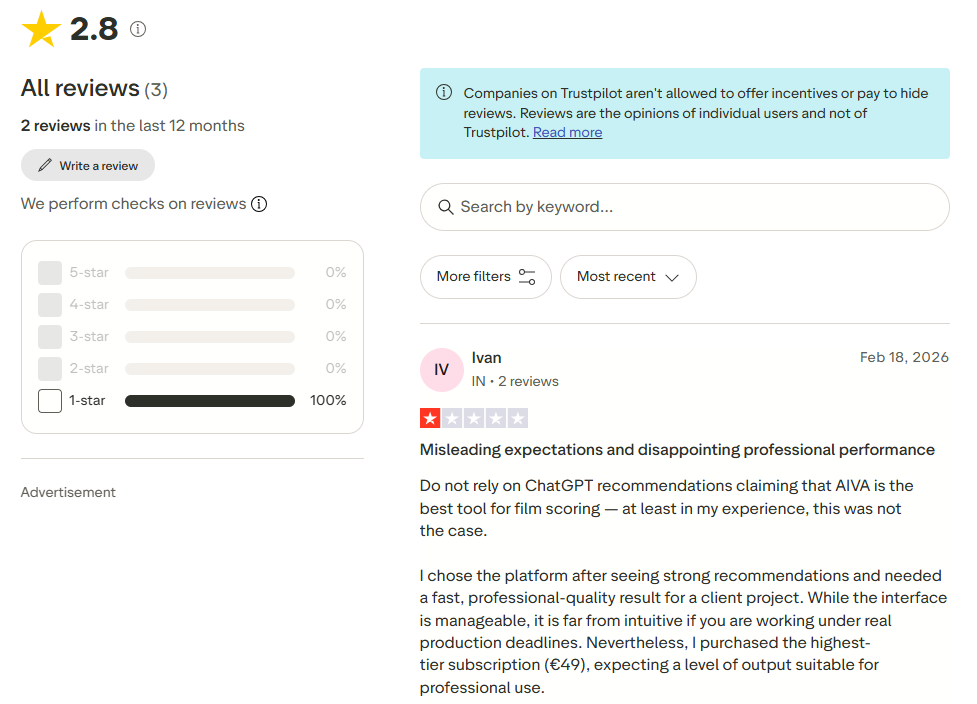
Image note: Trustpilot screenshot from Trustpilot’s public review page for aiva.ai. Used for editorial review commentary only; all trademarks, names, ratings, and review text belong to their owners.
How To Read AIVA Trustpilot Reviews
| Review Signal | What It Means |
|---|---|
| Small review sample | The data can show individual experiences, but not a broad user consensus |
| Public complaints or praise | Useful for spotting possible issues to test yourself |
| TrustScore | A quick reputation signal, but not a complete product review |
| Your own Free plan test | More reliable for judging whether AIVA fits your workflow |
What Users Should Test Themselves
| Test Area | Why It Matters |
|---|---|
| Music quality | Does the output fit your actual project? |
| Editing control | Can you refine the composition enough? |
| Licensing clarity | Do you understand what your plan allows? |
| Export options | Do you need MP3, MIDI, WAV, or all file formats? |
| Commercial use | Does the plan match your publishing or monetization use case? |
Trustpilot Takeaway
AIVA’s Trustpilot page can be useful as a light public review signal, but it should not be treated as the main basis for choosing AIVA. For this product, the more important decision is whether the generated music, editing workflow, export format, and license terms fit your real use case.
Does AIVA AI Generate Vocals?
AIVA AI is mainly known for instrumental AI composition, not vocal-first song generation. Users who want vocals, lyrics-to-song creation, or prompt-based song drafts may want to compare MusicSeed, Suno, or Udio.
This distinction matters because many people search for AI music generators expecting full songs with vocals. AIVA is more relevant when the project needs instrumental composition, background music, cinematic scoring, or editable composition drafts.
| Need | Better Workflow |
|---|---|
| Instrumental background music | AIVA |
| Cinematic or game music | AIVA |
| Lyrics-to-music generation | MusicSeed |
| Fast vocal AI songs | Suno |
| Creative song direction testing | Udio |
| Stem separation or vocal removal | LALAL.AI / Moises |
Does AIVA AI Fit YouTube, Games, Or Client Work?
AIVA AI can fit YouTube, games, client videos, and brand projects, but the plan matters. The same instrumental track can have different usage limits depending on whether it was created under Free, Standard, or Pro.
This is why AIVA is not only a music generation decision. It is also a license decision.
| Use Case | Fit | What To Check |
|---|---|---|
| YouTube background music | Good, depending on plan | Monetization rules |
| Game background music | Strong | Distribution and ownership needs |
| Client video | Good with the right plan | Copyright ownership and commercial use |
| Meditation or ambient tracks | Good | Export format and license |
| Corporate video music | Good with proper license | Commercial rights |
| Student composition practice | Good | Credit and non-commercial rules |
| Spotify or streaming release | Use caution | Ownership and distribution rights |
AIVA is strongest when the user needs instrumental music with some level of composition control. It is less suitable when the user wants original vocal songs from lyrics or a fast social-song workflow.
Best AIVA AI Alternatives by Workflow
AIVA AI should be compared by workflow, not by ranking every AI music tool as better or worse. AIVA fits instrumental composition and licensing-aware use cases. MusicSeed fits lyrics-to-music and prompt-to-song workflows. Suno and Udio fit different types of AI song generation.
This workflow-first comparison keeps the review neutral and helps users choose based on what they actually want to create.
| Workflow | Tool That Fits | Why |
|---|---|---|
| Instrumental composition with licensing control | AIVA | Strong fit for composition and copyright-tier decisions |
| Lyrics-to-music or prompt-to-song workflow | MusicSeed | More direct for creating song drafts from ideas |
| Fast AI songs with vocals | Suno | Designed for quick vocal song generation |
| Experimental style exploration | Udio | Useful for testing creative directions |
| Royalty-free background music | Soundraw / Mubert | Often used for content background tracks |
| Recording and editing | BandLab | Better for manual creation and production |
| Stem separation or vocal removal | LALAL.AI / Moises | Better for working with existing audio |
AIVA AI Pros and Cons
AIVA AI has clear strengths for instrumental composition, background music, and licensing-aware workflows. Its limitations are mostly related to vocal-first music, plan-based copyright rules, and the need to edit outputs for polished professional use.
| Pros | Cons |
|---|---|
| Strong instrumental composition workflow | Not mainly vocal-first song generation |
| Clear plan-based licensing structure | Copyright ownership depends on plan |
| Useful for cinematic, game, and background music | Free plan is non-commercial |
| Supports MIDI/audio influence | Standard monetization is limited |
| Pro plan gives broader copyright ownership | Pricing may feel high for casual users |
| More control than simple prompt-only tools | Output may still need editing for professional use |
Final Verdict
AIVA AI is worth trying if you need instrumental composition, cinematic background music, game music, or editable AI-generated tracks. Its biggest advantage is that it combines composition features with a clear plan-based licensing model.
However, users should choose the plan carefully. Free may be enough for testing and non-commercial ideas. Standard may fit limited creator monetization. Pro is the more relevant option when copyright ownership, broader commercial use, and high-quality exports matter.
If your goal is instrumental composition and licensing control, AIVA is directly relevant. If your goal is to create new music from lyrics, prompts, or song ideas, MusicSeed may fit that workflow more naturally.

