People searching for Kits AI review usually want to know: does it sound realistic, is it worth paying for, and can you use the vocals in real projects?
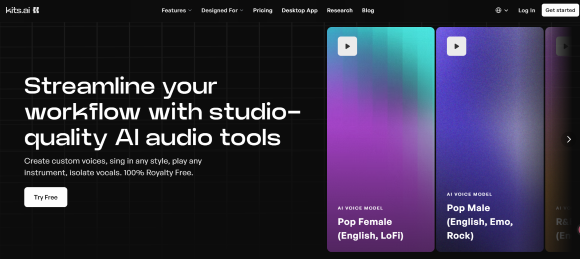
Kits AI (also written as kits.ai or app.kits.ai) is not a full AI song generator like Suno or Udio. It focuses on AI vocal workflows, including voice cloning, singing voice conversion, vocal demos, vocal remover, stem splitting, and basic audio tools.
It’s best for producers, songwriters, and creators who already work with vocals. If your workflow starts with vocals or voice models, Kits AI can help. If you want full songs from lyrics or prompts, tools like MusicSeed may be more suitable.
This review covers what Kits AI does, pricing, user feedback, voice quality, key limitations, and the best alternatives.
Quick Verdict And Kits AI Overview
Kits AI is worth trying if you need AI voice cloning, vocal demos, AI singing voice conversion, or vocal workflow tools. It works best for users who want to test vocal ideas quickly without recording a full polished performance.
However, Kits AI is not ideal if you want full songs from text prompts, a simple lyrics-to-music workflow, or ready-to-release tracks without editing. Voice quality can vary, source audio matters, download limits can affect real projects, and commercial rights should be checked before public or paid use.
If your goal is to turn lyrics, prompts, or song ideas into complete music drafts, MusicSeed may be a better fit. If your goal is voice cloning, AI singing voice conversion, or vocal workflow support, Kits AI is more directly relevant.
Quick Verdict
| Question | Answer |
|---|---|
| Is Kits AI worth trying? | Yes, if your workflow is focused on AI vocals, voice cloning, or vocal conversion. |
| Is Kits AI a full song generator? | No. It is more focused on vocal and audio workflows. |
| Best for | Producers, songwriters, vocal demo makers, AI vocal experiments |
| Not ideal for | Users who want full songs from lyrics or prompts |
| Best alternative for full song drafts | MusicSeed |
| Main caution | Check voice consent, download limits, and commercial rights before publishing |
Key Facts
| Item | Details |
| Type | AI vocal and audio tool |
| Brand variants | Kits AI, kits ai, kits.ai, Kits.ai, app.kits.ai |
| Main features | Voice cloning, vocal conversion, AI singing voices, vocal remover, stem splitter, mastering |
| Best for | Producers, songwriters, vocal demos, AI vocal experiments |
| Main strength | AI vocal workflow and custom voice creation |
| Main limitation | Not a full song generator; output quality, downloads, consent, and rights need checking |
| Skill level | Beginner to intermediate |
What Kits AI Does
| Use Case | What It Means |
| Voice cloning | Create or test custom AI voice models from vocal material |
| AI singing voice conversion | Convert vocal input into a different AI vocal tone or model |
| Vocal demos | Build reference vocals for songwriting and production |
| Vocal remover | Separate vocals from a mixed track |
| Stem splitter | Split existing audio into parts for practice, remixing, or preparation |
| Mastering tools | Improve rough audio previews or demos |
| Vocal repair | Clean or improve certain vocal recordings |
| Harmony and layers | Test vocal stacks, harmonies, or backing ideas |
Rating Summary
| Rating Item | Score |
| Overall Rating | ⭐⭐⭐⭐☆ 4.0/5 |
| Voice Cloning | 4.2/5 |
| AI Singing Voice | 4.1/5 |
| Vocal Conversion | 4.2/5 |
| Audio Tool Variety | 4.3/5 |
| Ease of Use | 4.2/5 |
| Pricing Value | 3.8/5 |
| Commercial Clarity | 3.7/5 |
| Support And Billing Confidence | 3.2/5 |
| Full Song Creation | 3.1/5 |
How We Reviewed Kits AI
This review evaluates Kits AI based on official product information, pricing details, terms and rights information, public user feedback, common vocal workflows, and comparisons with tools like MusicSeed, Suno, Udio, Moises, BandLab, Soundraw, and ElevenLabs.
We do not treat Kits AI as a complete replacement for a vocalist, producer, vocal engineer, DAW, or legal rights review. Instead, we evaluate it as a tool for AI voice cloning, AI singing voice experiments, vocal demos, audio preparation, and music workflow support.
Kits AI Pricing, Voice Slots And Download Limits
Kits AI pricing should be judged by workflow limits, not only by monthly cost. For vocal tools, custom voice slots, conversion minutes, download minutes, cloning access, audio tool access, and commercial rights can matter more than the headline price.
A casual user may only need to test a few voice conversions. A producer or creator working on real projects may need more downloads, more voice models, better cloning access, and clearer rights.
Pricing Snapshot
Pricing can change, so users should always check the live Kits AI pricing page before subscribing. At the time of review, the visible plan structure included these monthly and annual billed-yearly options:
| Plan | Monthly Price | Annual Billed-Yearly Price | Conversion Minutes | Voice Slots | Download Minutes | Best For |
| Free | $0/month | $0/month | 15 conversion minutes | 0 voice slots shown on plan card | 0 download minutes | First tests and basic exploration |
| Starter | $10/month | $8/month billed yearly | Unlimited conversions | 2 voice slots | 15 download minutes | Light vocal workflows and early testing |
| Producer | $30/month | $16/month billed yearly | Unlimited conversions | Unlimited voice slots | 60 download minutes | Active musicians and regular creators |
| Professional | $60/month | $40/month billed yearly | Unlimited conversions | Unlimited voice slots | Unlimited download minutes | Heavier production workflows |
The annual pricing display may show a discount label, but the actual discount differs by plan. For this reason, it is safer to mention the annual billed-yearly price rather than claiming one fixed discount for every plan.
Plan Feature Snapshot
| Plan | Visible Feature Highlights |
| Free | Voice designer/blender, Kits generative vocals |
| Starter | Everything on Free, professional voice cloning, advanced settings, choir tool |
| Producer | Everything on Starter |
| Professional | Everything on Producer |
Pricing Factors That Matter
| Pricing Factor | Why It Matters |
| Custom voice slots | Determines how many voice models users can create or keep |
| Conversion minutes | Affects how much vocal audio users can process |
| Download minutes | Important if users need exported audio files for real projects |
| Voice cloning access | Some cloning workflows may depend on plan level |
| Audio tools suite | Vocal remover, stem splitter, mastering, repair tools, and harmony tools may affect workflow |
| Fair use rules | “Unlimited” usage may still be subject to platform fair use policies |
| Commercial rights | Important before releases, ads, client work, AI covers, or monetized videos |
Before You Pay For Kits AI
Before paying for Kits AI, users should check whether the platform supports their actual vocal workflow. A plan that looks affordable may still feel limited if download minutes, voice slots, or commercial rights do not match the user’s project needs.
| Check Before Paying | Why It Matters |
| Test your own vocal file first | Demo examples may not match your recording quality, voice type, or genre |
| Check download minutes | You need enough export time for real production work |
| Confirm voice cloning access | Some cloning features may depend on plan |
| Review commercial rights | Important for releases, ads, client projects, AI covers, games, and monetized content |
| Check cancellation and refund rules | Useful before choosing monthly or annual billing |
| Keep records of generated vocals | Helpful for client review, licensing checks, and distribution questions |
| Avoid cloning without consent | Voice cloning can create legal and ethical risk |
Pricing Verdict
Kits AI can be useful for testing vocal ideas, but paid-plan decisions should be based on how much audio you need to process, download, and use. A songwriter making occasional demos has different needs from a producer preparing client work or a creator planning public releases.
For any serious project, users should review current pricing, plan limits, commercial use terms, voice model rules, and download minutes before treating generated vocals as release-ready assets.
Kits AI Rights, Commercial Use And Voice Consent
Rights are one of the most important parts of any Kits AI review because AI vocals involve both output rights and input rights. It is not enough to ask whether the generated audio can be downloaded. Users also need to ask whether they had the right to upload the input audio or clone the voice in the first place.
What Users Should Understand
Kits AI rights are not only about the output. They also depend on what users put into the tool. If you upload copyrighted songs, unlicensed vocals, or a voice you do not have permission to use, the generated result may create legal or ethical risk.
This matters for:
- Commercial releases
- YouTube monetization
- Spotify distribution
- Client projects
- Ads and brand campaigns
- AI cover-style content
- Voice cloning of real people
- Vocal models based on third-party recordings
Practical Rights Checklist
| Rights Question | Why It Matters |
| Do you own the input vocal? | You should not upload or clone voices you have no right to use |
| Do you have consent from the speaker or singer? | Voice cloning without permission can create legal and ethical concerns |
| Are you using royalty-free Kits voices or custom voices? | Different model types may have different rules |
| Can the output be used commercially? | Commercial use may depend on the model, plan, and terms |
| Are you using a copyrighted song? | AI cover workflows still need song copyright review |
| Can you prove your workflow? | Records may help with clients, distributors, or rights checks |
AI Covers And Consent
Kits AI can be relevant for AI cover-style workflows, especially when users want to experiment with vocal tone, melody delivery, or private cover demos. However, this is also where rights and consent matter most.
Users should avoid cloning real artists, public figures, private individuals, or recognizable vocal identities without permission. Even if a tool can technically generate a voice, that does not automatically mean the output is safe to publish, monetize, or distribute.
For publishable covers, users should consider:
- The copyright of the song itself
- Rights to the vocal model
- Consent from the person whose voice is cloned
- Platform rules for AI-generated or AI-altered content
- Commercial use terms
- Distribution requirements
- Whether the result could mislead listeners
Commercial Use Verdict
Kits AI may be useful for commercial workflows, but users should not assume all outputs are automatically safe for public release. Before monetizing or distributing vocals, check current terms, model rules, input rights, voice consent, and platform policies.
What Real Users Say About Kits AI Reviews
Public reviews for Kits AI should be treated as a risk signal, not a complete picture of every user. Review platforms often attract frustrated users, and the visible sample may not represent the full customer base. Still, public Kits AI reviews are useful because they show what potential paid users should check before subscribing.
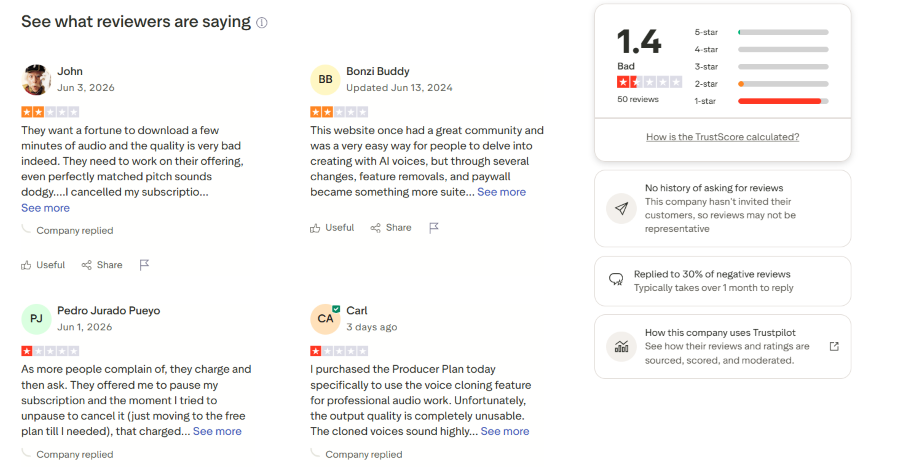
Image source: Trustpilot review page for Kits AI / app.kits.ai, accessed in June 2026. Screenshot used for review commentary and user feedback analysis.
In the visible Trustpilot screenshot, Kits AI shows a low public rating and a limited review sample. Several visible reviews mention issues such as high download cost, poor output quality, subscription cancellation problems, feature removals, paywall concerns, and voice cloning quality. One reviewer describes the voice cloning output as “completely unusable,” while another says that even matched pitch can sound “dodgy.”
These are individual user opinions, not a complete verdict on Kits AI. However, they highlight practical risks that users should test before paying: their own vocal file quality, download needs, voice cloning results, cancellation rules, and commercial use requirements.
User Feedback Patterns
| Feedback Theme | What Users Care About | Why It Matters |
|---|---|---|
| Voice quality | Whether cloned or converted vocals sound natural | Determines if vocals can be used beyond demos |
| Download cost | Whether users can export enough audio affordably | Important for real music projects |
| Billing and cancellation | Whether paid plans feel safe to try | Important before monthly or annual payment |
| Feature changes | Whether workflow stays stable over time | Important for returning users |
| Support response | Whether problems are solved quickly | Matters when billing, cloning, or downloads fail |
| Creative potential | Whether Kits AI helps with demos and experiments | Shows where the product may still be useful |
What Users May Like
| Positive Theme | Why It Matters |
| Useful AI vocal experiments | Helps creators test vocal directions quickly |
| Custom voice workflow | Useful for demo vocals, reference vocals, and voice model tests |
| Multiple audio tools | Vocal remover, stem splitter, mastering, and repair tools can support production |
| Faster vocal demo creation | Helps producers and songwriters move faster before hiring singers |
| AI cover-style testing | Useful for private drafts and concept exploration when rights are handled carefully |
Common Complaints To Watch
| Common Complaint | User Impact |
| Voice output may sound artificial | Results may not be ready for release without editing |
| Source audio affects quality | Poor recordings can lead to poor conversions |
| Billing or cancellation concerns | Users may hesitate before choosing paid plans |
| Download limits may matter | Users may not be able to export enough audio for real projects |
| Support may not meet expectations | Problems can be frustrating if users need urgent fixes |
| Rights may feel unclear | Commercial users need confidence before publishing |
What This Means For New Users
Kits AI is worth testing with your own vocal material before paying for a longer plan. Public feedback suggests that it can be useful for creative vocal work, but users should not assume that every voice clone, AI singing voice, or vocal conversion will sound natural enough for release.
A safer approach is to test one real workflow first: upload your own vocal, try a voice model, review the output, check download access, and confirm rights before using the result publicly.
Kits AI Voice Cloning And Singing Voice Review
Kits AI voice cloning is the core reason many users consider the platform. It can be useful for vocal demos, reference vocals, backing vocal ideas, harmony concepts, podcast-style voice tests, and AI cover-style experiments. However, voice cloning is also where quality, consent, and rights matter most.
What Works Well
Kits AI voice cloning can be helpful when users need to hear a vocal idea quickly without booking a singer or recording a polished performance. It may help producers and songwriters test melody, delivery, vocal tone, and arrangement direction at an early stage.
Useful situations include:
- Creating demo vocals for songwriting
- Testing how a melody might sound with another vocal tone
- Building reference vocals before a studio session
- Trying backing vocal or harmony ideas
- Exploring voice model concepts for private drafts
- Preparing rough vocal directions for collaborators
Best Input Audio For Kits AI Voice Cloning
| Input Factor | Recommended |
| Recording type | Clean, dry vocal |
| Background noise | As little as possible |
| Reverb | Avoid heavy reverb |
| Music under vocal | Avoid mixed full-track vocals when possible |
| Pronunciation | Clear and consistent |
| Pitch | Stable and natural |
| Length | Enough clean vocal material for the selected cloning method |
| Rights | Use only voices you own or have permission to use |
What Affects Voice Cloning Quality
| Voice Cloning Factor | Why It Affects Quality |
| Audio length | More suitable source material can help the model learn the voice better |
| Recording cleanliness | Noise, reverb, and background music can reduce clarity |
| Dry vocal quality | Clean vocals are usually easier to model than mixed or processed vocals |
| Pronunciation | Unclear words may create artifacts |
| Pitch stability | Out-of-tune input can affect converted vocals |
| Genre difficulty | Fast rap, aggressive vocals, or high notes may expose AI artifacts |
| Emotional delivery | AI vocals may not fully match human expression |
| Rights and consent | A realistic clone still needs permission and legal review |
Instant vs Professional Voice Cloning
Kits AI may offer different cloning workflows depending on the plan. Instant voice cloning is more useful for quick testing, while professional cloning is more relevant for users who want higher-quality custom voice models and are willing to prepare more source material.
For serious workflows, users should think less about speed and more about data quality, voice permission, project purpose, and final editing needs.
AI Singing Voice And Vocal Conversion
Kits AI can be useful for turning vocal input into different vocal styles or AI voices. This helps users hear how a melody or lyric might sound with another tone, range, or delivery style.
This workflow is useful for:
- Testing a topline with a different vocal color
- Trying male, female, bright, dark, soft, raw, or polished vocal directions
- Creating demo vocals for song pitches
- Comparing how the same melody works across styles
- Exploring vocal tones before recording a real vocalist
However, the result still depends heavily on source audio, pitch, timing, pronunciation, and model quality. If the input vocal is unclear, out of tune, noisy, or poorly timed, the output may also feel weak.
Vocal Remover, Stem Splitter And Mastering Tools
Kits AI also offers audio tools that can support a broader production workflow. These tools are useful when users need to isolate vocals, separate stems, repair audio, or prepare files before further editing.
| Tool Type | How It Helps |
| Vocal remover | Helps separate vocals from instrumentals for practice, remixing, or demo preparation |
| Stem splitter | Useful for separating parts of existing audio |
| Mastering | Helps polish audio for rough demos or previews |
| Vocal repair | Can help improve certain vocal recordings |
| Harmony tools | Useful for testing vocal layers and backing parts |
These tools make Kits AI more than a simple AI voice changer. Still, producers should not expect them to replace professional mixing, mastering, or manual editing in every case.
Voice And Audio Workflow Verdict
Kits AI is strongest when the project already involves vocals or audio files. It can support vocal demos, conversion, cleanup, and preparation. It is less useful when the user wants to generate a complete song directly from a text prompt.
How To Use Kits AI For Voice Cloning And AI Vocals
This section gives a simple workflow for users who want to understand how Kits AI voice cloning or vocal conversion usually fits into music production. The exact interface may change over time, but the practical process is generally similar.
Step 1: Choose A Vocal Workflow
Decide whether you want voice cloning, AI singing voice conversion, vocal removal, stem splitting, mastering, or another audio workflow.
For example, a songwriter may want to test a demo vocal, while a producer may want to convert a guide vocal into a different tone. A creator making an AI cover-style draft should think carefully about consent and rights before starting.
Step 2: Prepare Clean Vocal Audio
Use the cleanest vocal file possible. Background noise, poor microphone quality, heavy reverb, unclear pronunciation, or weak timing can affect the result.
A clean dry vocal is usually easier for AI tools to process than a noisy phone recording or a vocal mixed into a full track.
Step 3: Select Or Create A Voice Model
Choose an available AI voice or create a custom voice model if your plan supports it. If you are creating a custom voice, make sure you have the right to use the voice and that the training material is appropriate for your intended use.
Avoid cloning a voice without permission.
Step 4: Convert, Preview And Adjust
Generate the vocal output, then check tone, timing, pronunciation, pitch handling, artifacts, and emotional delivery. If the output sounds robotic or unnatural, try improving the input audio, changing the voice model, simplifying the vocal phrase, or testing another style.
Do not judge the tool from one generation only. AI vocal workflows often need several attempts.
Step 5: Download Only After Checking Rights
Before exporting or publishing, check download minutes, commercial use rules, source audio ownership, voice consent, and project requirements. This is especially important for Spotify releases, YouTube monetization, client projects, ads, games, podcasts, and AI cover-style content.
How-To Summary
Kits AI can make vocal experimentation faster, but the best results usually come from clean input audio, realistic expectations, careful voice model selection, and a clear understanding of rights before release.
Kits AI vs MusicSeed, Suno And Udio
Kits AI should not be judged as if it were the same type of tool as MusicSeed, Suno, or Udio. The better question is not “which one is best overall?” but “what does your workflow start with?”
If your workflow starts with vocals, Kits AI may fit. If it starts with lyrics, prompts, or a full song idea, MusicSeed, Suno, or Udio may be more relevant.
Workflow Comparison
| User Workflow | Better Choice | Why |
| Starts with a vocal recording | Kits AI | Built for voice cloning and vocal conversion |
| Starts with a voice model | Kits AI | Better for AI vocals and singing voice workflows |
| Starts with lyrics | MusicSeed | More direct lyrics-to-music workflow |
| Starts with a song idea or prompt | MusicSeed / Suno | Better for generating complete music drafts |
| Starts with style exploration | Udio | Better for testing creative directions |
| Starts with fast full song generation | Suno | Faster prompt-to-song workflow |
| Starts with existing audio stems | Moises | Better for stem separation and practice |
| Starts with recording and editing | BandLab | Better broader workspace |
Decision Summary
Kits AI is strongest when the workflow starts with vocals. MusicSeed is stronger when the workflow starts with lyrics, prompts, or song ideas. Suno is stronger when the user wants fast full-song generation. Udio is stronger when the user wants creative style exploration.
Simple Rule
Use Kits AI for vocals.
Use MusicSeed for complete song drafts from lyrics or prompts.
Use Suno for fast AI songs.
Use Udio for style exploration.
Pros And Cons
| Pros | Cons |
| Strong focus on AI vocals | Not a full song generator |
| Useful for voice cloning and vocal conversion | Output realism may vary |
| Helpful for producers and songwriters | Rights and consent require attention |
| Offers multiple audio tools | Download limits may matter |
| Useful for demos and reference vocals | Paid plans may be needed quickly |
| Can speed up vocal workflows | Support and billing feedback should be checked |
| Relevant for AI cover-style drafts | Public release requires extra rights review |
| Helpful for vocal cleanup and separation | Professional polish may still need manual work |
Pros And Cons Summary
Kits AI can be valuable for vocal-first workflows, but it is not a complete replacement for songwriting, arrangement, recording, editing, mixing, mastering, or rights review.
Best Kits AI Alternatives
The best Kits AI alternative depends on what the user actually needs. Some users want full music drafts from lyrics or prompts. Others want AI voiceover, stem separation, recording tools, or background music.
1. MusicSeed
MusicSeed is not a direct voice cloning replacement for Kits AI. It is a better alternative if your goal is to turn lyrics, prompts, or song ideas into complete music drafts.
Best for:
- Text-to-music
- Lyrics-to-music
- Song idea generation
- Short video creators
- Beginner-friendly music creation
- Users who want a guided music workflow
Compared with Kits AI, MusicSeed fits users whose workflow starts with a song idea rather than a vocal recording.
2. Suno
Suno is a strong choice if you want fast full AI songs from prompts.
Best for:
- Full song generation
- Viral song ideas
- Fast demos
- Prompt-to-song creation
- Social media music
Compared with Kits AI, Suno is more focused on complete songs than vocal conversion.
3. Udio
Udio is useful for creative style exploration and experimental AI music drafts.
Best for:
- Genre testing
- Style variation
- Creative AI music exploration
- Song draft experiments
Compared with Kits AI, Udio is better for exploring musical directions, while Kits AI is more vocal-focused.
4. Moises
Moises is better for users who work with existing audio and need separation or practice tools.
Best for:
- Stem separation
- Vocal removal
- Music practice
- Remix preparation
- Audio utility workflows
Compared with Kits AI, Moises is less focused on voice cloning and more focused on audio separation.
5. BandLab
BandLab is better for users who want recording, editing, loops, collaboration, and a broader creative workspace.
Best for:
- Recording vocals
- Editing tracks
- Mobile music creation
- Collaboration
- Manual production
Compared with Kits AI, BandLab gives more traditional music-making tools.
6. ElevenLabs
ElevenLabs may be more relevant if the user needs spoken voice, narration, voiceover, dubbing, or text-to-speech rather than singing voice conversion.
Best for:
- Voiceover
- Narration
- Dubbing
- Spoken voice generation
- Content production
Compared with Kits AI, ElevenLabs is more speech-focused, while Kits AI is more music-vocal-focused.
Final Alternative Table
| Need | Best Alternative |
| Full music drafts from lyrics or prompts | MusicSeed |
| Fast full AI songs | Suno |
| Creative style exploration | Udio |
| Stem separation and practice | Moises |
| Recording and editing | BandLab |
| Voiceover or narration voices | ElevenLabs |
| Background music | Soundraw |
| AI vocal cloning and singing voice workflows | Kits AI |
Use Cases And Who Kits AI Is For
Kits AI works best for users who need help with vocals, voice models, vocal conversion, or audio preparation. It is less useful for users who want to generate a full song from scratch.
Best Use Cases
| Use Case | Why Kits AI Fits |
| Demo vocals | Helps test vocal ideas without booking a singer |
| AI singing voice experiments | Useful for trying different vocal tones |
| Voice cloning tests | Helps users create or test custom vocal models |
| AI cover-style drafts | Can help explore cover concepts, with rights caution |
| Producer reference tracks | Helps build vocal references for collaborators |
| Vocal cleanup and separation | Useful for preparing audio |
| Harmony ideas | Helps test vocal layers and backing parts |
Best For
| User Type | Why It Fits |
| Producers | Useful for vocal references and fast demo workflows |
| Songwriters | Helps hear lyric and melody ideas with different vocal tones |
| AI cover creators | Useful for private drafts and concepts, with rights caution |
| Vocal demo makers | Helps create reference vocals quickly |
| Content creators | Useful for creative audio experiments |
| Musicians | Helpful for testing vocal directions before recording |
Not Ideal For
| User Type | Why It May Not Fit |
| Users who want full songs from text | Kits AI is not mainly a full song generator |
| Users who need simple lyrics-to-music | MusicSeed may be more direct |
| Users who need guaranteed commercial clarity | Terms and voice rights should be reviewed carefully |
| Users without permission to clone a voice | Consent is essential |
| Users expecting release-ready vocals every time | Output quality may vary |
| Users who need full production tools | A DAW or recording workspace may still be needed |
Why People Look For Kits AI Alternatives
People do not look for Kits AI alternatives only because Kits AI is weak. They often look for alternatives because they need a different workflow.
| Reason | What Users May Need |
| Need full song generation | MusicSeed, Suno, or Udio |
| Need simpler lyrics-to-music | MusicSeed |
| Need better stem separation | Moises or LALAL.AI |
| Need voiceover instead of singing | ElevenLabs |
| Need recording and editing | BandLab |
| Need clearer commercial workflow | Tools with simpler licensing |
| Need lower-cost workflow | Depends on usage and download needs |
| Need background music | Soundraw or similar background music tools |
Kits AI is useful when the task is voice-based. If the task is creating complete music from lyrics, prompts, or song ideas, MusicSeed may be a better fit.
Conclusion
Kits AI is worth trying if your workflow is centered on AI vocals, voice cloning, singing voice conversion, and music production audio tools. It is especially relevant for producers, songwriters, vocal demo makers, AI cover-style creators, and musicians who want to test vocal ideas quickly.
However, Kits AI is not the best choice if you want a full song generator, a simple lyrics-to-music workflow, or a tool where every output is immediately release-ready. Voice quality can vary, input quality matters, download limits may affect real workflows, and users should carefully check consent, commercial rights, pricing, and current terms before using generated vocals in public or paid projects.

