People searching for Moises AI review usually want a practical answer: can Moises.ai remove vocals cleanly, separate stems accurately, help musicians practice songs, and is the free plan or paid plan worth using?
Moises AI, also searched as Moises, moises ai, Moises.ai, moises.ai, and the Moises app, is not mainly a text-to-song generator. It is better understood as an AI-powered music practice and audio separation tool for working with existing songs.
This Moises AI review covers pricing, vocal remover quality, stem separation, practice tools, user feedback, rights considerations, pros and cons, and the best Moises alternatives.
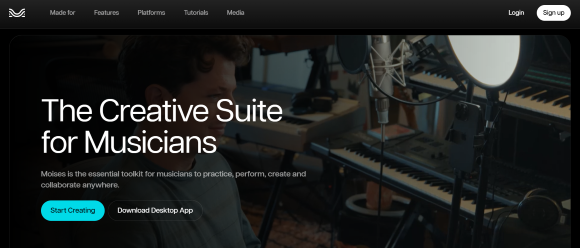
Quick Verdict And Moises AI Overview
Moises AI is worth trying if you need vocal removal, stem separation, backing tracks, chord detection, pitch control, tempo control, or music practice tools. It is especially useful for musicians who want to learn, rehearse, remix, or analyze existing songs.
However, Moises AI may not be the right fit if you want to generate original full songs from text prompts, create lyrics-to-music drafts, or get studio-perfect stems from every track. Stem separation quality depends on the source audio, mix density, instruments, reverb, and how the original song was produced.
| Question | Answer |
|---|---|
| Is Moises AI worth trying? | Yes, if you need vocal removal, stem separation, or practice tools. |
| Is Moises AI a song generator? | No. It mainly works with existing audio. |
| Best for | Singers, musicians, producers, teachers, students, cover creators |
| Not ideal for | Users who want full songs from lyrics or prompts |
| Best fit for creating new music | MusicSeed |
| Main caution | Check free-plan limits, export needs, copyright, and usage rights before using stems publicly. |
Key Facts
| Item | Details |
|---|---|
| Type | AI music practice and audio separation tool |
| Brand variants | Moises AI, Moises, moises ai, Moises.ai, moises.ai, Moises app |
| Main features | Vocal remover, stem separation, chord detection, speed control, pitch changer, smart metronome |
| Best for | Singers, instrumentalists, producers, music teachers, students, cover creators |
| Main strength | Working with existing songs for practice and stem separation |
| Main limitation | Not a full AI song generator; separation quality varies by source audio |
Rating Summary
| Rating Item | Score |
|---|---|
| Overall Rating | ⭐⭐⭐⭐☆ 4.1/5 |
| Vocal Remover | 4.3/5 |
| Stem Separation | 4.2/5 |
| Practice Tools | 4.5/5 |
| Ease of Use | 4.4/5 |
| Musician Workflow | 4.6/5 |
| Pricing Value | 3.8/5 |
| Commercial Clarity | 3.5/5 |
| Full Song Generation | 2.5/5 |
Moises AI Alternatives Quick Picks
Moises AI alternatives should be chosen by workflow, not by brand name alone. Some users need stem separation, while others need recording, editing, or new music generation from lyrics and prompts.
This quick table gives users a fast way to decide whether Moises fits their need or whether another tool is worth comparing first.
| Need | Tool That Fits |
|---|---|
| Create new music from lyrics or prompts | MusicSeed |
| Focused stem separation | LALAL.AI |
| Recording and editing | BandLab |
| Fast AI-generated songs | Suno |
| Creative AI music exploration | Udio |
| Free or technical vocal removal | VocalRemover.org / UVR |
| Music practice with stems, chords, tempo, and pitch | Moises AI |
This does not mean these tools replace Moises in every use case. Moises is strongest for existing-audio workflows, while MusicSeed, Suno, and Udio fit users who want to generate new music ideas.
Moises AI Pricing, Free Plan And Upload Limits
Moises AI pricing should be judged by workflow limits, not only by monthly cost. Users should compare monthly billing, annual billing, AI audio separation limits, stem types, export limits, AI generation credits, audio length, practice tools, and advanced production features.
Based on the visible Moises pricing page reviewed in June 2026, Moises offers Free, Premium, and Pro plans with both monthly and annual billing options. Annual prices are shown as monthly equivalents, but users are billed yearly.
Prices and plan details may change, so users should always check the live Moises pricing page before subscribing.
Moises AI Monthly vs Annual Pricing
| Plan | Monthly Billing | Annual Billing | Best For |
|---|---|---|---|
| Free | $0/month | $0/month | First tests and limited use of core features |
| Premium | $4.89/month | $2.91/month, billed yearly | Musicians who need regular stem separation, practice tools, and more export flexibility |
| Pro | $24.49/month | $14.58/month, billed yearly | Advanced creators who need Hi-Fi separation, Voice Studio, VST plugins, and heavier workflow features |
Moises AI Plan Comparison
| Plan | Key Limits And Features | Practical Meaning |
|---|---|---|
| Free | 5 AI audio separations per month, 5-minute audio separation limit, 10 AI generation credits per month, 1-minute export limit, pitch and BPM detection | Useful for testing Moises AI, but limited for regular practice or production |
| Premium | Unlimited audio separation, more instruments and vocals, 20-minute audio separation, 200 AI generation credits per month, unlimited export time, advanced AI chords, unlimited AI metronome, reference mastering processing | Better for regular musicians, singers, students, and teachers who use Moises often |
| Pro | Everything in Premium, Hi-Fi AI separation mode, custom multitrack separation, unlimited AI generation credits, advanced creative controls, 10 simultaneous generations, AI mixing, WAV export, Voice Studio, advanced AI stem processing, VST plugins | More suitable for advanced creators, producers, and heavier music production workflows |
Which Moises Plan Should You Choose?
| User Need | Suggested Plan |
|---|---|
| Test vocal removal once or twice | Free |
| Try Moises AI before paying | Free |
| Practice songs every week | Premium |
| Remove vocals and export full practice tracks | Premium |
| Need more stem types and longer audio separation | Premium |
| Need Hi-Fi separation or WAV export | Pro |
| Need Voice Studio, VST plugins, or advanced stem processing | Pro |
Pricing Verdict
Moises AI can be worth paying for if you regularly practice, teach, create backing tracks, or need stem separation across many songs. The Free plan is useful for first tests, but users who practice often may reach its limits quickly.
Premium may suit regular musicians who need unlimited audio separation, more stem types, longer audio processing, and unlimited export time. Pro may suit advanced creators who need Hi-Fi separation, lossless export, Voice Studio, advanced AI stem processing, and VST plugin workflows.
For users who only need one or two occasional vocal removals, the Free plan or a simple vocal remover may be enough.
Moises.ai Vocal Remover And Stem Separation Review
Moises.ai vocal remover is one of the main reasons users try the platform. It can help singers create backing tracks and help musicians isolate parts for practice, but results depend heavily on the original mix.
The best way to judge Moises is to test several of your own songs, not only one demo track. Dense mixes, heavy reverb, distorted guitars, layered vocals, and older masters may separate less cleanly.
What Works Well
Moises AI works well when users need to practice with existing songs. Singers can remove lead vocals and sing over the instrumental. Drummers can isolate or reduce drums. Bass players can focus on bass parts. Guitarists and pianists can combine stem separation with chord detection and tempo control.
Useful situations include:
- Removing vocals to create karaoke-style backing tracks
- Separating vocals, drums, bass, and other instruments for practice
- Slowing down difficult sections
- Changing key for vocal comfort
- Studying chord progressions
- Creating teaching materials
- Preparing remix or arrangement references
What Feels Limited
Stem separation quality depends on the source audio. Some songs may separate cleanly, while others may leave artifacts or bleed between stems.
Common limits include:
- Lead vocals may not disappear completely
- Backing vocals may remain in the instrumental
- Cymbals and reverb may bleed into other stems
- Guitars and pianos can be harder to separate cleanly
- Output may sound watery, phasey, metallic, or processed
- Professional remix or release workflows may need manual cleanup
Separation Quality Checklist
| Separation Test | What To Check |
|---|---|
| Vocal removal | Are lead vocals cleanly removed? |
| Instrumental export | Does the backing track still sound natural? |
| Drum separation | Are kick, snare, and cymbals clean enough? |
| Bass isolation | Is the bass stable without too much bleed? |
| Guitar or piano separation | Are harmonic instruments clear enough for practice? |
| Artifacts | Does the output sound watery, metallic, phasey, or unstable? |
Vocal Remover Verdict
Moises AI is useful for removing vocals and creating practice backing tracks. It is especially relevant for singers, cover creators, music students, and teachers. However, users should not expect every song to separate perfectly.
For private practice, Moises may be good enough for many users. For public release, commercial remixing, or client work, users should check output quality and rights much more carefully.
Moises App Practice Tools Review
The Moises app becomes more useful when stem separation is combined with practice tools. Chord detection, tempo control, pitch change, loops, and metronome features make it more musician-focused than a simple vocal remover.
This is where Moises has a clear workflow advantage for learning songs and preparing practice sessions.
Key Practice Features
| Practice Feature | Why It Matters |
|---|---|
| Chord detection | Helps guitarists, pianists, singers, and teachers learn songs faster |
| Smart metronome | Creates a practice click aligned with the song |
| Speed control | Helps users slow down difficult sections |
| Pitch change | Helps singers practice in a comfortable key |
| Stem player | Lets users mute or solo vocals, drums, bass, or other parts |
| Loop sections | Useful for repeating difficult phrases |
| BPM detection | Helps musicians understand tempo and timing |
Practice Tools Verdict
Moises AI is strongest when used as a musician practice app. The vocal remover is useful, but the combination of stems, chords, metronome, pitch, and speed tools is what makes Moises more useful than a basic online vocal remover for many musicians.
How To Use Moises AI To Remove Vocals
Moises AI is easiest to understand as a simple workflow: upload audio, choose a separation type, wait for processing, practice with stems and tools, then export only after checking rights.
This section is useful for users searching “how to use Moises AI” or “how to remove vocals with Moises.” The exact interface may change, but the practical workflow stays similar.
Step 1: Upload A Song Or Audio File
Start by uploading an audio file you have the right to use. Avoid DRM-protected, streaming-only, or unauthorized files. For best results, use a clear audio file with decent quality.
Step 2: Choose A Stem Separation Type
Select the separation type that matches your goal. If you only need a karaoke backing track, vocal removal may be enough. If you are practicing an instrument, choose a separation type that includes the stems you need, such as vocals, drums, bass, guitar, piano, or other instruments.
Step 3: Wait For AI Audio Separation
Moises processes the file and creates separated stems. Processing time can vary depending on file length, server load, and selected model.
After the separation is complete, listen carefully before assuming the output is usable. Some songs may separate cleanly, while others may have bleed or artifacts.
Step 4: Practice With Stems, Chords, Speed And Pitch
Use the stem player to mute or solo parts. Singers can remove lead vocals. Bass players can isolate bass. Guitarists and pianists can follow chords. Drummers can practice with or without drum stems.
You can also slow down difficult parts, loop sections, change key, or use the metronome to improve timing.
Step 5: Download Or Export After Checking Rights
Before downloading, sharing, or using stems publicly, check copyright and usage rights. Private practice is different from public release, monetized videos, commercial remixes, client work, or sample packs.
Moises.ai Rights And Fair Use
Moises.ai works with existing songs, so rights and usage rules matter. Separating a copyrighted song into vocals, drums, bass, or instrumentals does not automatically make the output safe for public or commercial use.
For private practice, risk is usually lower. For public uploads, client work, sample packs, monetized videos, or commercial release, users should review rights carefully.
Practical Rights Checklist
| Rights Question | Why It Matters |
|---|---|
| Do you own the uploaded song? | Existing songs may still be copyrighted |
| Is your use private practice or public release? | Practice and publication are different use cases |
| Are you downloading stems? | Exported stems may still carry copyright restrictions |
| Are you making karaoke or backing tracks? | Public sharing may need extra rights |
| Are you reusing stems as samples? | Sample packs, loops, and commercial reuse can create legal risk |
| Are you monetizing the result? | You may need additional permissions before commercial use |
Rights Verdict
Moises AI can be useful for music learning and practice, but users should not assume separated stems are automatically cleared for public or commercial use. If you plan to publish, monetize, sell, sample, or distribute output, review copyright and platform rules first.
What Real Users Say About Moises AI Reviews
Moises AI reviews should be read with balance. App store feedback often reflects musicians who use Moises for practice and learning, while Trustpilot reviews may highlight risk signals around subscriptions, support, feature changes, and output quality.
The goal is not to treat one review platform as the full truth, but to identify what users should test before paying.
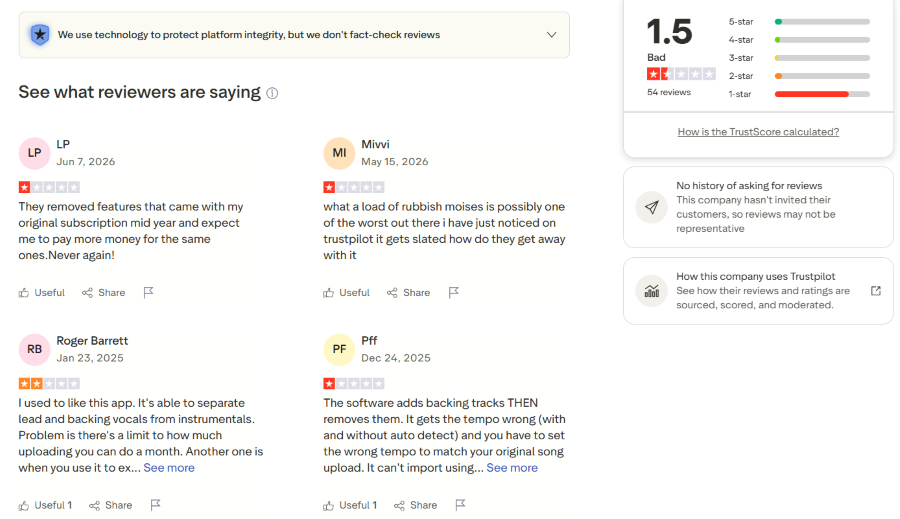
Source: Trustpilot review page for Moises.ai. Used for editorial review commentary only. All review content and trademarks belong to their respective owners.
In the visible Trustpilot screenshot, Moises.ai shows a low public rating and a limited review sample. Several visible reviews mention removed features, subscription concerns, upload limits, support frustration, tempo problems, and output quality issues. These are individual user opinions, not a complete verdict on Moises AI, but they highlight useful risks to test before paying.
User Feedback Patterns
| Feedback Source | What It Suggests | How To Use It |
|---|---|---|
| App store reviews | Many users discuss Moises as a practice, learning, stem separation, and musician workflow tool | Useful for understanding everyday practice value |
| Trustpilot reviews | Some users mention billing, subscription, feature changes, support, and output concerns | Useful as a risk signal before paying |
| Creator discussions | Musicians often compare Moises with free vocal removers and LALAL.AI | Useful for judging alternatives |
| Practical testing | Users should test their own songs before subscribing | Most reliable for personal decision-making |
For a fair decision, users should test Moises with at least two or three songs from their own practice or production workflow before choosing a paid plan.
Which Tool Fits Your Workflow?
Moises AI should be compared by workflow rather than by saying one tool is simply better than another. Moises fits users who already have a song to separate or practice. MusicSeed fits users who want to create new music from lyrics, prompts, or song ideas.
This workflow-first comparison keeps the review neutral and avoids unfair product comparisons.
| User Workflow | Tool That Fits | Why |
|---|---|---|
| Working with an existing song | Moises AI | Designed for stem separation, vocal removal, and practice |
| Removing vocals or creating backing tracks | Moises AI / LALAL.AI | Both are relevant audio separation workflows |
| Focused stem extraction | LALAL.AI | Focuses mainly on audio separation |
| Creating new music from lyrics | MusicSeed | Fits lyrics-to-music and text-to-music workflows |
| Creating music from prompts | MusicSeed / Suno | Fits users who want AI-generated song drafts |
| Recording and editing | BandLab | Offers a broader creation workspace |
| Fast prompt-to-song ideas | Suno | Designed for AI song generation from prompts |
| Style exploration | Udio | Useful for testing creative music directions |
| Song practice tools | Moises AI | Combines stems, chords, tempo, pitch, and metronome tools |
Simple Rule
- Use Moises AI for existing songs.
- Use MusicSeed for new songs from lyrics or prompts.
- Use LALAL.AI for focused stem extraction.
- Use BandLab for recording and editing.
- Use Suno for fast AI songs.
- Use Udio for style exploration.
Moises AI Pros And Cons
Moises AI has clear strengths for musicians, especially around stem separation and practice tools. Its main limits come from source-audio quality, free-plan restrictions, and copyright considerations.
This section summarizes the practical trade-offs before users choose a plan or compare alternatives.
| Pros | Cons |
|---|---|
| Strong for vocal removal and stem separation | Not a full AI song generator |
| Useful for musicians and practice | Separation quality varies by source audio |
| Includes chord detection and smart metronome | Free plan is limited |
| Helpful for creating backing tracks | Download and export needs should be checked |
| Useful for singers, guitarists, bassists, and drummers | Some stems may contain artifacts or bleed |
| More musician-focused than simple vocal remover tools | Copyright and fair-use rules still matter |
| Works for learning, rehearsal, and teaching prep | Paid plan may be needed for regular use |
Best Moises AI Alternatives
Moises AI alternatives are not all direct replacements. Some tools focus on stem separation, some focus on recording, and others focus on generating new music. The best alternative depends on whether the user starts with an existing song or a new idea.
For MusicSeed, the positioning should stay clear: it is not a Moises stem splitter replacement, but it fits users who want to create new music from lyrics or prompts.
1. MusicSeed
MusicSeed is not a direct replacement for Moises AI’s vocal remover or stem separation tools. It fits a different workflow: creating new music from lyrics, prompts, or song ideas.
MusicSeed and Moises solve different problems. Moises helps users work with existing songs, while MusicSeed helps users create new music ideas.
Best for:
- Text-to-music
- Lyrics-to-music
- Song idea generation
- Complete song drafts
2. LALAL.AI
LALAL.AI is a relevant option if the main goal is stem separation or vocal removal.
Best for:
- Stem separation
- Vocal remover
- Instrumental extraction
- Focused audio utility workflows
3. BandLab
BandLab fits users who want recording, editing, loops, collaboration, and a broader creation workspace.
Best for:
- Recording vocals
- Editing tracks
- Mobile music creation
- Collaboration
4. Suno
Suno fits users who want fast full AI songs from prompts.
Best for:
- Prompt-to-song generation
- Fast song ideas
- Social content songs
- Full AI music drafts
5. Udio
Udio is useful for creative AI music exploration and style testing.
Best for:
- Genre exploration
- Experimental song drafts
- Style variation
- AI music direction testing
6. VocalRemover.org Or UVR
Free or technical vocal removal tools may be useful for users who only need occasional separation and do not need Moises practice features.
Best for:
- Basic vocal removal
- Free separation tests
- Technical users
- Occasional audio utility tasks
Use Cases And Who Moises AI Is For
Moises AI is most useful for people who already work with songs: singers, guitarists, bass players, drummers, teachers, students, producers, and karaoke users. It helps them separate, slow down, transpose, and study music more easily.
It is less suitable for users who want original AI music generation without uploading existing audio.
Best Use Cases
| Use Case | Why Moises AI Fits |
|---|---|
| Karaoke-style backing tracks | Remove vocals and sing over the instrumental |
| Instrument practice | Mute or isolate drums, bass, guitar, or other parts |
| Song learning | Use chords, tempo, pitch, and loop tools |
| Music teaching | Prepare learning material for students |
| Cover preparation | Study arrangement and practice with stems |
| Remix prep | Extract reference stems for creative planning |
| Ear training | Focus on specific instruments and parts |
Not Ideal For
| User Type | Why It May Not Fit |
|---|---|
| Users who want full songs from prompts | Moises AI is not mainly a song generator |
| Users who need original music creation | MusicSeed or Suno may fit a different workflow |
| Users needing guaranteed studio-grade stems | Separation artifacts may remain |
| Users using copyrighted files publicly | Rights review is still needed |
| Users doing bulk commercial processing | Fair-use rules may apply |
Conclusion: Is Moises AI Worth It?
Moises AI is worth trying if you need vocal removal, stem separation, and practice tools for existing songs. It is especially useful when your goal is learning, rehearsal, teaching, or preparing backing tracks.
Moises AI is most relevant for singers, instrumentalists, music teachers, students, producers, and cover creators who work with existing songs. It may be less suitable if you want a full AI song generator, a lyrics-to-music workflow, or guaranteed studio-grade stems from every track.
If your goal is to separate and practice existing songs, Moises AI is directly relevant. If your goal is to create new music from lyrics, prompts, or song ideas, MusicSeed may fit that workflow more naturally.

