Mubert is often searched by creators who need royalty-free background music for videos, podcasts, apps, streams, ads, games, and social content. Instead of focusing mainly on vocal-first AI songs, Mubert is built around AI-generated soundtracks that can match a project’s mood, length, and style.
A useful Mubert review should not only ask whether the music sounds good. The bigger question is whether Mubert fits your actual publishing situation: personal content, monetized YouTube videos, podcasts, client work, branded projects, apps, games, or API-based products.
This Mubert Reviews 2026 guide covers Mubert pricing, licensing, commercial use, Render workflow, API access, Trustpilot feedback, pros and cons, creator use cases, and Mubert alternatives by workflow.
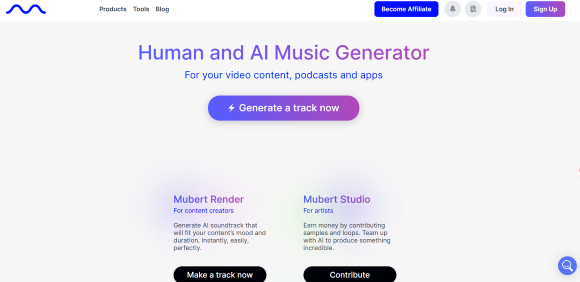
Mubert Review Quick Verdict
Mubert is worth considering if you need AI-generated background music for content projects. It is especially relevant for YouTubers, podcasters, short-form video creators, streamers, agencies, app builders, and teams that need royalty-free soundtrack generation.
It may be less suitable if your main goal is to generate vocal songs, turn lyrics into full songs, or create artist-style music drafts with lyrics and singing. For those workflows, tools such as MusicSeed, Suno, or Udio may fit different needs.
| Question | Practical Answer |
|---|---|
| Is Mubert worth trying? | Yes, if you need fast royalty-free AI background music. |
| What is Mubert best for? | Videos, podcasts, streams, ads, apps, games, and content soundtracks. |
| Is Mubert mainly a vocal song generator? | No. Mubert is more focused on background music and instrumental soundtracks. |
| Main strength | Fast soundtrack generation by mood, style, length, and content use case. |
| Main limitation | Licensing depends heavily on the selected plan and use case. |
| Best MusicSeed fit | Users who want lyrics-to-music, text-to-music, or song idea generation. |
Key Facts
| Item | Details |
|---|---|
| Product type | AI background music generator and royalty-free music tool |
| Brand and search variants | Mubert, Mubert AI, mubert.com, Mubert Render, Mubert API, Mubert AI music generator, Mubert royalty-free music |
| Main product workflow | Mubert Render |
| Business workflow | Mubert API |
| Best use cases | YouTube videos, podcasts, streams, social videos, ads, apps, games, client projects |
| Main decision factor | Pricing, licensing, commercial use, and project type |
| Less ideal for | Vocal-first songs, lyrics-to-music, detailed DAW-style production |
Editorial Rating Summary
These ratings are editorial estimates based on product positioning, pricing structure, licensing clarity, creator workflow fit, public user feedback, and comparison with adjacent AI music tools.
| Evaluation Area | Rating |
|---|---|
| Overall Rating | 4.1/5 |
| Ease of Use | 4.4/5 |
| Background Music Workflow | 4.5/5 |
| Creator Use Case Fit | 4.4/5 |
| Mood and Style Matching | 4.2/5 |
| Licensing Clarity | 3.8/5 |
| Pricing Value | 3.7/5 |
| API / Business Use | 4.3/5 |
| Vocal Song Generation Fit | 2.8/5 |
| Trustpilot Public Feedback | 2.8/5 |
Quick Answer:
Mubert is worth considering if you need royalty-free AI background music for videos, podcasts, streams, apps, games, or client projects. It is not the best fit for users who mainly want vocal songs, lyrics-to-music generation, or full AI song drafts.
- Best for: background music, content soundtracks, creator videos, podcasts, apps, games, and business integrations.
- Not ideal for: vocal songs, lyrics-to-music generation, or detailed song production.
- Main decision: choose the right plan based on non-commercial use, monetization, client work, apps, games, or API access.
Mubert Alternatives Quick Picks
Not every user reading Mubert reviews needs a direct replacement. Some users need a similar background music workflow, while others realize they actually need a song generator, a lyrics-to-music tool, a recording workspace, or an audio utility tool.
| If Your Real Need Is… | Better Direction to Compare | Why |
|---|---|---|
| Royalty-free background music | Mubert | Fits videos, podcasts, streams, apps, games, and content soundtracks |
| A song idea from lyrics or prompts | MusicSeed | Useful when the starting point is text, lyrics, or a simple song idea |
| Full AI songs with vocals | Suno / Udio | More relevant for vocal-first AI song generation and creative song drafts |
| Instrumental creator music with another workflow | Soundraw | Worth comparing for background music and content soundtrack needs |
| Recording, loops, and editing | BandLab | Better fit for users who want a broader manual music workspace |
| Stem separation or vocal removal | Moises / LALAL.AI | Better fit for working with existing audio rather than generating new background music |
This table is not a ranking. It is a workflow map. Mubert is closest to users who need background music for existing content, while other tools make more sense when the user wants to create a song, edit audio, separate stems, or build music manually.
Best Use Cases and Workflow Fit
Mubert is strongest when the user needs a soundtrack, not necessarily a full song. It is designed for creators and businesses that need music to support a video, podcast, stream, app, game, presentation, or branded content project.
| User Type | Why Mubert Fits |
|---|---|
| YouTube creators | Generate background music for videos and long-form content |
| TikTok / Reels creators | Create short-form music beds for social videos |
| Podcasters | Add intro, outro, or background music |
| Streamers | Use background sound for live content |
| Agencies | Create music options for client projects, depending on plan |
| App builders | Add generated music inside products through API access |
| Game developers | Create or integrate background music for game environments |
| Marketers | Generate soundtrack drafts for ads, campaigns, and branded videos |
When Mubert May Not Be the Best Fit
| User Need | What To Consider |
|---|---|
| Full vocal songs | Suno or Udio may fit vocal-first AI song workflows |
| Lyrics-to-music generation | MusicSeed may fit a guided lyrics or prompt-based workflow |
| Stem separation | Moises or LALAL.AI may fit existing-audio workflows |
| Manual recording and editing | BandLab may fit broader creator production needs |
| Standalone streaming releases | Check Mubert’s license limits before using tracks as standalone music releases |
| Content ID use | Check whether the license allows Content ID registration or similar claims |
Mubert is strongest as a content soundtrack workflow. It is less direct when the user wants to write lyrics, generate vocals, publish standalone songs, or control a full DAW-style production process.
Mubert Pricing, Plans and Licensing
Mubert pricing should be judged by usage rights, not only by monthly cost. The key question is whether you need music for non-commercial personal projects, monetized creator channels, client work, apps, games, or API-based product integration.
Based on the pricing screenshots reviewed, Mubert offers Ambassador, Creator, Pro, and Business subscription plans, plus separate API access for product teams. Mubert’s public pricing page currently shows the Render subscription area and includes plan pricing such as Creator at $14 monthly or $11.69/month when billed annually.
| Plan | Monthly Price | Annual Display | Best For | Usage Rights to Check |
|---|---|---|---|---|
| Ambassador | Free | Free | Testing Mubert with attribution | Attribution and limited use |
| Creator | $14/mo | $11.69/mo billed annually | Personal projects and non-monetized videos | Personal use, monetization limits, no ads/apps unless allowed |
| Pro | $39/mo | $32.49/mo billed annually | Monetized channels, YouTube, podcasts, and social content | Commercial and advertising use, with digital-use limits |
| Business | $199/mo | $149.29/mo billed annually | Client work, agencies, apps, and games | Broader commercial or custom business use |
| API Access | Custom / separate access | Custom / separate access | Products, platforms, apps, games, and automation | Custom terms, usage volume, and integration limits |
Annual prices are shown as monthly equivalents in the screenshot, but users should confirm whether they are billed annually before subscribing.
Mubert also shows a Perpetual License tab in the provided screenshot. Because the screenshot does not show full perpetual license details, this review does not compare perpetual license pricing in depth.
Plan Details
| Plan | Included Based on Screenshot | What It Means |
|---|---|---|
| Ambassador | 25 generations/month, 5 MP3 downloads/month, fixed track duration, attribution required | Useful for testing, but limited |
| Creator | 500 generations/month, unlimited downloads, no daily limit, custom track duration, WAV + MP3 exports, no audible watermark | Better for personal creator use, but license limits still need checking |
| Pro | 500 generations/month, unlimited downloads, no daily limit, limited commercial use, monetization, WAV + MP3 exports | More relevant for monetized channels and commercial creator workflows |
| Business | 1,000 generations/month, unlimited downloads, commercial use, monetization, client / agency use, apps and games | More relevant for client work and broader commercial use |
| API Access | Separate team contact / custom access | More relevant for product builders, apps, platforms, games, and automation |
Mubert’s subscription agreement adds important nuance: the Creator License allows certain personal-use derivative works and monetization, but still excludes uses such as advertising, TV or radio, apps, and certain public or business-location uses. The Pro License allows commercial and advertising use, but is described as digital-only and excludes use inside apps or software being developed.
Pricing Takeaway
Mubert is not a “pick the cheapest plan” tool. The safer choice depends on where the track will be used.
Ambassador and Creator may work for testing or personal creator use, but users should not assume they cover every monetized or commercial scenario. Pro is more relevant for monetized creator channels and digital commercial use. Business is more relevant for client work, agencies, apps, games, and broader commercial use. API access is for teams that need generative music inside a product.
Plan Risk Note:
The same track may have different usage limits depending on the plan used at download. Before using Mubert music in monetized videos, client projects, apps, games, or commercial campaigns, users should confirm the license tier, attribution rules, export format, and whether the plan allows that specific use case.
Which Mubert Plan Should You Choose?
The right Mubert plan depends on your publishing context. A personal non-monetized video does not need the same license as a client campaign, mobile app, agency video, or in-game soundtrack.
| Your Use Case | Suggested Plan to Check First | Why |
|---|---|---|
| Testing Mubert for free | Ambassador | Free trial-style use with attribution and limited rights |
| Personal creator projects | Creator | More generations and downloads, but license limits still matter |
| Monetized YouTube content | Pro | More relevant for monetized and commercial creator channels |
| Podcast or social content with monetization | Pro | Better fit when publishing and monetization matter |
| Client video or agency project | Business | Business-level rights may be needed for client-facing use |
| App or in-game music | Business or API | Pro may not cover apps; API or business terms should be checked |
| Product platform or automation | API Access | Built for apps, games, AI agents, and content platforms |
Rights Checklist Before Publishing
Before using Mubert music publicly, check these points:
| Checkpoint | Why It Matters |
|---|---|
| Plan used at download | Usage rights depend on the selected plan |
| License certificate | Useful for keeping records of allowed usage |
| Commercial or non-commercial use | Different plans cover different publishing scenarios |
| Monetization | Needed for YouTube, podcasts, paid channels, or social content |
| Client or agency use | Business terms may be required |
| Apps or games | Business or API access may be required |
| Content ID / streaming release limits | Important before registering, distributing, or claiming tracks |
This section is not legal advice. For client, brand, commercial, or platform-sensitive use, users should confirm the latest Mubert license terms before publishing.
How To Use Mubert in 5 Steps
Quick Answer:
To use Mubert, choose a project type, select a mood, genre, or style, set the track duration, generate and compare versions, then check your license and export the correct format before publishing.
| Step | What To Do | Why It Matters |
|---|---|---|
| 1 | Choose the project type | Helps match the music to a video, podcast, app, stream, or campaign |
| 2 | Select mood, genre, or style | Guides the soundtrack direction |
| 3 | Set the duration | Makes the track fit your content length |
| 4 | Generate and review versions | Helps compare mood, loop quality, and usability |
| 5 | Check license and export | Important before publishing, monetizing, or using music commercially |
Best for: background music, YouTube videos, podcasts, short videos, streams, ads, presentations, apps, games, and client-facing content.
Check before publishing: commercial rights, attribution, monetization, license certificate, export format, and whether the plan allows your use case.
Step 1: Choose the Project Type
Start by identifying the content you are making. Mubert can be useful for a YouTube video, podcast episode, TikTok clip, livestream, app experience, game scene, ad, or presentation.
A clear use case helps you choose the right mood, length, and license.
Step 2: Select Mood, Genre, or Style
Choose the musical direction based on the content’s tone. For example, a productivity video may need calm electronic music, while a sports clip may need energetic action music.
Mubert’s API use-case page notes that a track can sound good on its own but still feel wrong inside the content, which is why use cases such as UGC, marketing, fitness apps, developers, and AI automation matter.
Step 3: Set the Duration
Mubert’s value is partly tied to soundtrack length. A 15-second short video, 60-second ad, 5-minute podcast section, and 20-minute ambient stream need different music lengths.
Duration control is especially useful for creators who do not want to cut or loop music manually.
Step 4: Generate and Review Versions
Do not judge Mubert from one generation. Listen to several versions and check whether the track supports your content without distracting from voice, visuals, or message.
Review the track for mood fit, energy level, loop quality, beginning, ending, and whether it feels too repetitive or too busy.
Step 5: Check License and Export
Before downloading and publishing, confirm that your plan allows the intended use. This is especially important for monetized channels, client work, agency work, apps, games, and commercial projects.
Choose the right format based on your workflow. MP3 may be enough for simple creator use, while WAV can be useful for higher-quality production workflows.
Mubert Render Review
Mubert Render is the main workflow most creators will use. It is built for generating royalty-free background music quickly, especially for videos, podcasts, social content, presentations, streams, and content projects.
The Render workflow matters because background music is usually judged inside a project, not in isolation. A track that sounds interesting on its own may still be too busy for a voiceover, too repetitive for a long video, or too dramatic for a calm product demo.
| Render Feature | Why It Matters |
|---|---|
| Mood and style selection | Helps match music to content tone |
| Track duration control | Useful for videos, podcasts, ads, and social clips |
| Royalty-free background music focus | Important for creators who publish content regularly |
| MP3 and WAV exports on paid plans | Gives creators more format flexibility |
| No audible watermark on paid plans | Useful for public content |
| Multiple downloads on paid plans | Helpful when testing versions |
| License certificate per download | Helps users keep usage records |
Mubert Render Strengths
Mubert Render is useful when the user needs fast soundtrack drafts rather than a full songwriting workflow. It helps creators avoid searching through generic stock music libraries and instead generate a track that fits a specific length, mood, or use case.
It is especially useful when the music needs to support a video, podcast, stream, presentation, ad, or app experience without becoming the main focus of the content.
Mubert Render Limits
Mubert Render may not be ideal if the user needs lyrics, vocals, exact song structure, artist-style hooks, or detailed DAW-level editing. It is better understood as a soundtrack generation workflow than a full vocal song generator.
For music that needs a verse, chorus, vocal hook, or lyric-driven structure, users may want to compare tools designed around song creation rather than background music.
Mubert API and Business Use
Mubert API is one of the strongest reasons this review should not be treated like a normal AI song generator review. It is more relevant for developers, product teams, game platforms, content tools, and automation workflows than for casual creators.
Mubert’s API page says it can soundtrack apps, games, AI agents, and content platforms. The page also highlights licensed and partner content, commercial-use positioning, predictable usage tiers, 150+ genres, and more than 50 moods and themes.
| User Type | Why Mubert API May Matter |
|---|---|
| App builders | Add generated music inside a product |
| Game developers | Generate adaptive or background soundtracks |
| Video tools | Offer soundtrack generation for user videos |
| UGC platforms | Give users music options at scale |
| Livestream platforms | Add dynamic background music |
| Automation workflows | Generate music programmatically |
| AI product teams | Add music output to AI agents or creative tools |
API Takeaway
Mubert API is not necessary for every creator. A YouTuber or podcaster may only need Render. But for teams building apps, games, AI agents, video tools, or user-generated content platforms, API access is one of Mubert’s major differentiators.
The API angle also explains why Mubert should not be judged only as a creator tool. For some teams, Mubert is closer to music infrastructure than a one-off soundtrack generator.
Mubert Trustpilot Reviews and Public Feedback
Mubert Trustpilot reviews can be useful as public feedback signals, but they should not be treated as a full product verdict. Trustpilot’s public page for mubert.com shows 20 reviews, a 1.7 TrustScore marked as Bad, and a note that the company has no history of asking for reviews, so reviews may not be representative.
The visible reviews suggest recurring concerns around billing or cancellation, payment-related complaints, customer support, copyright or YouTube claim concerns, and changes to feature access such as duration controls. At the same time, Trustpilot also shows at least one visible review describing Mubert as useful for easy background tracking for video, which shows why the tool can still appeal to creators who need fast AI background music.
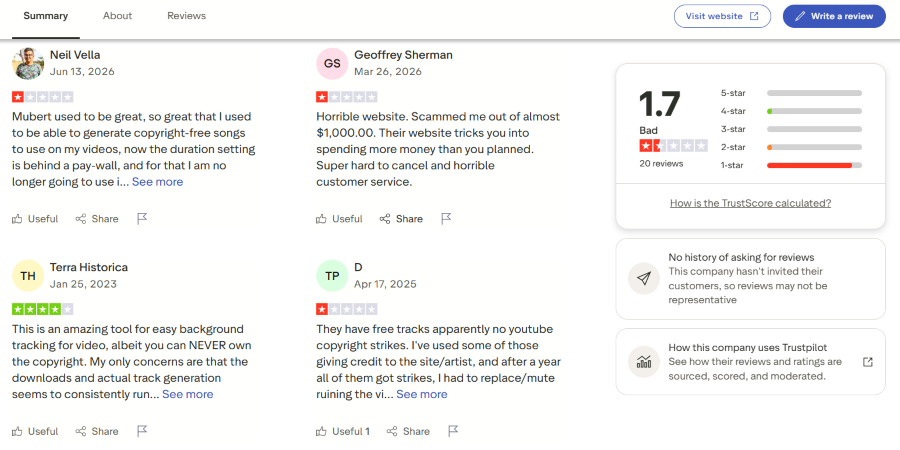
Image note: Trustpilot screenshot for mubert.com, accessed June 2026. Used for editorial review commentary only; all trademarks, names, ratings, and review text belong to their owners.
Trustpilot Review Pattern
| Trustpilot Signal | What It Means for Users |
|---|---|
| Low TrustScore | Treat public feedback as a risk-checking signal before subscribing |
| Small sample size | Do not treat around 20 reviews as a complete measure of all Mubert users |
| No history of asking for reviews | Trustpilot notes the review sample may not be representative |
| Billing and cancellation complaints | Review payment, renewal, and cancellation terms before choosing a plan |
| Copyright or YouTube claim concerns | Test licensing carefully before publishing monetized videos |
| Feature access complaints | Check whether duration, downloads, and exports are included in your plan |
| Positive background music feedback | Mubert may still fit creators who need fast soundtrack drafts |
What Users Should Test Before Paying
| Test Area | Why It Matters |
|---|---|
| Billing and cancellation | Public reviews mention subscription and payment concerns |
| License certificate | Useful for documenting allowed use |
| YouTube monetization | Helps reduce publishing risk |
| Track duration control | Some users care about access to duration settings |
| Export format | MP3 or WAV needs depend on the project |
| Support response | Important for business or client-facing workflows |
Trustpilot Takeaway
Trustpilot should not be the only basis for choosing Mubert. It is best used as a risk-checking signal. Users should test the workflow, confirm the license, understand billing terms, and keep records of downloads and license certificates before using tracks in commercial or monetized content.
Mubert Features, Strengths and Limits
Mubert’s feature set is strongest when viewed through the lens of creator soundtracks and background music. It is less about writing a full vocal song and more about creating usable music for content.
| Feature | Why It Matters |
|---|---|
| Royalty-free music focus | Important for creators, brands, and businesses |
| Mood-based generation | Helps match music to content tone |
| Duration control | Useful for videos, podcasts, ads, and social clips |
| Mubert Render | Main workflow for fast soundtrack generation |
| Mubert API | Useful for apps, platforms, games, and automation |
| MP3 and WAV export options | Gives creators more production flexibility |
| License certificate | Helps document usage rights |
| Background music orientation | Strong fit for content soundtracks |
Main Strengths
| Strength | Why It Matters |
|---|---|
| Fast background music generation | Saves time compared with searching stock libraries |
| Strong creator use-case fit | Useful for videos, podcasts, ads, streams, and presentations |
| Plan-based licensing structure | Helps users choose based on project type |
| API access | Useful for product and platform integrations |
| Duration and style controls | Helps adapt tracks to real content needs |
| Multiple export options | Useful for different production workflows |
Main Limits
| Limit | Why It Matters |
|---|---|
| Not mainly vocal-first | Users wanting full songs with vocals may need another workflow |
| Less suited for lyric-driven songs | Better for background and instrumental use |
| Licensing must be checked carefully | Commercial projects need the right plan |
| Client work requires higher-tier access | Business may be needed for agencies and client projects |
| API access needs separate setup | Not every creator needs product integration |
| Trustpilot feedback raises risk signals | Billing, cancellation, support, and copyright concerns should be checked |
Mubert Pros and Cons
| Pros | Cons |
|---|---|
| Strong fit for royalty-free background music | Not mainly built for vocal songs or lyrics-to-music |
| Useful for videos, podcasts, streams, and social content | Lower-tier plans may not fit every commercial use case |
| Pro plan supports more serious creator use | Client work, agency use, apps, and games may require higher-tier access |
| Business plan supports broader commercial use | Pricing may feel expensive for casual creators |
| Render workflow is simple for content soundtracks | Users should check copyright and YouTube claim risk carefully |
| API access supports product and platform use | Trustpilot feedback shows billing, support, and cancellation concerns |
| License certificates help with usage records | Tracks may not fit standalone artist-release workflows |
Mubert’s biggest strength is its focus on content-ready background music. Its biggest caution is that the right plan matters a lot. Users should not assume every plan covers every publishing or commercial scenario.
Mubert Compared With Other AI Music Tools
Mubert should be compared by workflow, not by saying one tool is universally better than another. It fits royalty-free background music and soundtrack generation, while other tools may fit lyrics-to-music, full AI songs, editing, or audio utility workflows.
| Tool | Best For | Main Strength | Main Limitation |
|---|---|---|---|
| Mubert | Royalty-free background music | Fast soundtrack generation for content | Not mainly vocal-first |
| MusicSeed | Lyrics-to-music and text-to-music | Guided song creation from ideas or lyrics | Not a stock background music library |
| Suno | Full AI songs with vocals | Fast prompt-to-song generation | Output control and rights clarity require checking |
| Udio | Creative AI song exploration | Style and genre experimentation | May require multiple attempts |
| Soundraw | Background music for creators | Creator-focused instrumental tracks | Less focused on lyric-based songs |
| BandLab | Recording and editing | Broader music workspace | More manual than pure AI generation |
| Moises | Stem separation | Existing-audio utility workflow | Not mainly a music generator |
Users comparing Mubert vs Suno are usually choosing between background soundtracks and full AI songs. Users comparing Mubert vs MusicSeed are usually choosing between royalty-free content music and a guided lyrics-to-music or text-to-music workflow. Users comparing Mubert vs Soundraw usually care about background music workflow, licensing, creator use cases, and how much control they need over soundtrack generation.
For users comparing Mubert vs Soundraw, the main question is usually not which tool is better overall, but which licensing model, soundtrack control, and creator workflow fits the project.
Choosing a Mubert Alternative Without Losing the Workflow Fit
A good Mubert alternative is not always the tool with the most features. It is the tool that matches the reason you were considering Mubert in the first place.
If you came to Mubert because you need background music for existing content, a background-music-focused tool will make more sense. If you came to Mubert but actually want to write a song, test lyrics, generate vocals, or build a demo from a prompt, the better alternative path is different.
If You Need a Song, Not a Soundtrack
MusicSeed, Suno, and Udio are more relevant when the goal is song creation rather than content background music.
MusicSeed fits users who start with lyrics, prompts, or a simple song idea and want a guided AI music creation workflow. Suno and Udio fit users exploring full AI songs, vocal-first tracks, or creative song directions.
This is not a better-or-worse comparison. It is a starting-point difference: Mubert begins with content soundtrack needs, while these tools are closer to song-generation workflows.
If You Need Background Music but Want a Different Workflow
Soundraw is one of the more relevant tools to compare with Mubert because both sit closer to creator background music than to vocal song generation.
Users comparing Mubert and Soundraw should look at licensing, export needs, soundtrack control, content type, and how each workflow handles repeated creator use. The right choice depends on whether the project needs fast AI-generated soundtracks, a particular editing flow, API/business use, or a creator-focused instrumental workflow.
If You Need a Production Workspace
BandLab is a different kind of alternative. It is not mainly a royalty-free background music generator. It fits users who want recording, editing, loops, collaboration, and a broader music-making environment.
This makes BandLab more relevant for creators who want to build or edit music manually rather than generate a ready-to-use soundtrack.
If You Work With Existing Audio
Moises and LALAL.AI are not direct Mubert replacements. They fit users who already have audio and need stem separation, vocal removal, practice tracks, or remix preparation.
This matters because some users search for AI music tools broadly, but the real workflow is not generation. It is audio cleanup, splitting, or editing.
Mubert Alternative Takeaway
The best Mubert alternative depends on the job:
| User Goal | Alternative Path |
|---|---|
| Turn lyrics or prompts into music | MusicSeed |
| Generate full AI songs with vocals | Suno or Udio |
| Compare background music workflows | Soundraw |
| Record and edit music manually | BandLab |
| Separate vocals or stems | Moises or LALAL.AI |
| Add AI music into an app or platform | Mubert API or another API-based provider |
Mubert remains most relevant when the project needs royalty-free background music for content. It becomes less direct when the project starts from lyrics, vocals, song structure, or existing audio.
Who Is Mubert Best For?
Mubert works best for users who need fast, usable background music for content. It is especially relevant when the music supports another asset, such as a video, podcast, stream, app, or campaign.
| Best For | Why It Fits |
|---|---|
| YouTubers | Generate background tracks for videos |
| Podcasters | Create intro, outro, or underscore music |
| Short-form creators | Make music beds for Reels, TikTok, and Shorts |
| Streamers | Add background ambience for live content |
| Agencies | Create licensed music for client-facing projects with the right plan |
| App builders | Use API access for product music integration |
| Game teams | Check Business or API access for in-game music |
| Marketers | Create soundtrack drafts for campaigns and ads |
Less Ideal For
| User Type | Why It May Not Fit |
|---|---|
| Lyric writers | Mubert is not mainly a lyrics-to-song workflow |
| Vocal song creators | The product is more background-music oriented |
| Artists releasing standalone songs | Check license limits before using tracks as standalone artist releases |
| Users needing Content ID | Confirm whether the plan permits Content ID or similar use |
| Users needing client rights on a low-tier plan | Client and agency use may require Business access |
| Users avoiding subscription risk | Trustpilot feedback includes billing and cancellation concerns |
Final Verdict
Mubert is worth considering if you need royalty-free AI background music for videos, podcasts, social content, streams, apps, games, or business integrations. Its main strength is not vocal song generation, but fast soundtrack creation for real content workflows.
The most important decision is plan fit. Ambassador and Creator may be enough for testing or some personal creator use. Pro is more relevant for monetized creator workflows and digital commercial use. Business is more relevant for client work, agencies, apps, games, and broader commercial use. API access is mainly for teams that need generative music inside a product or platform.
MusicSeed is worth considering if your starting point is a lyric, prompt, or song idea, while Mubert is more relevant when your project needs royalty-free background music for existing content.

