Introduction
Mureka AI is an AI music platform that helps users turn prompts, lyrics, melodies, and creative ideas into complete songs. Instead of starting with a blank DAW project, users can describe a genre, add lyrics, choose a mood, and generate a full AI song with vocals and instrumentation.
That sounds useful, but most users do not only want to know what Mureka can do. They want to know whether the songs are actually good, whether the free version is enough, whether paid plans are worth it, and whether there are issues with subscriptions, cancellation, or commercial use.
This Mureka AI review looks at the tool from a practical user perspective. We will cover how it works, how the output sounds, what real users say, how pricing should be understood, who it is best for, and which Mureka alternatives may be better for different music workflows.
Quick Overview of Mureka AI
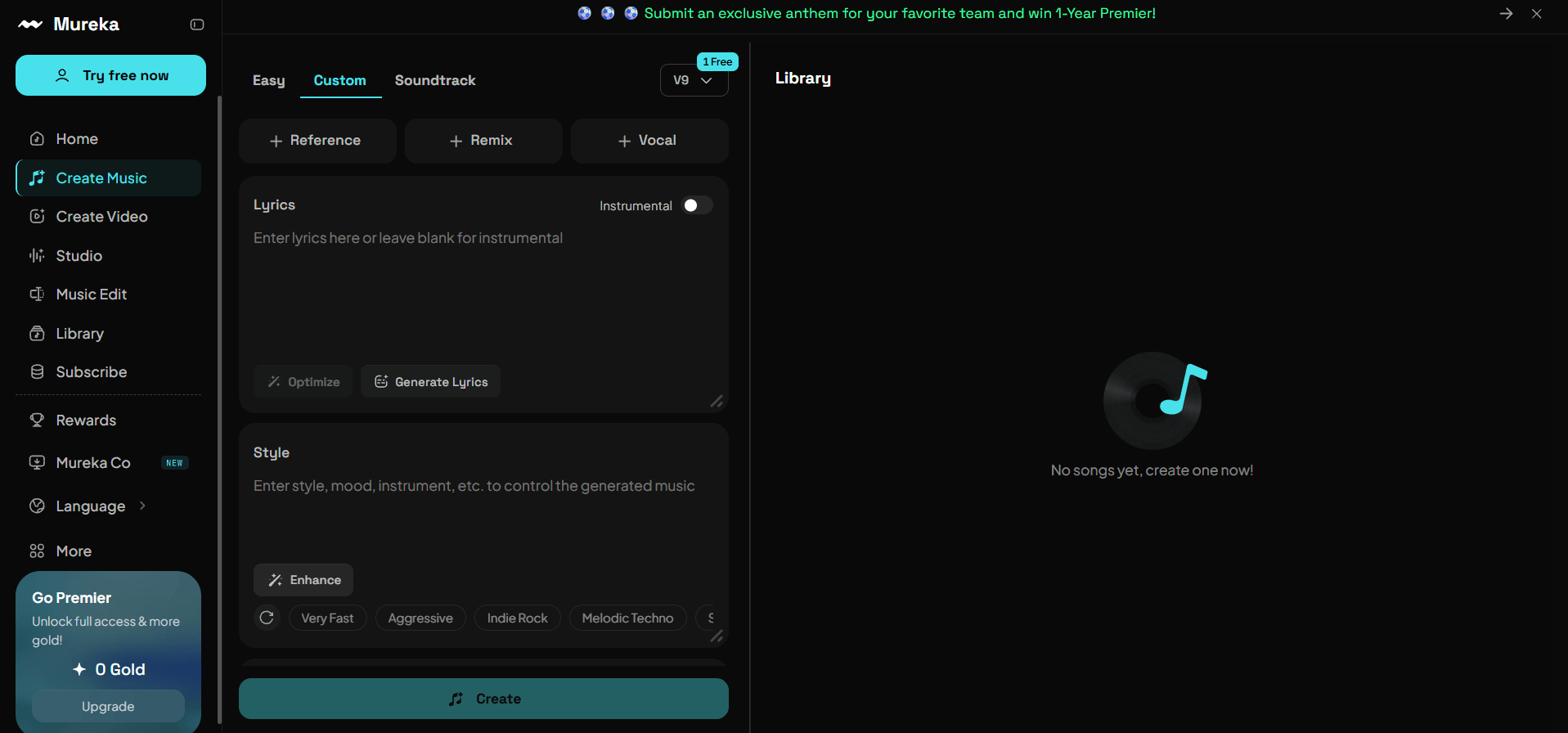
Mureka AI is a web and mobile AI music generator focused on creating songs from text prompts, lyrics, melodies, and style ideas. It is useful for fast song drafts, AI vocal ideas, remix-style experiments, and social content music. However, it may not be the best choice for users who need deep editing control, highly predictable output, or a very clear subscription and cancellation process.
Key Facts
- Type: AI music generator and AI song creation platform
- Output: Full songs, AI vocals, instrumentals, remixes, downloadable audio, and music ideas
- Skill level: Beginner to intermediate
- Main strength: Fast song creation from lyrics, prompts, and melody ideas
- Main limitation: Output consistency, editing control, and subscription clarity can be concerns
Rating Summary
Overall Rating: ⭐⭐⭐⭐☆ (4.3/5)
- Best for: Content creators, casual songwriters, lyric writers, demo makers, and users who want fast AI song ideas
- Main Strength: Mureka can turn a simple lyric or prompt into a complete song draft quickly
- Main Limitation: Results can vary, and some users report concerns around billing, cancellation, and prompt accuracy
Mureka AI is worth testing if you want a fast AI song generator for demos, social media content, songwriting drafts, and creative experiments. It is less ideal if you need precise vocal editing, professional mixing control, consistent results across multiple projects, or a smoother subscription management experience.
What Real Users Say About mureka.ai
User feedback on mureka.ai is mixed. Positive reviews usually focus on creativity, speed, mobile access, daily credits, and the ability to turn ideas into songs quickly. Negative reviews focus more on subscriptions, cancellation, refund issues, unclear payment flow, and inconsistent prompt following.
What Users Like
Many users like that Mureka makes the first step of music creation much easier. Instead of writing chords, recording vocals, arranging instruments, and mixing a track, users can enter lyrics or a prompt and hear a full song draft quickly.
Positive app-store style feedback often highlights three things:
- The app is easy to start using.
- Free credits make it possible to test songs before paying.
- The generated songs can sound surprisingly complete for casual use.
Some users also like the remix and community angle. The Mureka app is not only positioned as a tool for making songs, but also as a place where users can listen, remix, reshape, and share AI-generated music. This makes it feel more interactive than a simple text-to-music generator.
For beginners, the biggest advantage is clear: Mureka lowers the barrier to music creation. You do not need music theory, a microphone, vocal skills, or production software to create a first draft.
Common Complaints
The most serious complaints are not only about music quality. They are about payment, subscriptions, cancellation, refund expectations, and account management. Some users say they had trouble finding where to manage their subscription. Others complain about unexpected charges, difficulty canceling, or a refund process that felt unclear.
There are also creative complaints. Some users say the Mureka AI music generator does not always follow prompts closely, especially when the request is detailed. Others feel the songs can sound generic, repetitive, or emotionally weaker than expected.
This is important because the tool can create complete songs, but complete does not always mean usable. A song may have vocals, structure, and instruments, yet still miss the exact mood, rhythm, lyric phrasing, or emotional direction the user wanted.
Overall, users appreciate Mureka’s speed and creative value, but many also warn that pricing, subscription terms, cancellation flow, and output consistency should be checked carefully before paying.
Mureka Pricing
Mureka pricing is one of the most important parts of this review because many users search for whether Mureka is free, how much it costs, and whether the paid version is worth it.
Mureka appears to follow a freemium model. Users can test the platform with limited free access or credits, while heavier usage, higher-quality exports, more generations, commercial use, or advanced features may require a paid plan.
Is Mureka Free?
Yes, Mureka can be tested for free, but the free version is limited. It is mainly useful for trying the workflow, testing a few prompts, and deciding whether the output style fits your needs.
The free version is not ideal for regular content creation, client work, commercial projects, or high-volume song generation. If you need more songs, better export options, commercial rights, or advanced tools, you will likely need to upgrade.
How Much Does Mureka Cost?
Mureka pricing can vary by product path, region, platform, billing cycle, and whether you are using the consumer app, web platform, or API service. Some public pricing summaries list consumer-style plans in a lower monthly subscription range, while Mureka’s official developer pricing is shown separately for API-based song generation.
Because AI music pricing changes often, users should check the live checkout page before subscribing. This is especially important because some user complaints mention subscription confusion, annual billing concerns, or difficulty managing paid plans.
When reviewing Mureka pricing, check these details before paying:
- Is the plan billed monthly or yearly?
- How many song generations or credits are included?
- Can you download MP3, WAV, stems, or instrumentals?
- Is commercial use included?
- Can you cancel directly from the website or app store?
- Are refunds available?
- Are advanced tools included or locked behind higher plans?
Is Mureka Worth the Price?
Mureka may be worth paying for if you generate songs often, need quick AI music drafts, want AI vocals, or use AI music for videos, demos, and creative testing.
It is less convincing if you only need one or two songs, if you need detailed editing, or if you are worried about subscription management. The biggest pricing concern is not only the monthly cost. It is whether users clearly understand renewal, cancellation, commercial rights, export limits, and refund rules before paying.
The safest approach is to start free, generate several test songs, check export quality, review the current plan rules, and only then decide whether a paid plan makes sense.
What This Tool Actually Does
Mureka AI creates AI-generated songs and music drafts from prompts, lyrics, melodies, style ideas, and creative directions.
In practical terms, Mureka helps users move from “I have a song idea” to “I can hear a full draft” much faster than traditional production. Depending on the workflow and plan, it can generate vocals, instrumentals, arrangements, and remix-style variations.
However, Mureka should not be treated as a complete replacement for a producer, mixing engineer, vocalist, or DAW workflow. It is strongest as a fast idea generator and weakest when users expect exact control over every lyric, instrument, transition, vocal tone, and mix detail.
Real Workflow Test
Test Scenario
For this review, the test scenario is based on a realistic creator workflow. A user wants to create an emotional pop song from original lyrics for a short video, then decide whether the result is good enough for a demo or needs further editing.
A practical prompt could be:
“Create an emotional pop song with warm female vocals, soft piano, light drums, and a hopeful chorus. The song should feel intimate, modern, and suitable for a short video about moving on.”
This kind of prompt gives the Mureka AI song generator enough direction without becoming too technical.
Generation Process
The workflow is simple. You choose a creation mode, enter a prompt or lyrics, select a style direction, and generate the song. Mureka then creates one or more versions that users can preview, save, remix, or download depending on the available plan features.
For beginners, the experience feels accessible. You do not need music theory, vocal recording skills, production knowledge, or DAW experience. Mureka handles the first arrangement automatically.
The weaker point is precision. If the vocal tone feels wrong, the chorus is not strong enough, or the arrangement does not match the prompt, you may need to regenerate instead of editing the exact section in a detailed way. This makes the workflow fast, but not always predictable.
Output Quality
Mureka can create complete songs that sound more developed than basic loop-based music tools. The output may include vocals, structure, arrangement, rhythm, and a clear genre direction.
For social videos, personal demos, rough songwriting ideas, and creative testing, the quality can be useful. For professional releases, client campaigns, brand content, or streaming distribution, the output needs more careful review.
Some tracks may sound polished, while others may feel formulaic, repetitive, or emotionally flat. The best results usually come from generating several versions, comparing them, and refining the prompt.
In our view, Mureka works best when you judge it by the best result out of multiple generations, not by the first output. The first song may sound complete, but it is not always the most usable one.
Example Result
A strong Mureka result might include a clear verse, a memorable chorus, natural vocal phrasing, and an instrumental that matches the mood. A weaker result might follow the general style but miss the emotion, repeat lyrics too often, or use a vocal tone that does not fit the song.
Compared to tools like Suno, Udio, and MusicSeed, Mureka is useful for fast AI song exploration and remix-style workflows. Suno may feel more direct for full-song generation, Udio may appeal to users who care about musical detail, and MusicSeed may be easier for beginners who want a cleaner text-to-music or lyrics-to-song process.
Pros and Cons
Pros
- Fast song generation from prompts and lyrics
- Beginner-friendly workflow
- Useful for testing song ideas before production
- Can create vocals, instrumentals, and remix-style versions
- Good for social videos, demos, and creative experiments
- Supports broad genre exploration
- Helpful for users without DAW skills
- Available on web and mobile
Cons
- Output quality can vary
- Prompt following is not always precise
- Some users report subscription and cancellation issues
- Limited fine editing compared with a DAW
- Not every song sounds release-ready
- Commercial rights and plan details should be checked carefully
- May require multiple generations to get a strong result
Mureka AI is strongest as a fast creative draft tool. It is weaker as a fully controlled production system for users who need predictable results, transparent billing, and detailed post-generation editing.
Compare to Other AI Music Tools
Mureka AI sits in a competitive AI music market. The right choice depends on what the user wants to create.
| Tool | Best For | Main Difference |
|---|---|---|
| Mureka AI | Fast AI song drafts and remix-style exploration | Good for quick ideas, but user feedback is mixed |
| MusicSeed | Simple text-to-music and lyrics-to-song workflows | Better for users who want a clearer beginner path |
| Suno | Full AI songs with vocals | Strong mainstream AI song generation experience |
| Udio | Higher-quality experimental music output | Better for users who want more musical depth |
| Kits AI | AI vocals and voice workflows | Better for vocal conversion and voice model use |
| LALAL.AI | Stem separation and vocal removal | Better for splitting audio than generating songs |
| Soundraw | Background music for creators | Better for instrumental content and video music |
| Moises | Practice, stem separation, and musician tools | Better for editing existing songs |
| Loudly | Fast royalty-free music generation | Better for quick creator background tracks |
| Boomy | Simple AI song creation | Better for casual music-making experiments |
Mureka is a good choice if your goal is to quickly hear a song idea. Suno and Udio may be better if you are comparing overall AI song quality. MusicSeed is a better fit if you want a simple workflow focused on turning ideas, text, or lyrics into music without spending too much time learning the platform. Kits AI, LALAL.AI, and Moises are stronger for specific audio tasks rather than full song generation.
The key decision is simple: choose Mureka when you want fast creative experiments, choose MusicSeed when you want a cleaner beginner-friendly song creation process, choose Udio when you care most about musical detail, and choose specialist tools when your task is vocals, stems, or editing.
Alternatives
MusicSeed
MusicSeed is one of the best Mureka alternatives for beginners who want to create songs from text, lyrics, or simple music ideas. It is especially useful for users who want a direct workflow for AI music generation without needing to understand production settings.
For users who find Mureka too unpredictable or too subscription-sensitive, MusicSeed is a strong alternative because it focuses on a clearer path from idea to song. Users can start with text or lyrics, generate music, and test different directions without feeling forced into a complex production workflow.
Suno
Suno is one of the most popular AI song generators. It is strong for creating full songs with vocals from prompts and lyrics. Compared with Mureka, Suno may feel more familiar to users who have already tried AI music tools.
Suno is a good option for casual song generation, viral content ideas, and quick demos. It may be easier for users who simply want to type an idea and hear a complete song.
Udio
Udio is often chosen by users who care about sound quality and musical detail. It can be a better fit for people who want richer arrangements, more interesting textures, or more serious AI music experiments.
The learning curve may be slightly higher, but the results can be impressive when prompts are well written.
Kits AI
Kits AI is more focused on AI vocals, voice cloning, singing voice conversion, and vocal workflows. It is not a direct replacement for Mureka if you want full songs from prompts, but it is a strong alternative if your main need is testing vocal styles or creating AI singing voice demos.
LALAL.AI
LALAL.AI is best known for vocal removal, stem splitting, and audio separation. It is not a full AI song generator in the same way as Mureka, but it can be useful when you already have a track and need to separate vocals, drums, bass, or instruments.
Moises
Moises is useful for musicians, singers, and learners who want to work with existing songs. It offers stem separation, practice tools, and music analysis features. It is better for editing or studying tracks than creating a new AI song from scratch.
Soundraw
Soundraw is a good option for creators who need background music for videos, ads, podcasts, and business content. It focuses more on instrumental music and creator-friendly licensing workflows than AI vocal songs.
Loudly
Loudly is another AI music tool for generating tracks across styles. It may appeal to creators who want quick background music, social media audio, or royalty-free music ideas.
Boomy
Boomy is designed for quick music creation and distribution-style workflows. It is beginner-friendly, but output quality may vary depending on style and user expectations.
AIVA
AIVA is better for cinematic, orchestral, and composition-focused projects. It is less casual than Mureka but can be useful for users who want structured instrumental compositions.
Final verdict: MusicSeed is the best overall alternative for users who want a simpler AI song creation workflow. MusicSeed and Suno are best for beginners. Udio is best for users who care more about musical depth. Kits AI is best for vocal experiments, while LALAL.AI and Moises are better for audio editing and stem-based workflows.
Rating Breakdown for Mureka AI
Mureka AI vs Other AI Music Tools
Mureka AI earns a strong score for speed and accessibility, but loses points for consistency, subscription concerns, and limited precision control.
| Evaluation Area | Rating | Review Notes |
| Ease of Use | 4.5/5 | Simple enough for beginners and non-musicians |
| Song Quality | 4.2/5 | Good for demos, but not always consistent |
| Vocal Output | 4.1/5 | Can be useful, but tone and delivery vary |
| Prompt Accuracy | 3.8/5 | Works for broad prompts, weaker for detailed direction |
| Editing Control | 3.7/5 | Better for generating than fine editing |
| Pricing Clarity | 3.4/5 | Users should review plan and cancellation details carefully |
| Use Case Fit | 4.4/5 | Strong for demos, social content, and fast ideation |
| Overall Value | 4.3/5 | Worth testing, but compare alternatives before paying |
Key Evaluation Breakdown
The most important question is not whether Mureka can generate music. It can. The better question is whether it fits your workflow.
Quick pick:
- Choose Mureka if you want fast AI song drafts and remix-style experiments.
- Choose MusicSeed if you want a cleaner text-to-music or lyrics-to-song workflow.
- Choose Suno if you want a popular full-song AI generator with broad user adoption.
- Choose Udio if you want stronger musical detail and are willing to spend more time prompting.
- Choose Kits AI if your main focus is AI vocals.
- Choose LALAL.AI or Moises if you need stem separation instead of song generation.
The biggest insight is that Mureka is not a bad tool, but it is not the safest all-purpose choice for every user. It works best when treated as a fast idea generator, not as a guaranteed final production tool.
Use Cases
Case 1: Songwriting Demos
Mureka can help songwriters turn lyrics into rough demos. This is useful when you want to hear whether a chorus works, whether the mood fits the lyrics, or whether a song idea has potential.
Example: A songwriter writes a sad pop chorus and wants to hear it with piano and soft vocals before developing the full track.
Case 2: Social Media Music
Creators can use Mureka to test music for short videos, reels, TikTok edits, and YouTube Shorts. The tool can quickly create mood-based tracks for lifestyle, travel, fitness, comedy, or emotional storytelling content.
Example: A creator needs a dreamy electronic background track for a 30-second travel clip.
Case 3: Lyric-to-Song Experiments
Users who already have lyrics can paste them into Mureka and test different genres. This is helpful for comparing whether the lyrics work better as pop, rap, rock, EDM, country, or acoustic music.
Example: A user writes breakup lyrics and wants to compare a slow ballad version with an upbeat pop version.
Case 4: Beginner Music Creation
People with no music background can use Mureka to experience the feeling of making a song. It removes the early technical barriers of melody writing, arrangement, vocal recording, and mixing.
Example: A beginner wants to create a birthday song for a friend without learning music production.
Case 5: Creative Direction Testing
Mureka can help producers or content teams test different directions before hiring musicians, producers, or editors. It can act as a sonic mood board.
Example: A brand team wants to hear whether a campaign should use upbeat pop, cinematic piano, or soft acoustic music.
Case 6: Remix and Style Exploration
Mureka may be useful for users who want to reshape a song idea into different styles. This can help creators test how the same lyrics or melody might feel in multiple genres.
Example: A creator tests the same hook as EDM, lo-fi, and indie pop before choosing the final direction.
Who It's For
Best for
Mureka AI is best for users who want to create AI music quickly without learning production software. It fits casual creators, lyric writers, social media editors, beginner songwriters, and people who want to test song ideas before investing more time.
It is also useful for content creators who need quick music drafts for videos, podcasts, intros, outros, and creative campaigns. If your goal is to explore ideas and compare directions, Mureka can save time.
Mureka is especially suitable for:
- Beginners who want to turn lyrics into songs
- Creators who need music for short videos
- Songwriters testing hooks or chorus ideas
- Users comparing different genres or vocal moods
- Marketers building quick audio concepts
- Hobbyists who want to make songs without a DAW
Not Ideal for
Mureka is not ideal for users who need full control over mixing, mastering, vocal editing, arrangement, stems, and exact musical details. It is also not the best choice for users who are cautious about subscriptions or need a clearer cancellation process before starting.
Professional producers may find it useful for inspiration, but they may still prefer a DAW, Udio, Kits AI, MusicSeed, or specialist tools depending on the task. Users planning to release music commercially should carefully review licensing, rights, and plan details before publishing anything.
Mureka AI is a good fit for fast drafts and creative testing. It is less suitable for users who expect every output to be final, fully editable, and professionally controlled.
How to Use the Mureka AI Music Generator
Step 1: Choose the Right Creation Mode
Start by choosing the creation mode that matches your goal. If you have lyrics, use a lyric-based workflow. If you only have an idea, start with a prompt. If you want to explore a sound or mood, describe the genre, instruments, vocal tone, and use case clearly.
A weak prompt might be:
“Make a happy song.”
A stronger prompt would be:
“Create an upbeat indie pop song with warm male vocals, bright guitar, soft drums, and a hopeful chorus for a summer travel video.”
Step 2: Add Lyrics or a Clear Music Prompt
If you already have lyrics, paste them in and keep the structure clean. Use sections like verse, chorus, and bridge if the tool supports it. If you do not have lyrics, describe the theme, mood, genre, vocal style, and target use.
For better results, include:
- Genre
- Mood
- Vocal style
- Instruments
- Energy level
- Intended use
- Language
- Song structure
Avoid asking for too many conflicting styles in one prompt. A request like “sad, aggressive, relaxing, cinematic, funny dance song” may confuse the output.
Step 3: Generate Multiple Versions
Do not stop at the first result. Generate several versions and compare them. AI music tools often produce one weak result, one average result, and one surprisingly useful result from similar prompts.
Listen for:
- Whether the vocal fits the lyrics
- Whether the chorus is memorable
- Whether the instrumental matches the mood
- Whether the song structure feels natural
- Whether the audio quality is good enough for your use case
Step 4: Refine the Prompt
If the result is too generic, add more detail. If it is too busy, simplify the prompt. If the vocal tone is wrong, describe the singer more clearly. If the genre is inaccurate, give a more specific style direction.
For example:
“Make it slower, more emotional, less electronic, with softer piano and a more intimate vocal.”
This kind of refinement usually works better than rewriting the entire prompt from scratch.
Step 5: Review Pricing, Rights, and Download Options
Before downloading or publishing, check your plan, licensing terms, export options, and commercial rights. This is especially important if you want to use the song for YouTube monetization, client videos, ads, podcasts, streaming platforms, or brand content.
Also check subscription details before entering payment information. Many AI music tools update plan limits over time, so the live pricing page is more important than any old review or screenshot.
Conclusion
Mureka AI is a capable AI music generator for fast song drafts, lyric-to-song experiments, vocal ideas, remix-style creation, and social content music. Its biggest strength is speed. Users can go from a simple idea to a complete song draft without writing chords, recording vocals, or opening a DAW.
However, Mureka is not perfect. Output quality can vary, prompt control is not always precise, and third-party user feedback raises real concerns around subscriptions, payments, cancellation, and product consistency. This does not mean every user will have a bad experience, but it does mean new users should test carefully before paying for a long-term plan.
The final verdict: Mureka AI is worth trying if you want a quick AI song maker for demos and creative experiments. If you only want to test AI song ideas, Mureka is fun and useful. If you plan to pay, publish, or use the music for serious projects, check the plan terms first and compare it with MusicSeed, Suno, or Udio before committing.
For users who want a simpler and more beginner-friendly music creation workflow, MusicSeed is a strong alternative. For users who care most about musical depth, Udio may be better. For vocal workflows, Kits AI is more specialized. For stem separation, LALAL.AI and Moises are stronger choices.
Try Mureka if speed matters most. Choose an alternative if you need clearer control, safer billing expectations, or a workflow better matched to your specific music task.