Introduction
MusicGeneratorAI, also searched as Music Generator AI, musicgeneratorai.com, and MusicGeneratorAI.com, is an online AI music generator for users who want to create songs from prompts, lyrics, genres, moods, and vocal directions. It is mainly built for beginners, hobby songwriters, social media creators, YouTubers, marketers, and non-musicians who want to turn an idea into music without using a DAW.
The platform is not just a basic text-to-music tool. Its official site presents it as a broader AI music creation platform with song generation, multi-genre music creation, vocals, arrangements, AI cover, voice changer, vocal remover, WAV/MIDI downloads, and AI singing video features depending on the selected plan.
This MusicGeneratorAI review looks at what users actually want to know before signing up: Is it easy to use? Is the output good enough? Is the free plan useful? Is the paid plan worth it? What do real users complain about? And if MusicGeneratorAI is not the right fit, which AI music generator alternative should you try instead?
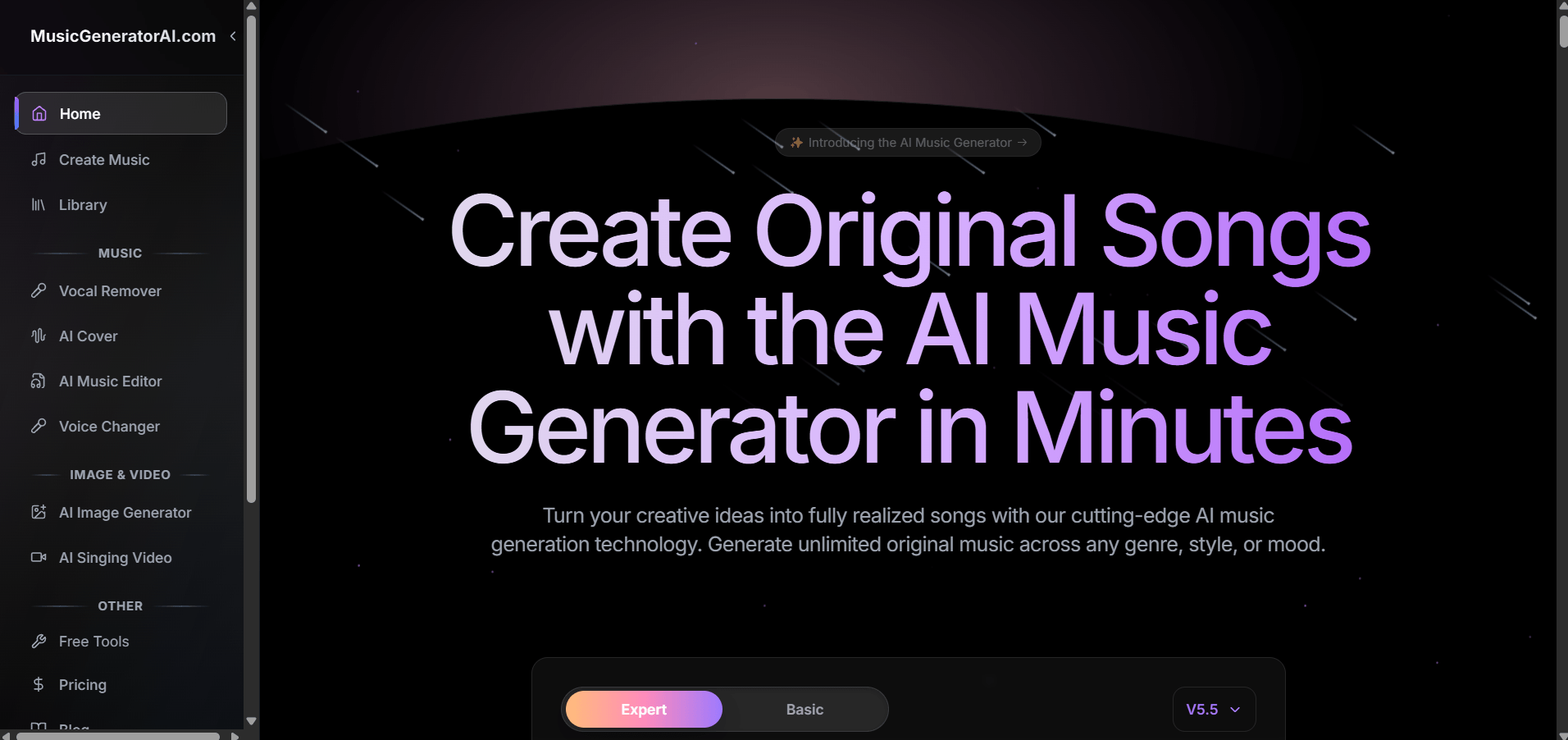
Quick Overview of MusicGeneratorAI
MusicGeneratorAI.com is best understood as a fast AI music draft tool. It can help users create song ideas quickly, but it is not a full replacement for professional music production, detailed arrangement work, or DAW-level editing.
Overview
MusicGeneratorAI is useful when you need a quick song draft, background track, lyric demo, or creative idea. It is less ideal when you need exact prompt control, detailed editing, or a final track that is ready to publish without review.
Key Facts
- Type: Online AI music generator and AI song creation platform
- Output: AI songs, vocals, instrumentals, covers, WAV/MIDI files, and other music assets depending on plan
- Skill level: Beginner-friendly
- Main strength: Fast song generation with several AI music tools in one platform
- Main limitation: Prompt accuracy, editing flexibility, support experience, and credit usage can vary
Rating Summary: MusicGeneratorAI Review Score
Overall Rating: ⭐⭐⭐⭐☆ (4.3/5)
- Best for: Beginners, short-video creators, hobby songwriters, YouTubers, marketers, and users who need quick AI-generated music drafts
- Main Strength: Simple workflow and broad AI music feature coverage
- Main Limitation: Not ideal for precise professional control, advanced editing, or highly specific genre matching
MusicGeneratorAI gets a strong score because it makes music creation easy for non-musicians. A user can write a prompt, choose a style, generate a track, and hear a complete music idea quickly. That is valuable for early-stage creative work.
However, the tool does not score higher because real user feedback points to several issues: limited editing, prompt mismatch, occasional bugs, credit-related frustration, and questions around paid access or license details. For casual users, these issues may be manageable. For serious creators, they are important before paying.
What Real Users Say About musicgeneratorai.com
Trustpilot currently lists Musicgeneratorai with a 4-star rating, a TrustScore of 4 out of 5, and 96 reviews. The review distribution shown includes 53% 5-star reviews and 14% 4-star reviews, while Trustpilot also notes that the company has no history of asking for reviews and that customer reviews may not fully represent all user experiences.
What Users Like
Positive reviews usually mention ease of use, fast music generation, and good results for beginners. Some users say the platform is easy for novices, while others praise the generated music quality and vocal results. This suggests that MusicGeneratorAI works best when users want a fast, simple way to create a listenable draft rather than a fully controlled production session.
From a reviewer’s perspective, this is the tool’s clearest strength. MusicGeneratorAI helps users get past the blank page. If someone has lyrics, a mood, or a vague song idea, the platform can quickly turn that into something they can hear, compare, and refine.
Common Complaints
Negative reviews tend to focus on limited control and reliability. Some users complain that prompts are not followed accurately, that editing options are limited, or that credits may be spent even when the result is not useful. A UK Trustpilot review also mentioned paying for a middle-tier plan but still being stuck on free-plan access after many hours, which shows that account or support issues may affect some users.
The most important takeaway is simple: MusicGeneratorAI is easy to start, but not always easy to fine-tune. If you expect the first generation to perfectly match your genre, lyrics, vocal tone, and structure, you may be disappointed. If you treat it as a draft generator, the experience is more reasonable.
Overall, users appreciate MusicGeneratorAI for speed and accessibility, but the most common concerns are limited customization, inconsistent prompt following, credit usage, and editing friction.
MusicGeneratorAI Pricing
MusicGeneratorAI pricing is one of the most important parts of this review because the free plan is mainly useful for testing, while serious use usually requires a paid plan.
The official pricing page currently lists Free, Basic, Standard, Pro, and Pay As You Go options. The annual pricing shown includes Basic at $11.92/month billed annually, Standard at $14.95/month billed annually, and Pro at $29.95/month billed annually. The page also lists Pay As You Go packages and says credits do not expire.
| Plan | Price Shown | Best For | Main Notes |
|---|---|---|---|
| Free | $0/month | Testing the interface | Limited daily song and generation access |
| Basic | $11.92/month billed annually | Beginners and hobbyists | More songs, more generations, WAV/MIDI download, AI cover, voice changer, vocal remover |
| Standard | $14.95/month billed annually | Content creators | Higher monthly limits, more concurrent tasks, private creation |
| Pro | $29.95/month billed annually | Heavy users | Higher generation limits and more workflow capacity |
| Pay As You Go | One-time purchase | Occasional users | Credits do not expire, but commercial license download may differ from subscriptions |
The free plan is enough to test the tool, but it is too limited for serious song creation, repeated revisions, or comparing many styles. If you need several generations before choosing a final result, the free plan will likely feel restrictive.
For commercial use, users should read the latest pricing and terms carefully. MusicGeneratorAI’s terms state that free-tier output is limited to personal, non-commercial use and that commercial use requires upgrading to a Premium subscription.
Before Paying, Check These Points
Before subscribing, users should check five things:
- Whether the plan includes enough generations for real testing
- Whether commercial use is included for your use case
- Whether you need a downloadable commercial license
- Whether failed or poor generations still consume credits
- Whether the editing tools are enough for your revision needs
From a buyer’s perspective, Basic may be enough for hobby use. Standard is more realistic for content creators who need repeated generations. Pro only makes sense if you generate music often or need higher monthly limits.
What MusicGeneratorAI Actually Does
MusicGeneratorAI is an online AI music generator that turns prompts, lyrics, genres, moods, and vocal directions into AI-generated song drafts.
In practical terms, it helps users create music without writing melodies, recording vocals, arranging tracks, or mixing audio manually. The homepage describes a process where users choose a style, customize settings, generate music, and export the result.
The tool is most useful for idea testing. It can help answer questions like: Does this lyric work as a pop song? Does this mood fit a YouTube intro? Could this chorus become a full demo? What would this concept sound like with vocals?
The output can be useful, but users should still check lyrics, pronunciation, arrangement, originality, sound quality, and license terms before publishing. MusicGeneratorAI is easy to use, but it works better as a draft generator than a final production tool.
Real Workflow Test on Music Generator AI
Test Scenario
For this review, the test scenario is based on a common creator need: generating a short pop song demo for a social media video.
Prompt example:
Create an upbeat pop song about starting over after a difficult week. Use a bright female vocal, catchy chorus, warm synths, soft drums, and a hopeful mood.
The goal is not to create a final radio-ready track. The goal is to see whether MusicGeneratorAI can turn a simple idea into a usable first draft.
Generation Process
The workflow is simple. Users enter a song idea, choose or describe a style, add lyrics or select an instrumental direction, adjust available settings, and generate the track. This process is beginner-friendly because it removes most technical production steps.
Users do not need MIDI programming, vocal recording, chord writing, audio editing, mixing plugins, or mastering knowledge. That makes MusicGeneratorAI useful for people who want music quickly but do not want to learn production software first.
Output Quality
The output is strongest as a draft. A good result may include a complete song structure, generated vocals, melody, arrangement, and mood. For casual videos, personal demos, and creative testing, this can be good enough.
However, most serious creators should not publish the result without checking it first. The track may need lyric edits, better vocal delivery, cleaner transitions, stronger structure, or additional mixing. Prompt accuracy can also vary, especially when users ask for very specific subgenres or detailed production textures.
Example Result
A successful MusicGeneratorAI result would likely sound like a complete pop-style draft with a clear hook, generated vocals, and a simple arrangement. It may work well for inspiration or a short social media concept. It may not be strong enough for a commercial release without extra editing.
Compared to tools like.....
Compared to MusicSeed, MusicGeneratorAI feels broader but less focused. MusicSeed is stronger for users who want a cleaner text-to-music or lyrics-to-song workflow. If your main goal is to turn a prompt or lyrics into a complete song quickly, MusicSeed is easier to position as a direct creation tool.
Compared to Suno and Udio, MusicGeneratorAI is less community-driven and more like a multi-tool platform. It tries to cover song generation plus extra tools such as AI cover, voice changer, vocal remover, and downloads.
Compared to SOUNDRAW or Beatoven.ai, MusicGeneratorAI is more song-focused. SOUNDRAW and Beatoven.ai are better choices when the main goal is royalty-free background music for videos, podcasts, ads, or branded content.
Pros and Cons of MusicGeneratorAI
Pros
- Easy for beginners to start
- Fast prompt-to-song workflow
- Useful for lyrics, demos, hooks, and background music ideas
- Includes multiple AI music tools in one platform
- Free plan is available for testing
- Paid plans include more generation capacity
- Commercial use is available through paid access according to the terms
- Helpful for social media creators, hobby songwriters, and non-musicians
Cons
- Free plan is limited
- Prompt accuracy may vary
- Editing control can feel restrictive
- Some users report bugs or account issues
- Poor generations may still cost time or credits
- Not ideal for professional producers who need precise control
- Users should verify license and commercial-use terms before publishing
MusicGeneratorAI is good if you need speed. It is less good if you need precision. That is the most important difference to understand before paying.
Compare MusicGeneratorAI to Other AI Music Tools
MusicGeneratorAI.com is not automatically the best or worst AI music generator. It depends on what you need: quick songs, background music, commercial-safe tracks, vocal tools, advanced editing, or beginner-friendly inspiration.
| Tool | Best For | Main Difference | Choose It If |
| MusicGeneratorAI | Fast song drafts and broad AI music tools | Combines generation, AI cover, voice changer, vocal remover, and exports | You want several AI music features in one place |
| MusicSeed | Text-to-music and lyrics-to-song creation | Cleaner workflow for turning prompts or lyrics into full songs | You want a direct idea-to-song experience |
| Suno | Full AI songs | Strong full-song generation and broader AI song ecosystem | You want a popular AI song generator |
| Udio | AI song creation and sharing | Good for exploring and sharing AI music | You want a music-first creative platform |
| SOUNDRAW | Royalty-free background music | Built for creator-safe music tracks | You need music for videos, ads, or branded content |
| Beatoven.ai | Background scores | Focuses on royalty-free music for content | You create videos, podcasts, games, or short films |
| AIVA | Composition-style music | Better for structured instrumental composition | You want more composition control |
| Loudly | Creator music and remix workflows | Useful for AI music assets and creator tools | You want music generation plus remix-related features |
The decision hook is clear: choose MusicGeneratorAI if you want broad AI music features in one platform. Choose MusicSeed if you want a cleaner song generation workflow. Choose SOUNDRAW or Beatoven.ai if you mainly need royalty-free background music. Choose Suno or Udio if you want a more established AI song generation ecosystem.
Alternatives to MusicGeneratorAI
MusicSeed
MusicSeed is the best overall alternative for users who want to create full songs from text prompts or lyrics. It is especially suitable for beginners who want a simple workflow: describe the song, enter lyrics if needed, generate music, and refine the result.
MusicSeed is a stronger fit if your main goal is direct song creation rather than managing many separate tools. It is also a better conversion option for users who want fast text-to-music or lyrics-to-music creation without a complicated setup.
Suno
Suno is one of the most recognized AI song generators. It is a strong option for users who want full AI songs, vocal tracks, and a mature music generation ecosystem. It is better for users who want to explore full-song generation at scale.
Udio
Udio is useful for users who want to create and discover AI-generated songs. It works well for people who enjoy testing creative song ideas and listening to AI music from other users.
SOUNDRAW
SOUNDRAW is better for royalty-free background music than lyrical song creation. It is a stronger option for YouTubers, advertisers, agencies, and creators who need commercial-safe music assets.
Beatoven.ai
Beatoven.ai is suitable for creators who need background music for videos, podcasts, games, short films, livestreams, and social content. It is more focused on soundtrack-style use than full song generation.
AIVA
AIVA is better for users who want composition-style control. It may be more suitable for instrumental music, cinematic pieces, game music, and structured composition workflows.
Loudly
Loudly is useful for creators who need AI music generation, remix-style workflows, and commercial music assets. It is a good fit for users who want background music and creator-focused production support.
Boomy
Boomy is beginner-friendly and useful for simple AI song experiments. It is a good option for users who want to create original song ideas quickly without many technical settings.
BandLab SongStarter
BandLab SongStarter is better for beat and melody inspiration than full song completion. It can help users overcome writer’s block and start a new track idea.
Mureka
Mureka is useful for users who want AI songs, remixing, and a more social AI music experience. It may fit users who like experimenting with song ideas and sharing results.
Compared with these alternatives, MusicGeneratorAI sits in the middle. It is broader than a simple AI song starter, but not always as focused as tools built for one specific workflow.
Final Verdict
- Best overall alternative: MusicSeed
- Best for beginners: MusicSeed or Boomy
- Best for professionals: AIVA, SOUNDRAW, or Suno, depending on workflow
If you want a fast and simple text-to-song or lyrics-to-song workflow, MusicSeed is the stronger overall alternative. If you want one platform with song generation, covers, vocal tools, and exports, MusicGeneratorAI is still worth testing.
Rating Breakdown
MusicGeneratorAI vs Other AI Music Tools
MusicGeneratorAI performs well in ease of use, feature range, and beginner accessibility. It loses points in editing depth, prompt accuracy, and workflow reliability because some users may need several generations before getting a result they like.
| Evaluation Area | Rating | Notes |
| Ease of Use | 4.6/5 | Simple enough for beginners and non-musicians |
| Music Quality | 4.2/5 | Good for drafts, social content, and demos |
| Prompt Accuracy | 3.9/5 | Works for broad ideas, less reliable for precise genre control |
| Feature Range | 4.5/5 | Strong coverage across songs, covers, vocals, remover tools, and downloads |
| Editing Flexibility | 3.8/5 | Useful for basic revision, but limited for detailed production changes |
| Pricing Value | 4.0/5 | Free plan exists, but serious testing likely needs paid access |
| Commercial Use | 4.0/5 | Paid use is supported, but users should verify the latest license terms |
| Beginner Fit | 4.6/5 | One of the tool’s biggest strengths |
| Professional Fit | 3.6/5 | Useful for ideas, not a complete DAW replacement |
| Overall | 4.3/5 | Strong draft generator with some control and reliability limits |
Key Evaluation Breakdown
For most users, the decision is simple:
- Choose MusicGeneratorAI if you want quick AI song drafts and several music tools in one place.
- Choose MusicSeed if you want a cleaner prompt-to-song or lyrics-to-song workflow.
- Choose SOUNDRAW or Beatoven.ai if you need royalty-free background music.
- Choose Suno or Udio if you want a popular full-song AI generation platform.
- Choose AIVA if you need more composition-style control.
Insight
MusicGeneratorAI is strongest as a creative shortcut. It helps users move from idea to audio quickly. It is weaker as a precision production tool, especially when users need exact lyrics, detailed arrangement edits, or predictable genre matching.
Use Cases
Case 1: Social Media Background Music
A TikTok, Instagram, or YouTube Shorts creator can use MusicGeneratorAI to create quick music for lifestyle clips, travel videos, product showcases, motivational edits, or short-form storytelling.
Case 2: Songwriting Drafts
Songwriters can use Music Generator AI to test lyrics, hooks, chorus ideas, or genre directions before arranging the song manually.
Case 3: YouTube and Podcast Intros
Creators can generate intro music, transition tracks, or short branded audio ideas. Before using the result commercially, they should confirm plan access and license details.
Case 4: Demo Tracks for Non-Musicians
Users with no production background can turn a rough idea into a listenable demo. This is useful for personal songs, birthday songs, concept tracks, and early creative experiments.
Case 5: Marketing and Brand Content
Small teams can use musicgeneratorai.com to test music directions for ads, landing pages, product videos, and campaign concepts.
Case 6: AI Cover and Vocal Experiments
Because MusicGeneratorAI lists AI Cover and Voice Changer features on its pricing page, users can also test cover-style ideas or vocal directions depending on plan access.
Who It's For
Best for
- Beginners who want to create music without production skills
- Content creators who need quick music for videos
- Hobby songwriters testing lyrics and hooks
- YouTubers and podcasters looking for intro music
- Marketers testing audio concepts
- Users who want song generation, AI cover, vocal remover, and voice changer features in one platform
Not Ideal for
- Professional producers who need DAW-level editing
- Artists who need highly realistic human vocal emotion
- Users who require exact prompt-to-output accuracy
- Creators who need many revisions before choosing a final track
- Teams that need very clear licensing documentation before publishing
- Musicians who want detailed stem control, mix control, and arrangement control
- Users who dislike credit-based generation systems
MusicGeneratorAI is best for fast creation and early-stage testing. It is not ideal as the only tool for professional music production.
How to Use MusicGeneratorAI
Using MusicGeneratorAI is straightforward, but the quality of the result depends heavily on your prompt and revision process.
Step 1: Choose the Right Creation Mode
Start by deciding whether you want a full song, an instrumental, a vocal track, an AI cover, or a quick music idea. If you already have lyrics, use a lyrics-based workflow. If you only have a concept, describe the mood, style, vocal direction, and use case.
Weak prompt:
“Make a pop song.”
Better prompt:
“Create an upbeat synth-pop song with a bright female vocal, warm drums, catchy chorus, and hopeful mood for a 30-second social media video.”
Step 2: Add Genre, Mood, Vocals, and Use Case
AI music tools usually perform better when the prompt is specific but not overloaded. Include the genre, mood, vocal direction, instruments, and intended use.
Useful prompt elements include:
- Genre: pop, rock, EDM, jazz, cinematic, acoustic, lo-fi
- Mood: hopeful, sad, romantic, energetic, dreamy, dark
- Vocal direction: male vocal, female vocal, rap flow, soft vocal, no vocal
- Use case: TikTok edit, YouTube intro, podcast theme, demo song
- Structure: intro, verse, chorus, bridge, outro
Step 3: Generate and Review
After generation, listen to the whole track. Check the hook, lyrics, pronunciation, arrangement, vocal tone, and whether the result matches the prompt. Do not judge only the first few seconds because AI-generated songs can change direction later in the track.
Step 4: Revise Carefully
If the output is close, change one or two details at a time. For example, adjust “bright female vocal” to “softer emotional female vocal,” or change “EDM pop” to “dance pop.” If you rewrite everything at once, it becomes harder to understand what improved the result.
Step 5: Check Pricing and Usage Rights
Before downloading or using the song commercially, check your plan. MusicGeneratorAI’s terms say free-tier output is limited to personal, non-commercial use and commercial use requires upgrading to a Premium subscription.
The best experience comes from treating MusicGeneratorAI as a draft engine: generate, compare, refine, export, and polish elsewhere if the track is important.
Conclusion
MusicGeneratorAI.com is a solid AI music generator for users who want fast song drafts, simple prompt-based creation, and multiple AI music tools in one platform. It is easy to start, useful for beginners, and flexible enough for social media creators, hobby songwriters, marketers, and non-musicians.
Its biggest strengths are speed and accessibility. Users can create songs without a DAW, test different musical ideas, and access features such as AI Cover, Voice Changer, Vocal Remover, WAV/MIDI download, and paid commercial-use options depending on plan.
Its weaknesses are also clear. Real user feedback shows that some people want better editing, more reliable prompt following, clearer support, and fewer credit-related frustrations. Trustpilot reviews are generally positive overall, but they are mixed enough that users should test the workflow before committing long term.
Final verdict: MusicGeneratorAI is worth trying if you need quick AI-generated music drafts and want several music tools in one place. If you mainly want a cleaner text-to-song or lyrics-to-song workflow, MusicSeed is the stronger overall alternative. If you need royalty-free background music, compare SOUNDRAW and Beatoven.ai. If you want a more mature full-song AI ecosystem, also test Suno and Udio.