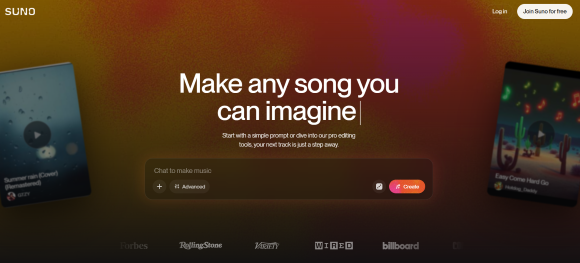
Suno is one of the most talked-about AI music generators, often searched as a Suno AI music generator, Suno music generator, or Suno song generator, because it can turn a simple idea into a full song quickly. Its App Store listing describes Suno as an AI music generator that can turn ideas into full songs through text prompts, humming, tapping, or uploaded audio.
But a useful Suno AI review should look beyond speed. Users also want to know whether the free plan is enough, whether paid plans are worth it, what commercial use rules apply, what real users say, and which Suno alternatives may fit different music workflows.
This review covers Suno pricing, free-plan limits, commercial use, workflow tests, Trustpilot feedback, pros and cons, use cases, and the best Suno alternatives to consider in 2026.
Suno AI Review Quick Verdict
Suno is worth trying if you want fast AI-generated songs from prompts, lyrics, humming, or audio ideas. It is especially useful for beginners, songwriters, social media creators, and people who need quick demos, hooks, or creative inspiration.
It may be less suitable when the project needs precise arrangement control, predictable output quality, clean stems, advanced editing, or a fully documented licensing workflow.
| Question | Practical Answer |
|---|---|
| Is Suno AI worth trying? | Yes, especially for fast AI-generated songs and creative drafts. |
| Is Suno beginner-friendly? | Yes. The workflow is much simpler than a traditional production setup. |
| Best for | Song ideas, demos, hooks, social content, lyric testing, creative experiments |
| Main strength | Fast prompt-to-song and lyrics-to-song generation |
| Main limitation | Output consistency, detailed control, support reliability, and rights clarity |
| Best MusicSeed fit | Users who want a guided text-to-music or lyrics-to-music workflow |
Key Facts
| Item | Details |
|---|---|
| Product type | AI music generator and AI song maker |
| Brand and search variants | Suno, Suno AI, Suno AI music generator, Suno song generator, Suno music generator, suno.com |
| Main outputs | Full songs, vocals, lyrics, instrumentals, remixes, and audio-based generations |
| Skill level | Beginner-friendly |
| Strongest workflow | Fast song generation from prompts or lyrics |
| Main caution | Rights, credits, output quality, and subscription terms should be checked before publishing |
Editorial Rating Summary
These scores are editorial estimates, not official ratings. They reflect ease of use, output quality, creative range, pricing value, rights clarity, public feedback, and workflow fit.
| Evaluation Area | Rating |
|---|---|
| Overall Rating | 4.2/5 |
| Ease of Use | 4.7/5 |
| Song Generation Quality | 4.5/5 |
| Creative Variety | 4.6/5 |
| Prompt Understanding | 4.3/5 |
| Lyrics-To-Song Use | 4.3/5 |
| Customization | 3.9/5 |
| Pricing Value | 4.0/5 |
| Commercial Use Clarity | 3.8/5 |
| Support And Reliability | 3.3/5 |
| Professional Workflow Fit | 3.7/5 |
Suno Alternatives Quick Picks
Not every user looking for Suno AI reviews needs the same music workflow. Suno is useful for fast full-song generation, while other tools may fit guided lyrics-to-music creation, editing, background music, or audio separation needs.
| If You Need… | Tool To Consider | Why It Fits |
|---|---|---|
| Fast AI-generated songs | Suno | Good for quick full-song drafts from prompts, lyrics, or audio ideas |
| Guided lyrics-to-music creation | MusicSeed | Useful for turning lyrics, prompts, and song ideas into music |
| Creative AI song exploration | Udio | Helpful for testing styles, genres, and variations |
| Recording and editing | BandLab | Fits users who want a broader music workspace |
| Stem separation or vocal removal | Moises / LALAL.AI | Fits users working with existing audio |
| Background music for content | Soundraw / Mubert | Useful for creator-focused instrumental tracks |
This table is workflow-based. It does not mean one tool is universally better than another. The right choice depends on whether your starting point is a prompt, lyrics, an audio file, a video project, or an existing song.
Best Use Cases and Workflow Fit
Suno fits users who want to move from idea to song draft quickly. It works especially well when the goal is inspiration, demo creation, lyric testing, short-form content, or playful music experiments.
| User Type | Why Suno Fits |
|---|---|
| Beginners | Create songs without DAW skills or music theory |
| Songwriters | Test lyrics, hooks, chorus ideas, and melodies quickly |
| Content creators | Generate song ideas for TikTok, YouTube Shorts, Reels, or personal videos |
| Musicians | Explore demo directions before recording or producing manually |
| Marketers | Create rough music concepts for campaigns or internal drafts |
| Casual users | Make funny, emotional, or experimental songs for fun |
| Educators and students | Explore songwriting, genre, structure, and AI music concepts |
When Suno May Not Be the Best Fit
| User Need | What To Consider |
|---|---|
| Professional production control | A DAW or production-focused workflow may be needed |
| Predictable arrangement | AI outputs may vary between generations |
| Exact lyric delivery | Phrasing and timing can change |
| Clean licensing records | Users should document plan, creation date, and usage rights |
| Stem separation or vocal removal | Moises or LALAL.AI may fit that specific workflow |
| Guided lyrics-to-music creation | MusicSeed may fit users who want a simpler text or lyrics-based workflow |
| Background-only music | Soundraw or Mubert may fit content-focused instrumental needs |
Suno is strongest when the user wants fast AI song creation. It is less direct when the user needs precise production control, detailed audio editing, or a workflow built around existing tracks.
Suno Pricing, Free Plan, Pro and Premier
Suno pricing matters because Free, Pro, and Premier plans affect credits, commercial use, publishing rights, and how often users can generate songs.
Suno’s pricing page currently shows Free, Pro, and Premier plans. The Free plan includes 50 daily credits and no commercial use. The Pro plan shows 2,500 monthly credits, while Premier shows 10,000 monthly credits. Pricing, billing, features, credits, and model access may change, so users should check the live pricing page before subscribing.
| Plan | Practical Role | Commercial Use | Credits / Usage |
|---|---|---|---|
| Free | Testing and casual non-commercial creation | No commercial use | 50 credits renew daily |
| Pro | Regular creators who need paid features and commercial rights | Commercial use rights for new songs made while subscribed | 2,500 monthly credits |
| Premier | Higher-volume creators who need more credits and advanced access | Commercial use rights for new songs made while subscribed | 10,000 monthly credits |
What Commercial Rights Mean in Practice
Suno’s Help Center states that songs made while subscribed are granted commercial use rights, while songs made on the free plan are intended for non-commercial use. Suno also explains that songs made on the free plan do not automatically receive retroactive commercial-use licensing after upgrading by default.
| Question | Practical Answer |
|---|---|
| Is Suno free? | Yes, but the free plan is mainly for testing and non-commercial use. |
| Can free-plan songs be monetized? | Suno says free-plan songs are for non-commercial use. |
| Do paid plans include commercial rights? | Pro and Premier generally include commercial-use rights for eligible new songs made while subscribed. |
| Are free-plan songs retroactively commercial after upgrading? | Not by default, according to Suno’s Help Center. |
| Can Suno songs be distributed to Spotify or Apple Music? | Users should confirm current Suno rules and platform requirements first. |
Pricing Takeaway
Suno’s free plan is useful for testing ideas. Paid plans are more relevant for creators who generate often or need commercial usage rights.
Before using Suno music in public or commercial projects, users should check the plan used when the song was created, whether copyrighted input material was used, whether the platform allows the intended use, and whether they need records for client or brand approval.
How To Use Suno AI in 5 Steps
Quick Answer:
To use Suno AI, start with a clear song idea, choose prompt, lyrics, humming, or audio input, describe the genre and mood, generate several versions, then review the output and check usage rights before publishing.
| Step | What To Do | Why It Matters |
|---|---|---|
| 1 | Start with a clear song idea | Helps Suno understand the creative direction |
| 2 | Choose prompt, lyrics, humming, or audio input | Matches the workflow to what you already have |
| 3 | Describe genre, mood, vocals, and use case | Improves output relevance |
| 4 | Generate and compare versions | Reduces the risk of judging from one result |
| 5 | Check rights and export needs | Important before publishing or monetizing |
Best for: AI song drafts, lyric testing, social content, demos, hooks, and creative experiments.
Check before publishing: commercial rights, plan status, copyright input, credit usage, platform policy, and whether the final output needs editing.
Step 1: Start With a Clear Song Idea
Begin with the song’s purpose. Are you making a demo, a social media track, a birthday song, a hook idea, a video soundtrack, or a full song experiment?
A better starting idea usually leads to better output. Instead of writing “make a pop song,” describe the mood, story, audience, and use case.
Example:
“Create a hopeful indie pop song about starting over, with warm vocals, soft guitar, light drums, and a memorable chorus.”
Step 2: Choose Prompt, Lyrics, Humming, or Audio Input
Suno can work from different starting points. If you already have lyrics, use them as the main input. If you only have a concept, start with a prompt. If you have a melody or rough audio idea, audio input may help guide the direction.
Choose the input type based on what you already have, not based on which workflow sounds more advanced.
Step 3: Describe Genre, Mood, Vocals, and Use Case
Prompt details matter. Useful details include genre, tempo, vocal tone, instruments, emotional direction, structure, and where the song will be used.
Example:
“Create a 90 BPM emotional pop ballad with soft piano, warm female vocals, subtle cinematic strings, a strong chorus hook, and a hopeful ending. The song should feel modern and suitable for a short inspirational video.”
This type of prompt gives Suno more context than a vague one-line request.
Step 4: Generate and Compare Several Versions
Do not judge Suno from one generation. AI song output can vary, so it is better to compare a few versions before deciding whether the idea works.
Listen for melody, vocal delivery, lyric clarity, structure, mix quality, and whether the song ends cleanly.
Step 5: Check Rights and Export Needs
Before publishing, check whether the song was created under the correct plan. This is especially important for YouTube monetization, Spotify distribution, ads, games, podcasts, client projects, and brand work.
If the track is only for private testing, the free plan may be enough. If the track will be monetized or distributed, review Suno’s current pricing, rights, and ownership information first.
Suno AI Workflow Tests
Test Method: This review focuses on common creator workflows rather than lab-based audio measurement: prompt-to-song, lyrics-to-song, and instrumental background track generation.
Test 1: Full Song From a Prompt
Scenario: A beginner wants to create a short emotional pop song for a personal video.
Prompt example:
“Create a 90 BPM emotional pop ballad with soft piano, warm female vocals, subtle cinematic strings, a strong chorus hook, and a hopeful ending. The song should feel modern and suitable for a short inspirational video.”
| Area | Result |
|---|---|
| Output quality | Usually strong for full song drafts |
| What works well | Mood, chorus direction, fast structure, inspiration value |
| What may need work | Vocal phrasing, lyric originality, exact arrangement control |
| Best use | Song drafts, short videos, creative inspiration |
| Test rating | 4.4/5 |
Suno usually performs well with this type of prompt because the request includes genre, tempo, mood, vocal style, instruments, and use case.
Test 2: Lyrics-To-Song
Scenario: A songwriter already has lyrics and wants to hear them as a song.
Prompt example:
“Turn these lyrics into a slow R&B song with smooth male vocals, soft drums, warm electric piano, and a late-night mood. Keep the chorus emotional and memorable.”
| Area | Result |
|---|---|
| Output quality | Strong for demos and songwriting tests |
| What works well | Chorus testing, lyric mood, topline ideas |
| What may need work | Exact lyric timing, phrasing, line compression |
| Best use | Lyric testing, demo sketches, songwriting experiments |
| Test rating | 4.3/5 |
This is one of Suno’s useful workflows for lyric writers. It can help users hear whether a verse, chorus, or hook has musical potential.
Test 3: Instrumental Background Track
Scenario: A content creator needs music for a short video.
Prompt example:
“Create a 30-second upbeat electronic background track for a travel video, with bright synths, light percussion, and a clean feel-good rhythm. No vocals.”
| Area | Result |
|---|---|
| Output quality | Useful, but not always the most controllable |
| What works well | Mood-based music ideas, fast drafts, creative soundtrack direction |
| What may need work | Loop control, exact duration, clean background-only feel |
| Best use | Short video drafts, mood testing, social content |
| Test rating | 4.0/5 |
Suno can generate useful instrumental ideas, but creators who need very predictable background music may also compare tools focused specifically on content soundtracks.
Suno Trustpilot Reviews and Real User Feedback
Suno Trustpilot reviews give useful public feedback beyond marketing pages, but they should be interpreted carefully because they reflect individual user experiences, not a controlled product test.
The public Trustpilot page for suno.com shows review themes around subscriptions, product experience, customer service, user experience, and payment issues. Because Trustpilot reviews represent voluntary public feedback, they are best used as a risk-checking signal rather than a complete measure of Suno’s overall product quality.
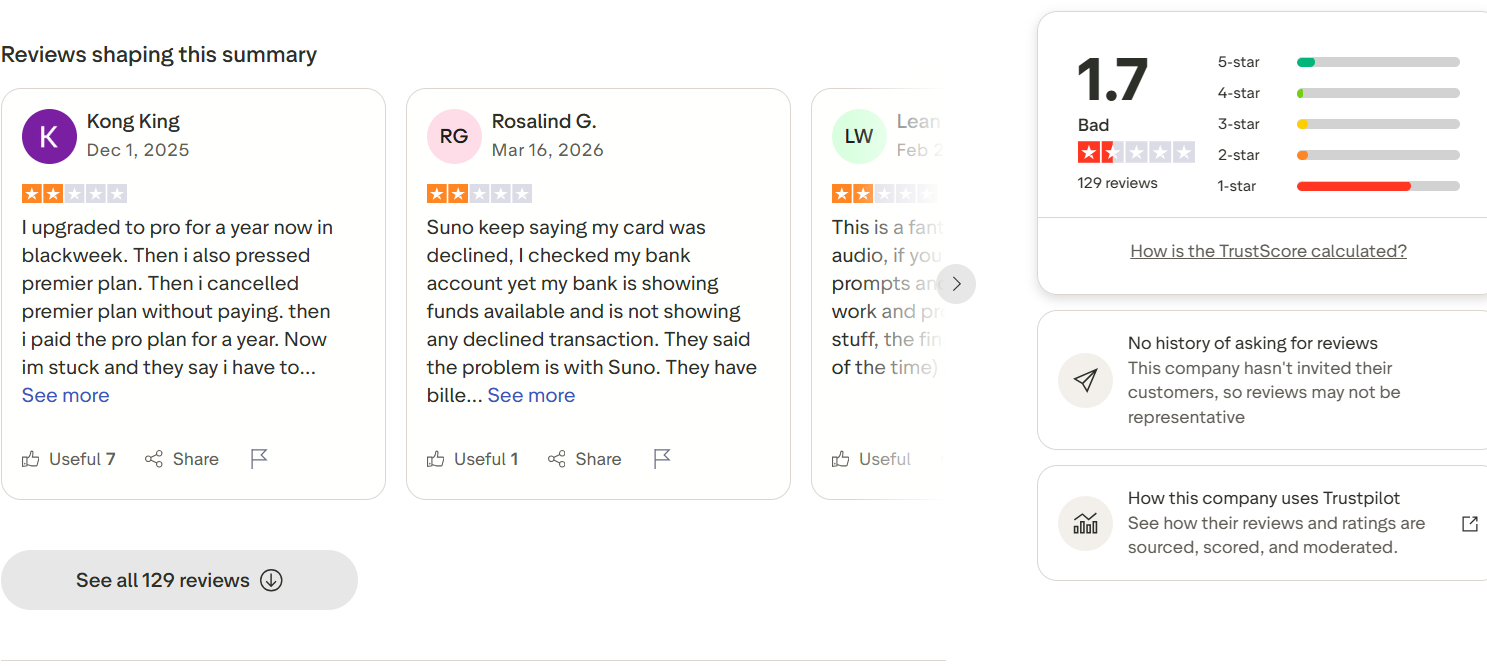
Image note: Trustpilot screenshot for suno.com, accessed June 2026. Used for editorial review commentary only; all trademarks, names, ratings, and review text belong to their owners.
Trustpilot Review Pattern
| Review Signal | What It Suggests |
|---|---|
| Subscription complaints | Users should review billing, cancellation, renewal, and plan terms before subscribing |
| Payment complaints | Paid access, failed billing, refunds, and credit issues may matter for some users |
| Support complaints | Users who depend on fast support should be cautious |
| Product complaints | Some users report bugs, failed generations, inconsistent output, or feature problems |
| Positive audio feedback | Some users still praise Suno’s creative output and audio generation when it works well |
What Users Often Like
| Positive Theme | Why It Matters |
|---|---|
| Fast full-song creation | Users can move from idea to song draft quickly |
| Beginner-friendly workflow | No recording setup or DAW experience is required |
| Creative output | Some results can feel surprisingly complete |
| Useful for hooks and lyrics | Songwriters can test ideas faster |
| Fun experimentation | Good for memes, personal tracks, and playful creative work |
Common User Complaints
| Complaint Theme | User Impact |
|---|---|
| Output quality can vary | Multiple generations may be needed |
| Limited detailed control | Exact sections, lyrics delivery, structure, or mix may be hard to control |
| Credits can run quickly | Testing several versions may use more credits than expected |
| Subscription concerns | Billing, cancellation, renewal, or paid access issues can frustrate users |
| Support reliability | Some users report slow, limited, or automated responses |
| Commercial use confusion | Users may not immediately know which songs can be monetized |
Trustpilot Takeaway
Trustpilot should not be the only basis for judging Suno. It is best used as a risk signal. If you plan to pay for Suno or use it for commercial work, test the workflow first, read the current rights pages, understand billing terms, and keep records of your plan and song creation date.
Suno AI Features, Strengths and Limits
Suno is designed for fast AI song generation. It can help users create full songs, lyric-based tracks, instrumentals, remixes, and audio-based generations from simple inputs.
| Use Case | Example |
|---|---|
| Full AI songs | Generate pop, rap, EDM, rock, country, cinematic, or experimental songs |
| Lyrics-based songs | Turn written lyrics into a song draft with vocals and music |
| Instrumentals | Create background tracks, beats, or mood-based music |
| Remixes and extensions | Rework or extend existing music ideas |
| Vocal and melody concepts | Test hooks, toplines, and chorus ideas |
| Social media music | Make quick tracks for TikTok, YouTube Shorts, Reels, or memes |
| Demo ideas | Create rough song concepts before manual recording or production |
| Audio-based creation | Start from humming, tapping, recorded audio, or uploaded audio |
Main Strengths
| Strength | Why It Matters |
|---|---|
| Speed | Helps users create song drafts quickly |
| Accessibility | Beginners can start without production skills |
| Vocal song generation | Useful for full AI songs with vocals |
| Lyrics workflow | Helpful for testing lyrics and hooks |
| Creative range | Supports many styles and moods |
| Low barrier to experimentation | Good for casual and early-stage creative work |
Main Limits
| Limit | Why It Matters |
|---|---|
| Output consistency | Results may vary across generations |
| Detailed control | Users may not control every section, mix, or transition precisely |
| Credit usage | Repeated testing may consume credits quickly |
| Commercial-use rules | Users need to check rights before publishing |
| Support reliability | Public feedback includes support-related complaints |
| Professional polish | Final production may require additional editing or mastering |
Suno AI Pros and Cons
| Pros | Cons |
|---|---|
| Very easy for beginners | Output quality can vary |
| Strong full-song generation | Limited control over exact musical details |
| Fast prompt-to-song workflow | Multiple generations may be needed |
| Useful for lyrics, hooks, and demos | Credits can be consumed quickly |
| Supports creative genre experiments | Free plan has important usage and rights limits |
| Good for social content and inspiration | Public reviews include support and subscription complaints |
| Multiple ways to start creating | Not always ideal for polished professional production |
Suno’s biggest advantage is speed. It can turn a small idea into a complete song draft quickly. Its biggest drawback is that users may not always get full control over final structure, sound, licensing path, or production quality.
Suno AI Compared With Other AI Music Tools
Suno is not the only AI music tool worth considering. The best choice depends on what kind of music workflow the user actually needs.
| Tool | Best For | Main Strength | Main Limitation |
|---|---|---|---|
| Suno | Fast full AI songs | Strong prompt-to-song generation | Output control and consistency can vary |
| MusicSeed | Text-to-music, lyrics-to-music, guided AI music creation | Simple workflow for turning ideas and lyrics into music | Best for guided creation, not full DAW editing |
| Udio | Creative AI music exploration | Strong style variety and experimentation | May require multiple attempts |
| BandLab | Recording, editing, loops, and collaboration | Broader creator workspace | More manual than pure AI generation |
| Moises | Stem separation and music practice | Strong audio utility workflow | Not mainly a text-to-song generator |
| Soundraw | Background music for creators | Useful for content-focused instrumental music | Less focused on full vocal songs |
| Mubert | Generated background music and loops | Useful for content and ambient-style needs | Less suitable for lyric-based songs |
Users comparing Suno vs Udio usually care about AI song generation, style exploration, and creative variation. Users comparing Suno vs MusicSeed usually care about whether they want fast full-song generation or a guided lyrics-to-music workflow.
This comparison is workflow-based. It does not mean one tool is universally better than another.
Best Suno Alternatives by Workflow
Suno alternatives are useful when users need a different type of AI music workflow. Some users want a simpler lyrics-to-music process, some want more manual editing, some need stem separation, and others need background music.
1. MusicSeed
MusicSeed fits a different workflow from Suno. Suno is useful for fast full-song generation, while MusicSeed is useful for users who want a guided text-to-music or lyrics-to-music creation process.
Use MusicSeed for:
- Text-to-music creation
- Lyrics-to-music workflows
- Song idea generation
- Beginner-friendly AI music drafts
- Creator-friendly music experiments
MusicSeed is a practical option when the starting point is a lyric, prompt, or simple song idea rather than a full production session.
2. Udio
Udio is one of the closest Suno alternatives for AI-generated song experimentation. It is useful for users who want to test styles, genres, and creative variations.
Use Udio for:
- AI song experiments
- Style exploration
- Genre testing
- Creative music drafts
3. BandLab
BandLab is better for users who want a broader music creation workspace. It includes recording, editing, loops, collaboration, and mobile music creation features.
Use BandLab for:
- Recording vocals
- Editing tracks
- Mobile music creation
- Collaboration
- Manual music production
4. Moises
Moises fits users who work with existing audio. It is not mainly a prompt-to-song generator, but it is strong for stem separation, vocal removal, practice, and remix preparation.
Use Moises for:
- Vocal removal
- Stem separation
- Practice tracks
- Remix preparation
- Audio utility workflows
5. Soundraw
Soundraw is useful for creators who need background music for videos, podcasts, ads, or social media content.
Use Soundraw for:
- YouTube background music
- Social video soundtracks
- Instrumental tracks
- Content-focused music
6. Mubert
Mubert fits users who need generated background music, loops, or content-friendly audio.
Use Mubert for:
- Background tracks
- Loops
- Ambient music
- Creator content
- Streaming-style music generation
Final Verdict
Suno is one of the strongest AI music generators for users who want to create full songs quickly from prompts, lyrics, audio ideas, or simple concepts. Its biggest strength is speed. It can help beginners, creators, and songwriters move from a rough idea to a listenable song draft in minutes.
However, Suno is not perfect. Output quality can vary, credits can be consumed quickly during testing, and public user feedback includes recurring complaints around subscriptions, payment, support, failed generations, and technical reliability. Users also need to pay close attention to commercial use rules, especially when comparing free and paid plans.
Suno is worth trying if you want fast AI song generation and creative inspiration. MusicSeed is worth considering if your starting point is a lyric, prompt, or simple song idea, and you want a guided AI music workflow without a complicated production setup.

