Udio is an AI music generator that creates songs, vocals, instrumentals, and musical ideas from prompts, lyrics, and style directions. Udio’s official site positions the product around creating and sharing AI music, while its pricing page separates Free, Standard, and Pro plans for different creation needs.
This review focuses on practical decision points rather than demo-only impressions: pricing limits, credits, download access, prompt control, public feedback, rights checks, and which workflow Udio actually fits.
Udio is often compared with Suno because both tools can generate AI songs, but they do not always fit the same workflow. Udio may appeal more to users who want creative variation and style exploration, while Suno may appeal more to users who want faster full-song drafts from simple prompts.
Udio Review Quick Verdict
Udio is best understood as a creative AI song generator rather than a fully predictable production system. It can generate impressive song ideas, vocal drafts, instrumental directions, and genre variations, but users may need multiple generations, careful prompting, and additional editing before a result feels ready for serious use.
It is a strong option for creators who enjoy experimentation. It may be less suitable for users who need a simple step-by-step workflow, stable vocal realism, clear download access, or predictable commercial publishing conditions.
| Question | Practical Answer |
|---|---|
| Is Udio worth trying? | Yes, if you want creative AI song drafts and style exploration. |
| Is Udio better than Suno? | Not universally. Udio and Suno fit different workflows. |
| What is Udio best for? | Genre testing, lyrics-to-song drafts, prompt-to-song experiments, and creative variation. |
| What is the main limitation? | Output consistency, prompt accuracy, vocal realism, credits, downloads, and rights need checking. |
| Who should test it first? | Songwriters, creators, producers, AI music experimenters, and users comparing Udio vs Suno. |
| Best MusicSeed fit | Users who want a more guided lyrics-to-music or text-to-music workflow. |
Key Facts
| Item | Details |
|---|---|
| Product type | AI song generator |
| Brand variants | Udio, Udio AI, udio.com, Udio music generator, Udio AI music generator |
| Main output | Songs, vocals, instrumentals, song sections, extensions, and style variations |
| Main strength | Creative style exploration and music idea generation |
| Best use cases | Song drafts, lyrics-to-song tests, genre experiments, social content ideas |
| Main decision factors | Credits, downloads, prompt control, vocal realism, editing tools, and rights |
| Less ideal for | Users needing exact control, simple licensing, or polished final production from one prompt |
Editorial Rating Summary
These ratings are editorial estimates based on Udio’s visible pricing structure, workflow fit, public feedback, style exploration value, prompt-to-song usefulness, and comparison with adjacent AI music tools.
| Evaluation Area | Rating |
|---|---|
| Overall Rating | 4.1/5 |
| Ease of Use | 4.4/5 |
| Output Quality | 4.3/5 |
| Style Variety | 4.6/5 |
| Lyrics-To-Music Usefulness | 4.2/5 |
| Prompt Accuracy | 4.0/5 |
| Editing and Extension Workflow | 4.1/5 |
| Pricing Value | 3.9/5 |
| Commercial Clarity | 3.7/5 |
| Trustpilot Public Feedback | 2.8/5 |
| Professional Workflow Fit | 3.6/5 |
Quick Answer:
Udio is worth trying if you want to explore AI music styles, test lyrics as songs, or create creative song drafts from prompts. Its strongest fit is style exploration, genre testing, and early music idea development.
- Best for: AI song experiments, lyrics-to-song drafts, genre testing, creative style exploration, and early demo ideas.
- Not ideal for: users who need predictable output, exact production control, simple licensing clarity, or fully polished release-ready songs from one prompt.
- Main decision: test the Free plan first, check credits, downloads, editing access, Trustpilot feedback, and commercial-use terms before paying.
Udio Pricing, Free Plan, Standard and Pro
Udio pricing should be judged by credits, generation limits, editing access, and whether the plan fits casual testing or heavier AI music creation. Udio’s pricing page lists flexible plans for AI music creation, and the pricing screenshots reviewed show Free, Standard, and Pro options with monthly and annual billing displays.
The Free plan is useful for first tests. Standard is more relevant for regular creators who need more credits and editing tools. Pro is more relevant for heavier users who need higher generation volume and more simultaneous song creation.
[Insert Udio pricing screenshot here]
Image note: Udio pricing screenshot, accessed June 2026. Used for editorial pricing commentary only; pricing, credits, plan names, limits, and features belong to Udio and may change.
Alt text: Udio pricing screenshot showing Free, Standard, and Pro plans with monthly and annual billing, credits, song generation limits, Voice Control, editing tools, and upload audio features.
Suggested file name: udio-pricing-plans-screenshot.webp
| Plan | Monthly Price | Annual Display | Best For | Key Limits / Features |
|---|---|---|---|---|
| Free | $0/month | $0 billed annually | Basic testing and casual users | 10 credits per day, 100 credits per month, generate up to 4 songs at the same time, limit of 3 full-length songs per day |
| Standard | $10/month | $8/month, $96 billed annually | Regular creators who need more credits and editing tools | 2,400 credits per month, generate up to 6 songs at the same time, Voice Control, editing tools, uploaded audio, style reference, custom cover art |
| Pro | $30/month | $24/month, $288 billed annually | Heavy users and advanced creators | 6,000 credits per month, generate up to 10 songs at the same time, all features from other plans |
Annual prices are shown as monthly equivalents in the screenshot, but users should confirm whether billing is charged annually before subscribing. Tax rates may also vary by location.
Pricing Takeaway
Udio’s Free plan is useful for testing the platform without paying, but the limits can feel restrictive if you want to generate many versions or work on longer songs. Standard is likely the most practical plan for regular creators because it unlocks higher monthly credits, Voice Control, editing tools, uploaded audio workflows, style reference options, and more simultaneous generations.
Pro is more relevant for users who need higher monthly credit volume, more simultaneous generations, and access to all features from other plans.
Credit Use Note
Users who test many styles, regenerate vocals, compare versions, or work on longer songs may use credits faster than expected. The best plan depends not only on monthly credits, but also on how often you create full songs, edit results, and compare variations.
This matters because Udio’s strongest use case is experimentation. The same creative strength that makes Udio useful for style exploration can also make users spend more credits while searching for the right version.
Before You Pay for Udio
| Checkpoint | Why It Matters |
|---|---|
| Monthly credits | Determines how much music you can generate |
| Daily full-song limits | Affects how often you can create longer songs |
| Simultaneous generations | Helpful when comparing multiple versions quickly |
| Voice Control | Useful for more detailed vocal direction |
| Editing tools | Important if you want to refine lyrics, music, and structure |
| Uploaded audio generation | Useful if your workflow starts from existing audio |
| Download access | Essential for YouTube, video editing, client work, or distribution |
| Annual billing | Lower monthly display may require annual payment |
| Commercial-use terms | Important before monetizing, publishing, or using tracks for clients |
Plan Risk Note:
Udio can be useful for creative drafting, but serious users should confirm live pricing, credit rules, download access, ownership language, commercial-use terms, refund rules, and platform policies before using generated music in paid or public projects. Udio’s Terms of Service page is the source users should review for current platform rules and rights language.
How To Use Udio in 5 Steps
Quick Answer:
To use Udio, start with a clear song idea, write a prompt or lyrics, describe the style and vocals, generate several versions, then check downloads, credits, and rights before publishing or monetizing the result.
| Step | What To Do | Why It Matters |
|---|---|---|
| 1 | Start with a clear song idea | Helps define mood, genre, and direction |
| 2 | Add lyrics or a prompt | Gives Udio the song concept |
| 3 | Describe style and vocals | Improves creative targeting |
| 4 | Generate and compare versions | Udio results can vary across attempts |
| 5 | Check downloads and rights | Important before publishing, monetizing, or paying |
Step 1: Start With a Clear Song Idea
Before generating, decide what the song should feel like. A prompt such as “sad pop song” is too broad. A more useful direction might include mood, genre, vocal tone, energy level, and intended use.
Example:
“Create an emotional indie pop song with soft male vocals, warm synths, gentle drums, and a memorable chorus about moving on after a breakup.”
Step 2: Add Lyrics or a Prompt
Udio can be useful for both prompt-to-song and lyrics-to-song workflows. If you already have lyrics, make sure they are clean, readable, and structured enough for a song. If you only have a concept, describe the story, mood, and sound.
For lyric drafts, shorter sections often work better than overly long text. Testing a verse or chorus first can help you avoid wasting credits.
Step 3: Describe Style and Vocals
Style direction matters. Include genre, mood, instrumentation, vocal delivery, tempo feel, and reference-level descriptions without asking the tool to copy a specific protected artist or song.
Useful style details include:
| Detail Type | Examples |
|---|---|
| Vocal tone | Soft, raw, bright, cinematic, emotional, playful |
| Genre | Indie pop, synth-pop, country, EDM, rock, rap, folk |
| Energy | Slow, mid-tempo, high-energy, intimate, dramatic |
| Arrangement | Acoustic guitar, warm synths, punchy drums, piano, strings |
| Use case | Demo, social clip, chorus test, intro idea, style reference |
Step 4: Generate and Compare Versions
Do not judge Udio from one generation. AI music output can vary, especially with vocals, structure, pronunciation, genre accuracy, and arrangement.
| Check | Why It Matters |
|---|---|
| Vocal realism | Determines whether the result feels usable |
| Prompt accuracy | Shows whether Udio followed the creative direction |
| Lyric delivery | Reveals awkward phrasing or weak lines |
| Song structure | Helps decide whether the draft needs editing |
| Genre fit | Important for style exploration |
| Repeatability | Helps you understand how predictable the workflow feels |
Step 5: Check Downloads, Credits, and Rights
Before using a generated track publicly, check whether you can download it, whether the plan allows your intended use, and whether there are any restrictions around monetization, distribution, client work, or uploaded inputs.
This is especially important for YouTube videos, TikTok content, Spotify releases, podcasts, ads, games, and client campaigns.
What Udio Actually Does
Udio is not a traditional DAW, and it is not only a loop generator. It sits between AI song generation and creative song drafting. Its main value is helping users hear musical directions quickly.
| Use Case | What It Means |
|---|---|
| Prompt-to-song generation | Create a song idea from a written prompt |
| Lyrics-to-song drafting | Hear how written lyrics might work as music |
| Style exploration | Try different genres, moods, and vocal directions |
| Song extension | Build longer sections from shorter ideas |
| Uploaded audio workflows | Use existing audio as part of the creation process, depending on plan |
| Voice Control | Adjust vocal direction when available |
| Editing tools | Refine lyrics, music, or song elements |
| Cover art upload | Add custom cover art on supported plans |
Direct Judgment
Udio is useful for creative music exploration and song drafting. It is less ideal if you need predictable output, precise editing, DAW-level control, guaranteed vocal realism, or a simple licensing workflow.
Practical Workflow Review
This practical workflow review focuses on three common Udio use cases: prompt-to-song generation, lyrics-to-song drafting, and style variation. These examples are not lab tests. They reflect the kinds of workflows creators usually care about when comparing Udio reviews.
Prompt-To-Song Test
Scenario:
A creator wants to turn a short idea into a cinematic indie pop song.
Prompt example:
“Create a cinematic indie pop song with emotional vocals, warm synths, soft drums, and a memorable chorus.”
| What Worked | What Felt Limited |
|---|---|
| Good for mood and style exploration | Prompt accuracy may vary |
| Can create a listenable first draft quickly | Vocal phrasing may not always feel natural |
| Useful for testing song direction | Fine control over arrangement is limited |
| Helps users move beyond a blank idea | Some outputs may feel close but not publish-ready |
| Good for hearing whether a genre direction fits | Multiple attempts may be needed |
Best use: creative drafts, style testing, demo ideas, and early song direction.
Rating: 4.3/5
Lyrics-To-Song Test
Scenario:
A songwriter wants to hear written lyrics as a full song concept.
Prompt example:
“Turn these lyrics into a slow alternative rock song with raw vocals, atmospheric guitars, and a dramatic chorus.”
| What Worked | What Felt Limited |
|---|---|
| Helpful for testing lyric mood | Lyrics delivery can change |
| Useful for chorus and hook ideas | Vocal emotion may not match the intended feeling |
| Good for early songwriting feedback | Some lines may need rewriting |
| Turns static lyrics into a musical direction | Multiple attempts may be required |
| Helps writers identify weak lines or pacing issues | Exact phrasing control is limited |
Best use: songwriting drafts, lyric testing, melody exploration, and demo concepts.
Rating: 4.2/5
Style Variation Test
Scenario:
A user wants to test the same song idea in different genres.
Prompt example:
“Create the same chorus idea in three styles: synth-pop, acoustic folk, and dark cinematic trap.”
| What Worked | What Felt Limited |
|---|---|
| Strong for comparing creative directions | Some styles may be stronger than others |
| Useful for producers testing references | Results may not stay fully consistent |
| Good for creators exploring mood options | Style labels may not always match expectations |
| Helps choose a genre before deeper production | Requires careful prompt writing |
| Makes one idea easier to compare across styles | Several generations may be needed |
Best use: genre testing, music direction, creative discovery, and reference building.
Rating: 4.5/5
Practical Workflow Verdict
Udio works best when users treat it as a creative AI music lab. It is strong for testing directions, but less ideal when users expect one prompt to produce a polished, predictable, release-ready song.
Udio Trustpilot Reviews and Public Feedback
Udio Trustpilot reviews should be treated as a public feedback signal, not a complete product verdict. Trustpilot currently shows Udio with 52 reviews and a 1.6 TrustScore marked as Bad. Trustpilot also notes that Udio has no history of asking for reviews, which means the sample may not be representative.
The visible reviews raise concerns around voice quality, audio quality, style prompts being ignored, download access, membership or refund handling, support, and account issues. Trustpilot also explains that reviews are user opinions and that the platform does not fact-check individual claims, so this section should be used as a point-in-time public feedback reference, not a final verdict on every Udio user experience.
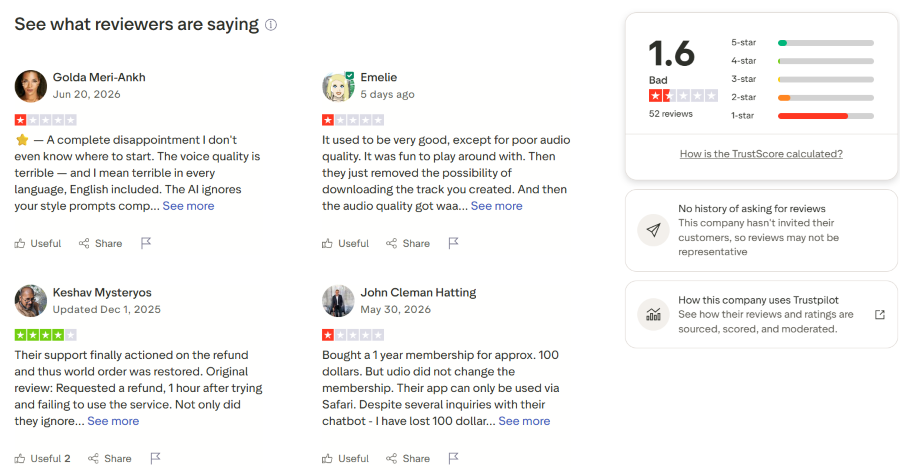
Image note: Trustpilot screenshot for Udio, accessed June 2026. Used for editorial review commentary only; all trademarks, names, ratings, and review text belong to their owners.
Trustpilot Review Pattern
| Trustpilot Signal | What It Means for Users |
|---|---|
| Low TrustScore | Treat feedback as a risk-check before paying |
| 52 reviews | More than a tiny sample, but still not a complete picture of all users |
| No history of asking for reviews | Trustpilot notes the sample may not be representative |
| Voice and audio quality complaints | Test your own genre and vocal expectations first |
| Prompt-following concerns | Check whether Udio follows style prompts closely enough |
| Download or feature access complaints | Confirm what each plan allows before subscribing |
| Membership or billing complaints | Review cancellation, refund, and account terms carefully |
| Support concerns | Important if you plan to use Udio for serious or paid projects |
What Users Should Test Before Paying
| Test Area | Why It Matters |
|---|---|
| Prompt accuracy | Some visible reviews mention style prompts not being followed well |
| Voice quality | AI vocals may vary by genre, prompt, language, and generation |
| Audio quality | Users should test whether results are good enough for their project |
| Download access | Important before relying on Udio for real content or releases |
| Editing workflow | Standard unlocks editing-related features shown in the pricing screenshot |
| Billing and cancellation | Public reviews mention membership and refund concerns |
| Support response | Important if account or payment issues appear |
Trustpilot Takeaway
Udio can still be useful for AI song generation, but users should not judge it only from demo examples or promotional results. The safer approach is to test the Free plan first, generate several songs in the user’s actual genre, check prompt control and vocal quality, confirm download access, and read billing terms before choosing Standard or Pro.
Udio vs Suno: Which Workflow Fits Better?
Udio and Suno are often compared, but this should not be treated as a simple winner-takes-all comparison. Both tools can support AI song generation, but they may fit different creator workflows.
Udio may appeal to users who enjoy exploring style, genre, vocal direction, and creative variation. Suno may appeal to users who want faster prompt-to-song drafts with a more direct creation flow.
| User Need | Udio May Fit Better | Suno May Fit Better |
|---|---|---|
| Style exploration | Useful for testing different creative directions | May be more direct but less exploration-focused |
| Fast full songs | May require more experimentation | Often feels more direct for quick prompt-to-song drafts |
| Lyrics-to-song | Useful for creative testing and variations | Useful for fast song concepts |
| Prompt control | Good for experimentation, but results can vary | Simpler workflow, but also variable |
| Beginner workflow | May feel more exploratory | May feel more direct |
| Social content | Good for unusual styles and genre tests | Good for quick catchy ideas |
| Creative drafting | Strong for comparing directions | Strong for fast first drafts |
Udio vs Suno Verdict
Udio is not simply better or worse than Suno. Udio is more useful when you want to explore style, genre, and creative direction. Suno may feel more direct when you want a fast full song from a simple prompt.
The better choice depends on whether you value creative exploration or speed of output more.
Choosing a Udio Alternative Without Losing the Workflow Fit
A good Udio alternative is not always the tool with the longest feature list. It is the tool that matches the reason Udio may not fit your workflow.
Some users want a simpler lyrics-to-music path. Some want faster full songs. Others need recording, stem separation, background music, or a more manual production environment.
| Your Starting Point | Tool Direction to Compare | Why |
|---|---|---|
| Fast full-song drafts | Suno | More direct prompt-to-song workflow |
| Lyrics or prompts into guided music drafts | MusicSeed | More guided path from text to music |
| Existing audio or stems | Moises / LALAL.AI | Better for separation and practice workflows |
| Recording and editing | BandLab | Broader manual production workspace |
| Background music for content | Soundraw | More focused on instrumental creator music |
| Creative style exploration | Udio | Strong fit for genre and style testing |
If You Want a Simpler Lyrics-To-Music Workflow
MusicSeed may be more relevant when your workflow starts with lyrics, prompts, or a song idea and you want a guided path toward usable music drafts.
This is not a better-or-worse comparison. It is a workflow difference. Udio is more exploratory, while MusicSeed may feel more direct for users who do not want to spend as much time testing many style variations.
If You Want Faster Full-Song Drafts
Suno may be more relevant when speed matters more than deep style exploration. Users who want quick prompt-to-song output, social song ideas, or fast demos may prefer a more direct generation path.
Udio may still be more appealing for users who want to test unusual styles, variations, and creative directions.
If You Need Recording or Editing
BandLab is a different kind of option. It is not mainly an AI song generator, but it gives users a broader workspace for recording, editing, loops, collaboration, and manual production.
This makes BandLab more relevant for users who want to build or edit music manually rather than generate song drafts from prompts.
If You Work With Existing Audio
Moises and LALAL.AI are better directions when the workflow starts with an existing track or recording. They fit vocal removal, stem separation, practice, remix preparation, and audio utility workflows.
They are not direct Udio replacements, but they may be more useful if the user’s real need is editing or separating audio rather than generating new music.
If You Need Background Music for Content
Soundraw may fit users who need instrumental background music for videos, podcasts, ads, and creator content. It is closer to a content music workflow than a vocal AI song generator workflow.
Users comparing Udio and Soundraw should decide whether they need AI songs and vocals, or more controllable instrumental background music.
Udio Alternative Takeaway
Udio remains a strong fit for creative style exploration. It becomes less direct when the user needs a guided lyrics-to-music workflow, fast full-song drafts, audio separation, recording tools, or background music for content.
Udio Pros and Cons
| Pros | Cons |
|---|---|
| Strong for creative style exploration | Output quality can vary |
| Good for AI song drafts | Vocals may sound unnatural in some results |
| Useful for lyric and melody testing | Prompt following is not always exact |
| Good for comparing genres | Commercial use terms need careful review |
| Better than simple loop generators for song-like output | Multiple generations may be needed |
| Helpful for creators and songwriters | Not a full professional production workflow |
| Useful for reference ideas | Downloads, credits, and plan limits require attention |
| Free plan allows initial testing | Support and billing feedback should be checked |
Pros and Cons Summary
Udio is better as an idea and style exploration tool than as a fully predictable production system. It can help users discover musical directions, but it should not replace editing, mixing, mastering, and rights review for serious projects.
Who Is Udio Best For?
Udio works best for users who want to explore musical possibilities rather than users who need exact, predictable, finished production. It can be useful in the early creative stage, but less reliable as a final production system.
| Best For | Why It Fits |
|---|---|
| AI music experimenters | Good for testing styles and song ideas |
| Songwriters | Useful for hearing lyrics as music |
| Creators | Helpful for social content and demos |
| Beginners | Easy to start with prompts |
| Producers | Useful for reference ideas and mood testing |
| Genre explorers | Strong for creative style variation |
Less Ideal For
| User Type | Why It May Not Fit |
|---|---|
| Professional producers needing full control | Udio is not a DAW |
| Commercial teams needing legal clarity | Terms should be checked carefully |
| Users needing predictable results | Output may vary |
| Mixing engineers | Not a full mixing workflow |
| Users on limited credits | Style testing may consume credits quickly |
| Users needing simple lyrics-to-music flow | A guided tool like MusicSeed may feel easier |
Final Verdict
Udio is a strong AI music generator for creative exploration, genre testing, lyrics-to-song experiments, and early song drafts. Its biggest advantage is style variety. It helps users hear different musical directions quickly and can be useful for creators, songwriters, producers, and AI music experimenters.
Udio is not perfect. Output quality, vocal realism, prompt accuracy, pricing value, downloads, commercial-use clarity, support feedback, and plan limits can all affect the real experience. Users who plan to publish, monetize, distribute, or use generated songs in client work should review current terms and test their own workflow before relying on Udio for serious projects.
MusicSeed may be worth considering if your starting point is lyrics, prompts, or a song idea and you want a more guided path to music drafts. Udio may be more relevant when your goal is style exploration and creative variation.

